

The Family Sharing feature in your Avast Account allows you to share your Avast subscriptions with up to 5 other people.
- Avast One Family: Family Sharing is available on Windows, Mac, Android, and iOS.
- Avast Premium Security (Multi-Device): Family Sharing is available on Windows and Android.
- Avast Cleanup (Multi-Device): Family Sharing is available on Windows only.
This article explains how to set up and use Family Sharing. Refer to the information in the relevant section below, depending on if you are the Family Organizer (you will share your subscription) or a Family Member (the subscription will be shared with you).
Send invitations
To invite people to join your Avast Family:
- Sign in to your Avast Account using the link below:
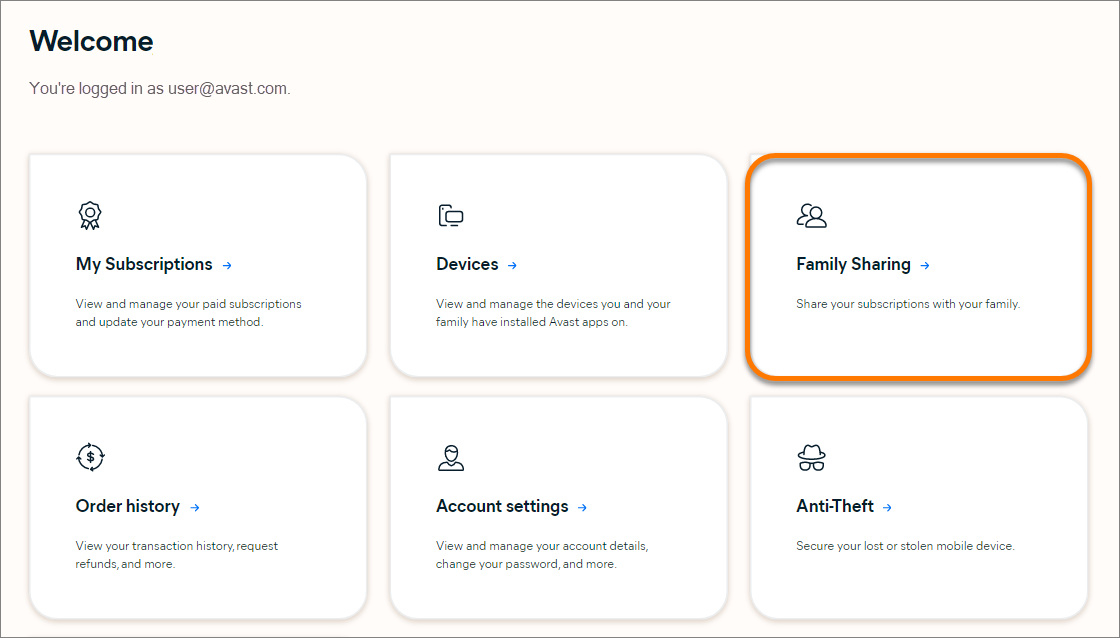
- Click the Family Sharing tile.

- Click Invite first member.
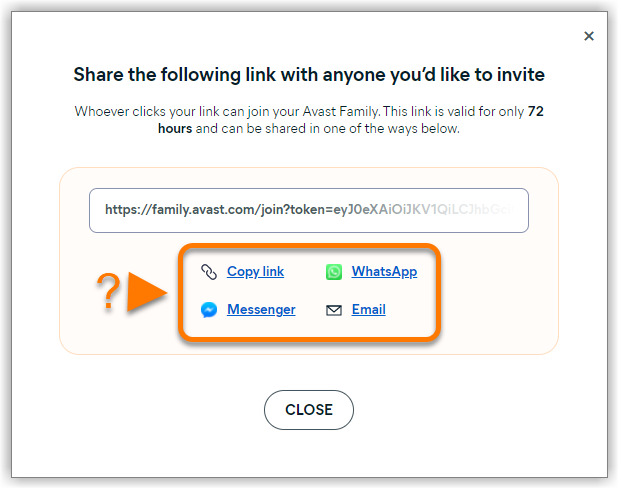
- Choose your preferred option below:
- Copy link: This option copies the invitation link to your clipboard. To paste the link, follow the relevant step below according to your device:
- Windows PC: On your keyboard, press the
Ctrlkey andVkey simultaneously. - Mac: On your keyboard, press the
⌘ Commandkey andVkey simultaneously. - Android device: Touch and hold your screen, then select Paste.
- iPhone / iPad: Double tap your screen, then select Paste.
- Windows PC: On your keyboard, press the
- Messenger: This option opens Facebook Messenger. To share the invitiation link, follow the relevant step below according to your device:
- Mobile devices: Tap Send next to the private message where you want to share the link.
- Desktop devices: Select Share in private message in the top drop-down menu. Search for the private message where you want to share the link, and click Send message.
- WhatsApp: This option opens WhatsApp. Select the chat where you want to share the invitation link. When the chat opens, the link is automatically included in the message box.
- Email: This option opens a new email message in your default email app. The invitation link is automatically included in the email body.
- Copy link: This option copies the invitation link to your clipboard. To paste the link, follow the relevant step below according to your device:
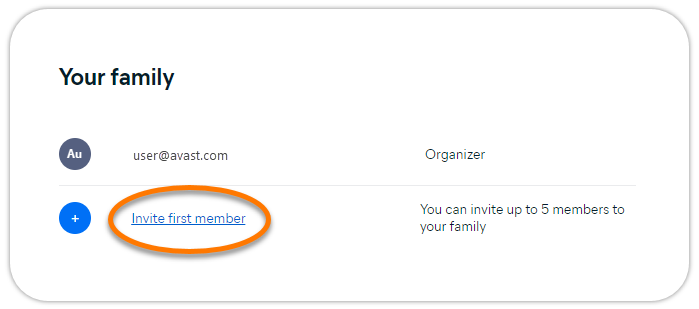
You can invite up to 5 people to join your Avast Family. Subscriptions that are shared using Family Sharing can be activated on a maximum of 30 devices simultaneously. This applies regardless of the number of Family Members in your Avast Family.
Manage your Avast Family
- Sign in to your Avast Account using the link below:
- Click the Family Sharing tile.
The following options are available via the Family Sharing screen:
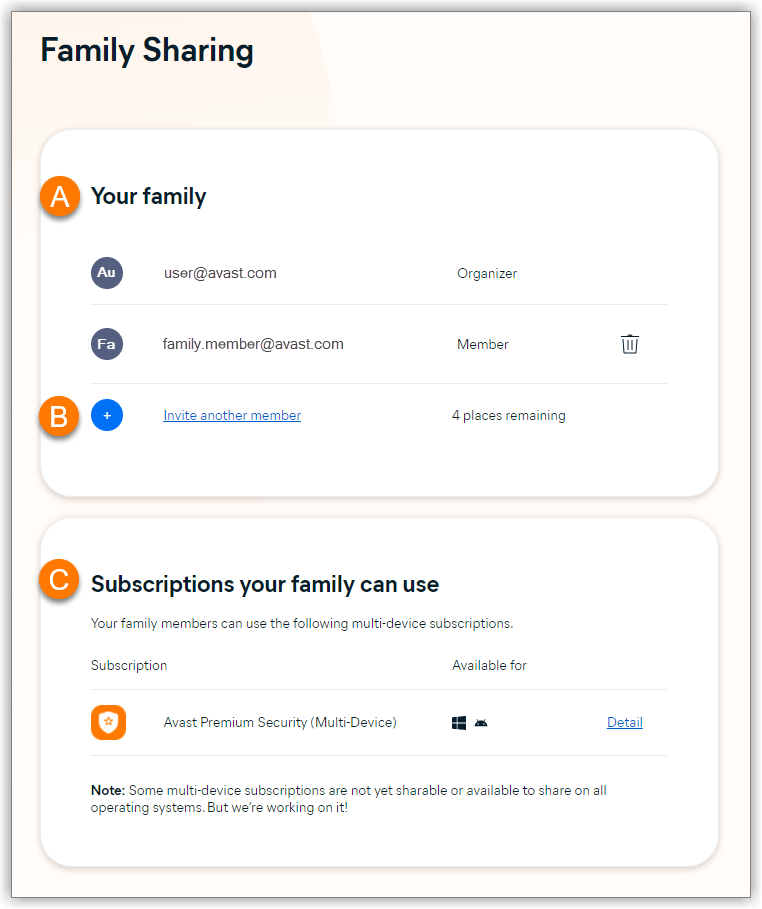
- View and manage your Avast Family: View your current Family Members. These are the Avast Accounts that are currently sharing your Avast subscriptions. To remove a Family Member from this list, click the trash icon in the relevant panel.
- Invite Family Members: Add Family Members to your Avast Family. Click Invite another member to send an invitation link.
- View shared subscriptions: View all of the subscriptions that your Avast Family can currently use.
 trash icon in the relevant panel.
Manage your subscription
As the Family Organizer, you can manage your Avast subscriptions by clicking the Subscriptions tile on the main screen of your Avast Account. Options include:
- Check the next billing date.
- Update payment details.
- Cancel the subscription.
For more information, refer to the following article:
Join an Avast Family
After you click the invitation link that you received from the Family Organizer, you need to follow the steps in the relevant section below:
- Create a new Avast Account: Applies if you do not yet have an Avast Account.
- Sign in to an existing Avast Account: Applies if you already have an Avast Account.
Create a new Avast Account
- Click the invitation link that you received from the Family Organizer.
- Click Create an account.
- Enter your email address, then click Continue. A confirmation email is sent to the email address you provided.
- Open your email inbox and locate the email from notification@emails.avast.com with the subject: Please verify your email address.
- Click the Verify email button included in the email.
- Enter a new password for your Avast Account, then click Continue.
- Click Continue to access the Avast Account portal.
- Click Join Avast Family.


You have created an Avast Account and joined your Avast Family. You can now install and activate the products that are included in the shared subscriptions.
Sign in to an existing Avast Account
- Click the invitation link that you received from the Family Organizer.
- Follow the relevant step below:
- Check that the Avast Account under You're signed in as is the one you want to use for Family Sharing, then click Join Avast Family. Otherwise, click Sign in as someone else.
- Click Continue to sign-in. Enter the credentials for the Avast Account that you want to use for Family Sharing, then click Continue. Click Join Avast Family to confirm.
- Check that the Avast Account under You're signed in as is the one you want to use for Family Sharing, then click Join Avast Family. Otherwise, click Sign in as someone else.


You have signed in to your Avast Account and joined your Avast Family. You can now install and activate the products that are included in the shared subscriptions.
Install and activate products
After you have successfully joined your Avast Family, follow the steps below:
- Install the product that you want to start using. For instructions, refer to the relevant article below according to device and product:
- Windows: Avast One | Avast Premium Security | Avast Cleanup Premium
- Android: Avast One | Avast Mobile Security Premium
- Mac: Avast One
- iOS: Avast One
- Activate the shared subscription by signing in to the newly installed Avast application with your Avast Account credentials. For instructions, refer to the relevant article below according to device and product:
- Windows: Avast One | Avast Premium Security | Avast Cleanup Premium
- Android: Avast One | Avast Mobile Security Premium
- Mac: Avast One
- iOS: Avast One
The shared subscription is now active and your Avast product is ready to use.
Manage Family Sharing
After you have successfully joined an Avast Family, you can manage Family Sharing preferences via your Avast Account:
- Sign in to your Avast Account using the link below:
- Click the Family Sharing tile.

The following options are available via the Family Sharing screen:
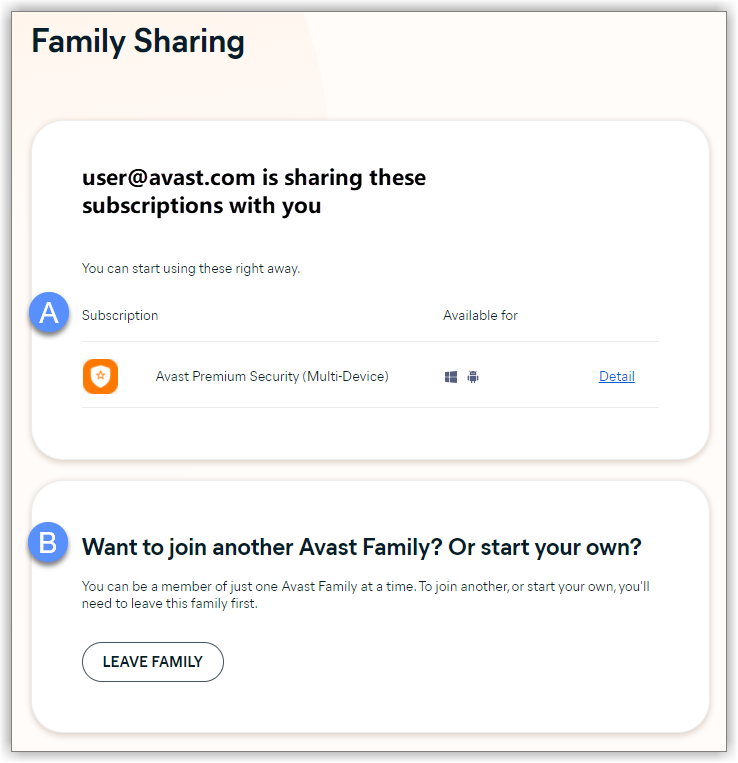
- View shared subscriptions: View all of the subscriptions that your Family Organizer is currently sharing with you.
- Leave family: Leave this Avast Family if you need to join a different Avast Family, or start your own Avast Family.
- Avast Premium Security 22.x for Windows
- Avast One 22.x for Windows
- Avast Cleanup Premium 22.x for Windows
- Avast One 22.x for Mac
- Avast Mobile Security Premium 6.x for Android
- Avast One 2.x for Android
- Avast One 2.x for iOS
- All supported operating systems
Updated on: 02/06/2022


 © 2024 Gen Digital Inc.