

Agent anti-ransomware protège vos photos, documents et autres fichiers personnels contre toute modification, toute suppression ou tout chiffrement lors d’attaques de ransomwares. Cette fonctionnalité vous permet de protéger certains fichiers des applications non fiables et de choisir quelles applications sont autorisées ou non à accéder à vos dossiers protégés.
Ajouter ou supprimer des dossiers protégés
Par défaut, l’Agent anti-ransomwares analyse et sécurise automatiquement les dossiers où sont habituellement stockées vos données personnelles (par exemple, le dossier Documents). Les sous-dossiers des dossiers protégés sont également inclus. Pour ajouter des dossiers à la liste Dossiers protégés ou en supprimer :
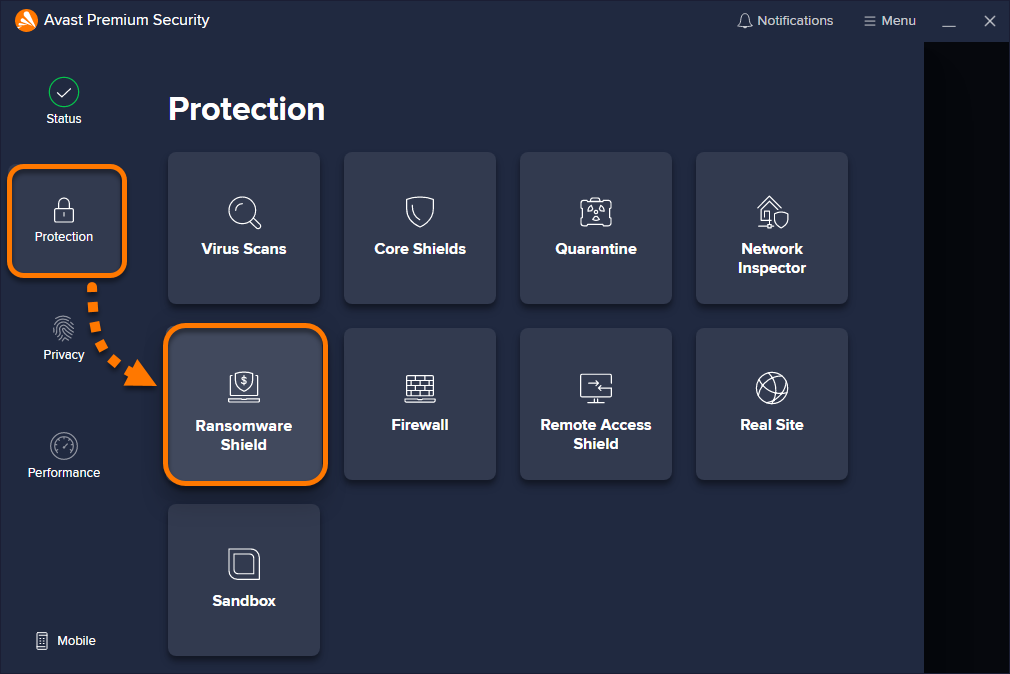
- Ouvrez Avast Antivirus, puis sélectionnez Protection ▸ Agent anti-ransomware.

- Ajouter ou supprimer un dossier sélectionné :
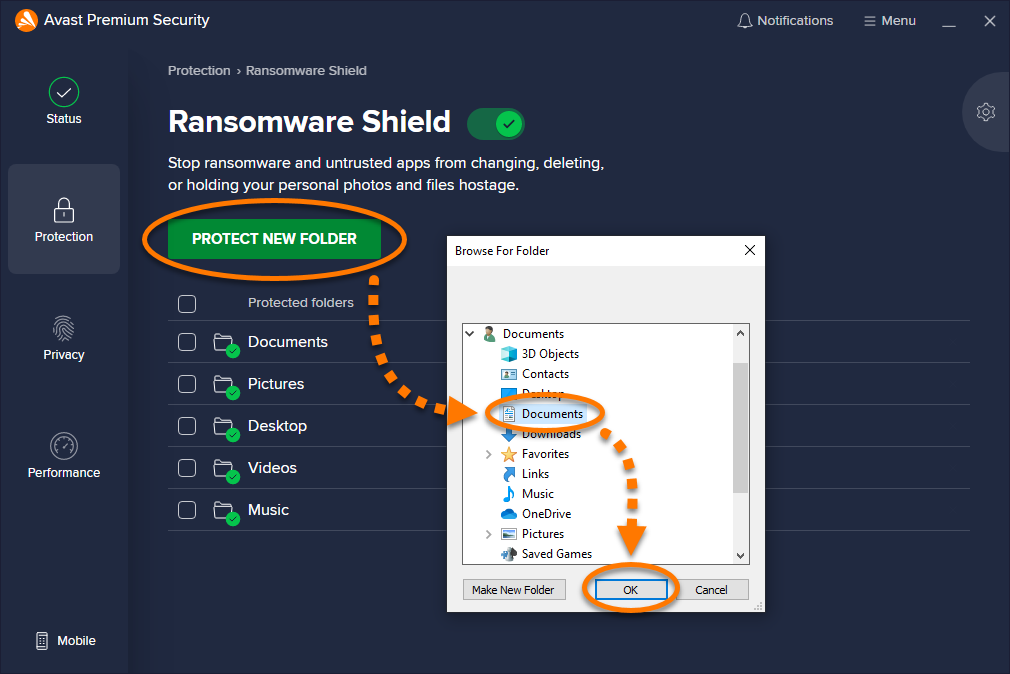
- Pour ajouter un dossier : cliquez sur Protéger un nouveau dossier, sélectionnez le dossier à protéger, puis cliquez sur OK.
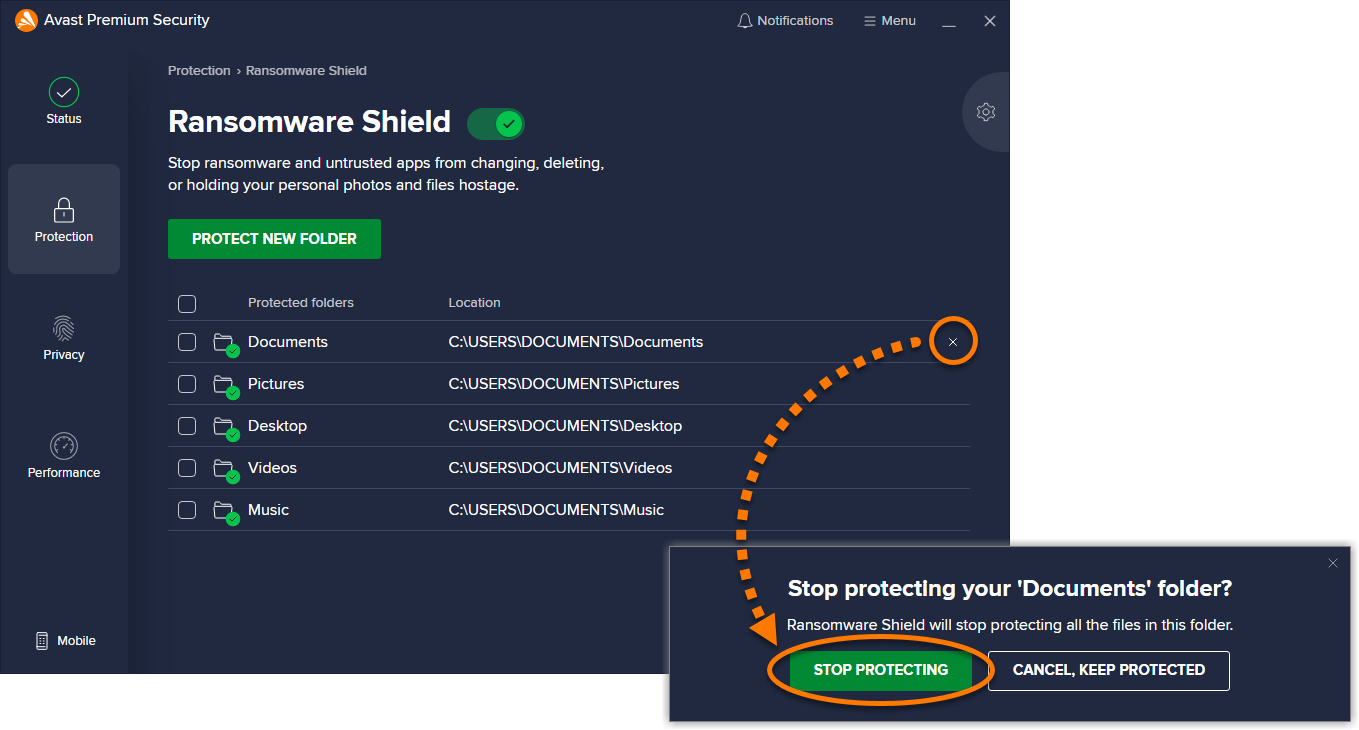
- Pour supprimer un dossier : placez le curseur sur le panneau du dossier, cliquez sur l’icône X, puis cliquez sur Arrêter la protection.
- Pour ajouter un dossier : cliquez sur Protéger un nouveau dossier, sélectionnez le dossier à protéger, puis cliquez sur OK.
Spécifier les types de fichiers protégés
L’Agent anti-ransomwares protège les types de fichiers spécifiés dans vos dossiers protégés. Vous pouvez modifier la liste prédéfinie et ajouter ou supprimer des types de fichiers en procédant comme suit :
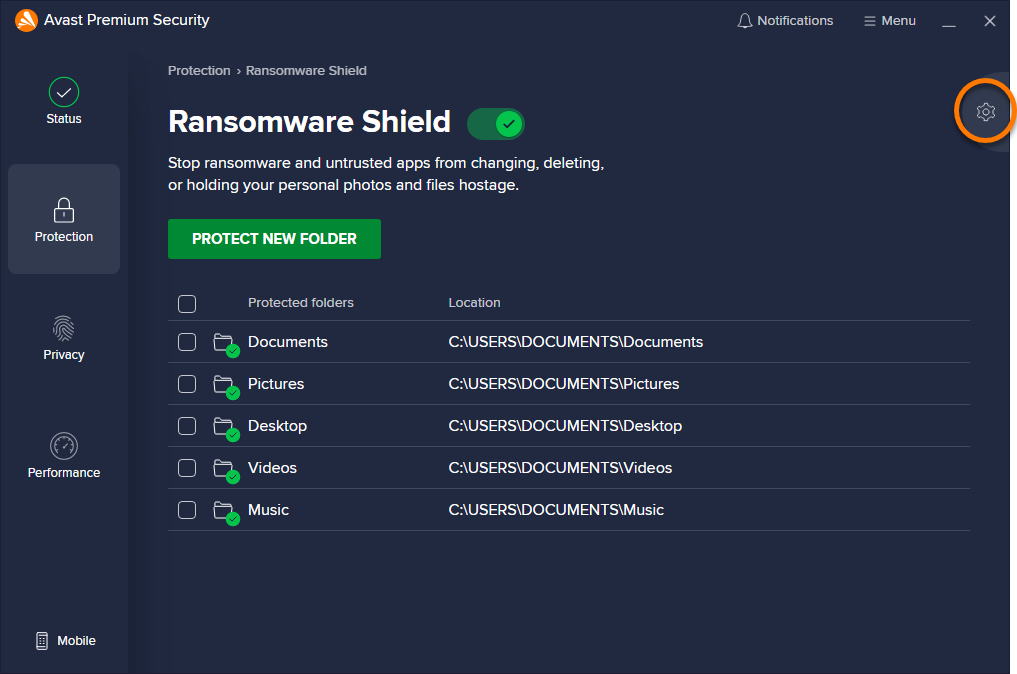
- Cliquez sur Paramètres (l’icône de roue dentée) en haut à droite de l’écran Agent anti-ransomwares.
- Descendez jusqu’à Types de fichiers pour voir quels types de fichiers sont sécurisés dans vos dossiers protégés. Décochez la case en face des types de fichiers que vous ne voulez pas que l’Agent anti-ransomwares protège, ou cochez la case en regard des fichiers à protéger.
- Ajoutez ou supprimez d’autres types de fichiers :
- Pour ajouter un nouveau type de fichier : saisissez l’extension de fichier dans la zone située sous la liste par défaut (par exemple, .html).
- Pour supprimer un type de fichier : cliquez dans la zone située sous la liste par défaut et utilisez la touche Suppr de votre clavier pour effacer l’extension de fichier.
 Paramètres (l’icône de roue dentée) en haut à droite de l’écran Agent anti-ransomwares.

Comportement de l’Agent anti-ransomware
Vous pouvez ajuster la sensibilité de l’Agent anti-ransomware lorsqu’il surveille les applications qui tentent d’accéder à des fichiers dans vos dossiers protégés. Pour configurer le comportement de l’Agent anti-ransomware :
- Cliquez sur Paramètres (l’icône de roue dentée) en haut à droite de l’écran Agent anti-ransomwares.
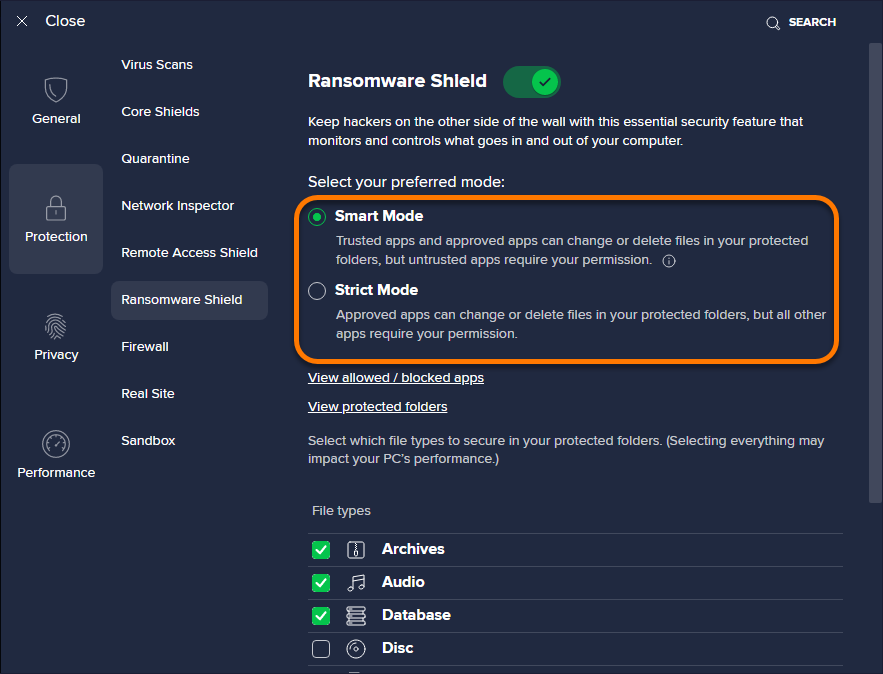
- Sous Sélectionnez un mode, choisissez l’une des options suivantes :
- Mode smart (définie par défaut et recommandée) : L’Agent anti-ransomware se base sur une liste d’applications fiables et courantes pour déterminer celles qui peuvent modifier les fichiers dans vos dossiers protégés. Si une application qui ne figure pas dans cette liste tente de modifier des fichiers dans vos dossiers protégés, vous en êtes averti et une autorisation vous est demandée.
- Mode strict : chaque fois qu’une application quelconque tente de modifier des fichiers placés dans vos dossiers protégés, vous recevez une notification et une demande d’autorisation (excepté pour les applications que vous avez déjà ajoutées aux listes d’applications bloquées et autorisées). La sélection de cette option peut entraîner la création d’alertes fréquentes et potentiellement gênantes.
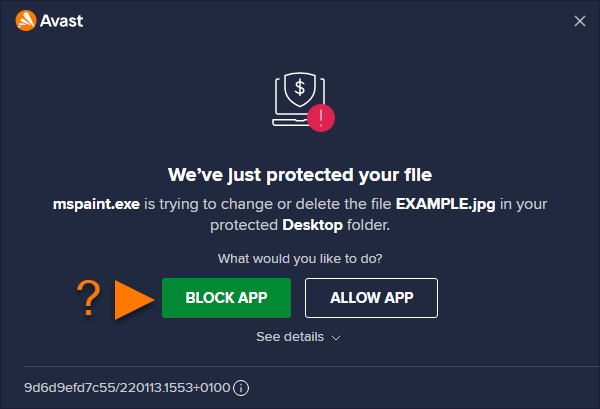
- Lorsqu’une notification de l’Agent anti-ransomware s’affiche, cliquez sur Autoriser l'appli pour ajouter l’application à la liste des applications autorisées ou sur Bloquer l'appli pour systématiquement l’empêcher d’accéder à vos dossiers protégés.
Pour plus d’informations sur la gestion des applications bloquées et autorisées, veuillez consulter l’article suivant :
Désactivation de l’Agent anti-ransomware
L’Agent anti-ransomware est activé par défaut, mais vous pouvez le désactiver pour la résolution des problèmes en suivant les étapes ci-dessous :
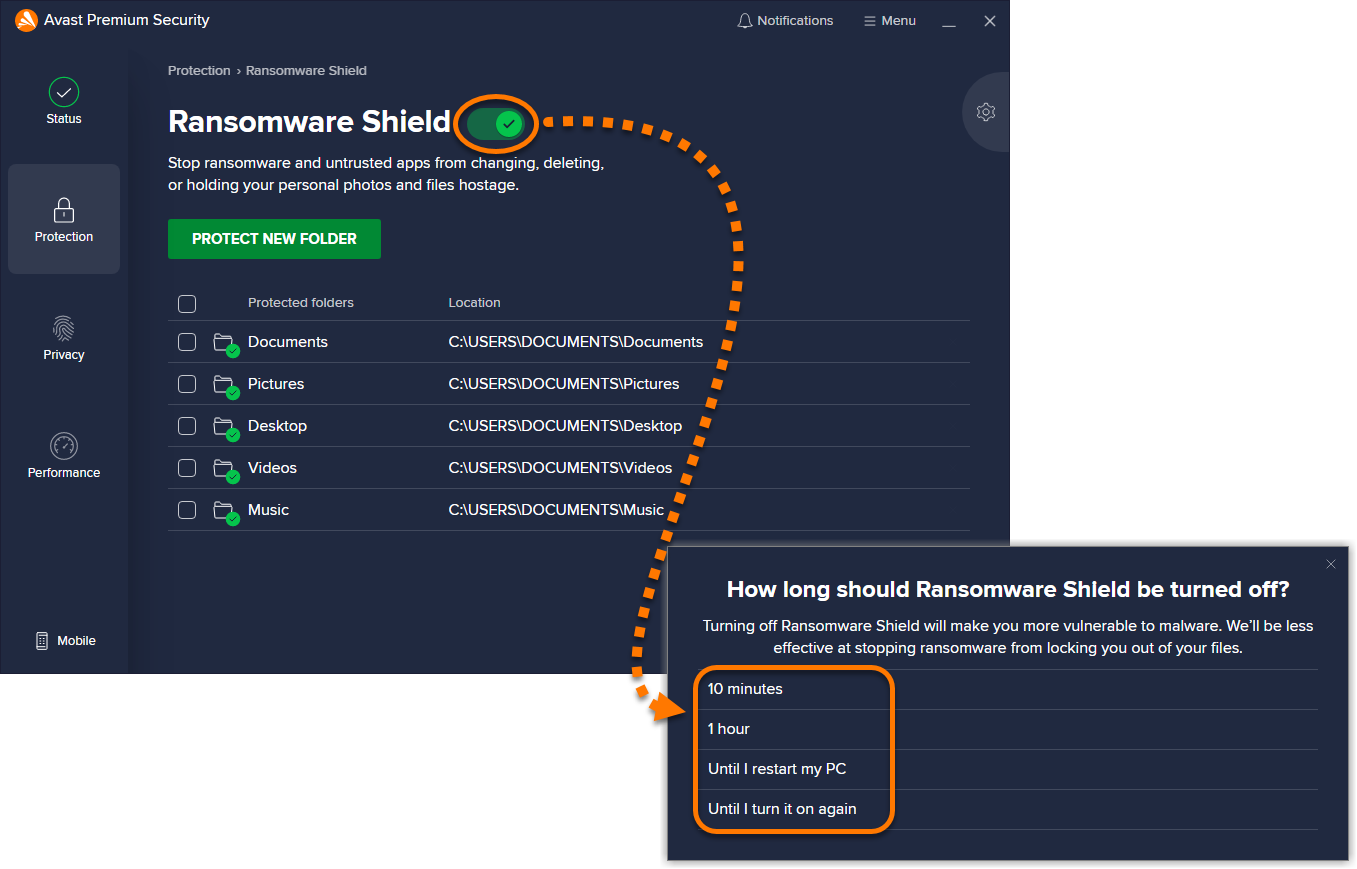
- Cliquez sur le curseur vert (activé) pour le faire passer au rouge (désactivé), puis sélectionnez la durée de désactivation de l’Agent anti-ransomware.
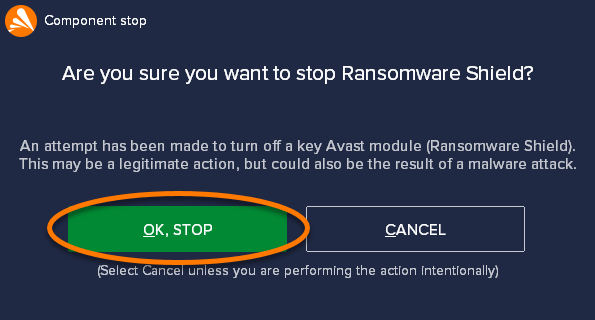
- Cliquez sur OK, arrêter pour confirmer.
L’Agent anti-ransomware est maintenant désactivé. Pour l’activer, cliquez sur le curseur rouge (désactivé) pour le faire passer au vert (activé).
Résolution des problèmes
Consultez les informations ci-dessous pour résoudre les problèmes les plus courants :
- L’Agent anti-ransomware n’apparaît pas dans le menu principal : vérifiez que vous utilisez bien la dernière version d’Avast Antivirus. Pour mettre à jour Avast Antivirus, accédez à
☰Menu ▸ Paramètres ▸ Mettre à jour, puis cliquez sur Rechercher des mises à jour dans la section de l’application. - L’Agent anti-ransomware affiche trop souvent des messages contextuels : assurez-vous que le comportement de l’Agent anti-ransomware est défini sur Mode smart. Si l’Agent anti-ransomware est défini sur Mode strict, Avast Antivirus vous envoie une notification chaque fois que n’importe quelle application essaie de modifier des fichiers dans vos dossiers protégés (à l’exception de ceux que vous avez déjà ajoutés aux listes d’applications bloquées/autorisées).
- Vous ne pouvez pas enregistrer de fichiers à l’aide d’une application d’édition : vérifiez que l’application que vous utilisez ne se trouve pas dans la liste Applications bloquées. Vous pouvez également ajouter l’application à votre liste Applications autorisées.
Autres recommandations
Pour plus d’informations sur l’Agent anti-ransomware, consultez l’article suivant :
Ajouter ou supprimer des dossiers protégés
Par défaut, l’Agent anti-ransomware analyse et sécurise automatiquement les dossiers où sont habituellement stockées vos données personnelles (par exemple, les dossiers Documents et Images). Les sous-dossiers des dossiers protégés sont également inclus. Pour ajouter des dossiers à la liste des Dossiers protégés ou en supprimer :
- Ouvrez Avast Premium Security et cliquez sur la vignette Agent anti-ransomware.
- Ajouter ou supprimer un dossier sélectionné :
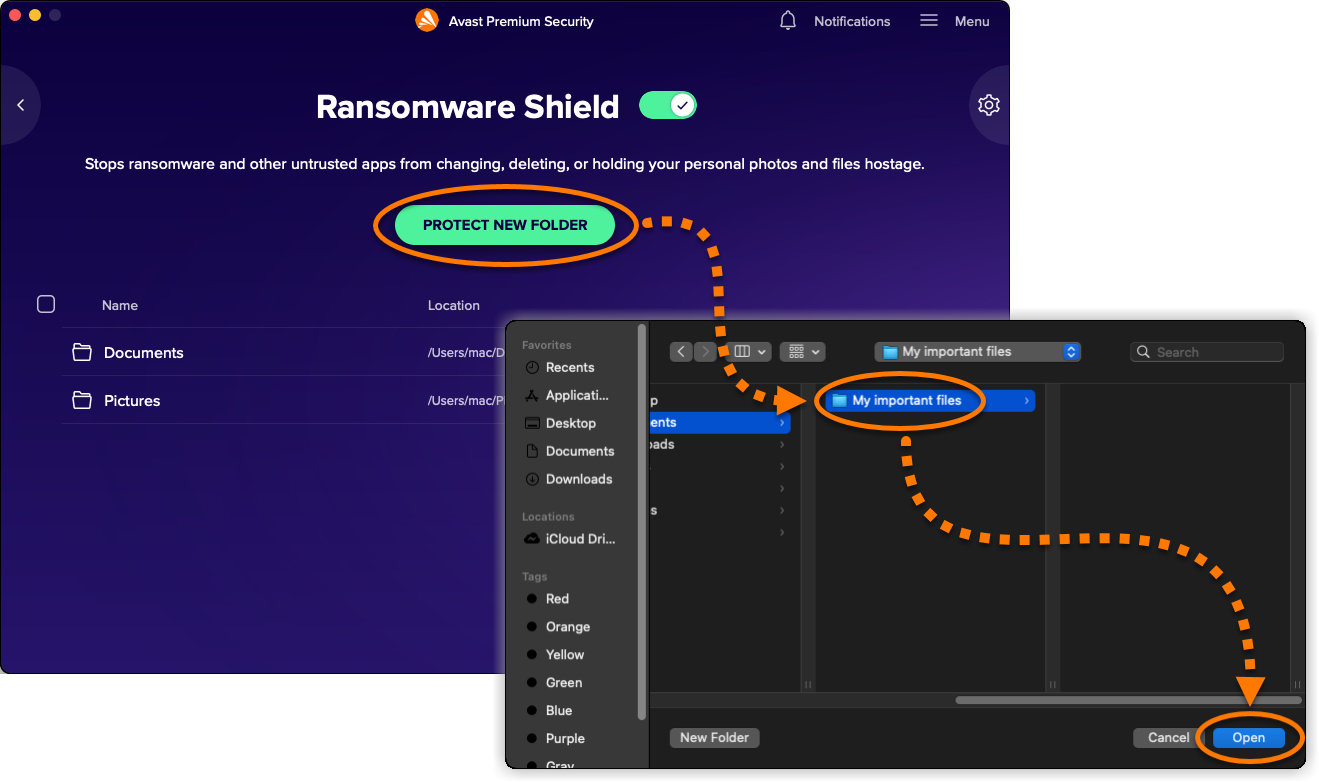
- Pour ajouter un dossier : Cliquez sur Protéger un nouveau dossier, sélectionnez le dossier à protéger, puis cliquez sur Ouvrir.
- Pour supprimer un dossier : cochez la case en regard du dossier que vous souhaitez exclure, puis cliquez sur Arrêter la protection.
- Pour ajouter un dossier : Cliquez sur Protéger un nouveau dossier, sélectionnez le dossier à protéger, puis cliquez sur Ouvrir.
- Saisissez le mot de passe que vous utilisez au démarrage de votre Mac, puis cliquez sur OK.



Spécifier les types de fichiers protégés
L’Agent anti-ransomwares protège les types de fichiers spécifiés dans vos dossiers protégés. Vous pouvez modifier la liste prédéfinie et ajouter ou supprimer des types de fichiers en procédant comme suit :
- Cliquez sur Options (l’icône de roue dentée) en haut à droite de l’écran Agent anti-ransomwares.
- Dans la section Types de fichiers protégés, décochez la case en face des types de fichiers que vous ne voulez pas que l’Agent anti-ransomwares protège ou cochez la case en face des fichiers à protéger.
- Ajoutez ou supprimez d’autres types de fichiers :
- Pour ajouter un nouveau type de fichier : cliquez sur Ajoutez un type de fichier, saisissez l’extension du fichier, puis choisissez Enregistrer.
- Pour supprimer un type de fichier : passez le curseur sur l’extension de fichier dans la liste Autres types de fichiers, puis cliquez sur l’icône de corbeille.
- Pour ajouter un nouveau type de fichier : cliquez sur Ajoutez un type de fichier, saisissez l’extension du fichier, puis choisissez Enregistrer.
- Saisissez le mot de passe que vous utilisez au démarrage de votre Mac, puis cliquez sur OK.


Gérer la liste des applications autorisées
Les applications de la liste Applications autorisées sont autorisées à accéder aux fichiers de vos dossiers protégés. Ceci vous permet de protéger vos fichiers à l’aide de l’Agent anti-ransomwares et en même temps de n’accéder à ces fichiers qu’avec des applications de confiance. Pour ajouter des applications à la liste Applications autorisées ou en supprimer :
- Cliquez sur Options (l’icône de roue dentée) en haut à droite de l’écran Agent anti-ransomwares.
- Ajoutez ou supprimez une application :
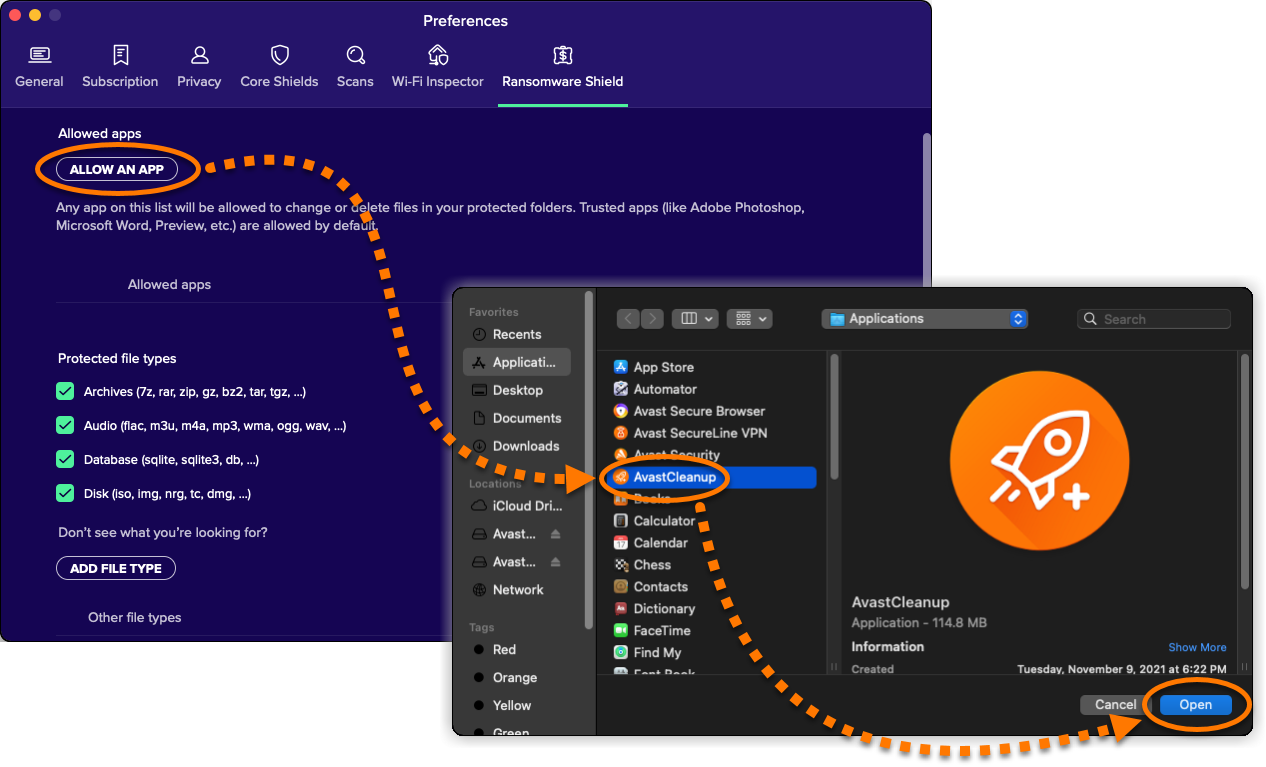
- Pour ajouter une application : cliquez sur Autoriser une application, sélectionnez l’application que vous souhaitez autoriser, puis sélectionnez Ouvrir.
- Pour supprimer une application : Passez le curseur sur le nom de l’application dans la liste des Applications autorisées, puis cliquez sur l’icône de corbeille.
- Pour ajouter une application : cliquez sur Autoriser une application, sélectionnez l’application que vous souhaitez autoriser, puis sélectionnez Ouvrir.
- Saisissez le mot de passe que vous utilisez au démarrage de votre Mac, puis cliquez sur OK.

Désactivation de l’Agent anti-ransomware
L’Agent anti-ransomware est activé par défaut, mais vous pouvez le désactiver pour la résolution des problèmes en suivant les étapes ci-dessous :
- Cliquez sur le curseur vert (activé) sur l’écran Agent anti-ransomwares.
- Saisissez le mot de passe que vous utilisez au démarrage de votre Mac, puis cliquez sur OK.
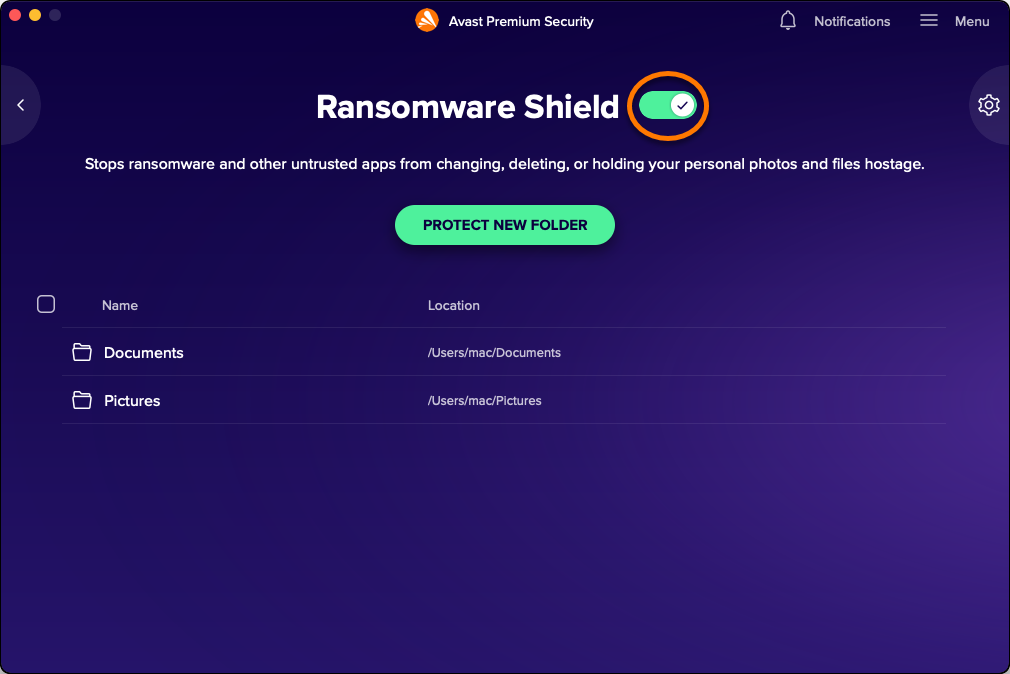
L’Agent anti-ransomware est maintenant désactivé. Pour l’activer, cliquez sur le curseur rouge (désactivé) pour le faire passer au vert (activé).
- Avast Premium Security 22.x pour Windows
- Avast Antivirus Gratuit 22.x pour Windows
- Avast Premium Security 15.x pour Mac
- Microsoft Windows 11 Famille/Pro/Entreprise/Éducation
- Microsoft Windows 10 Famille/Pro/Entreprise/Éducation (32/64 bits)
- Microsoft Windows 8.1/Professionnel/Entreprise (32/64 bits)
- Microsoft Windows 8/Professionnel/Entreprise (32/64 bits)
- Microsoft Windows 7 Édition Familiale Basique/Édition Familiale Premium/Professionnel/Entreprise/Édition Intégrale – Service Pack 1 avec mise à jour cumulative de commodité (32/64 bits)
- Apple macOS 12.x (Monterey)
- Apple macOS 11.x (Big Sur)
- Apple macOS 10.15.x (Catalina)
- Apple macOS 10.14.x (Mojave)
- Apple macOS 10.13.x (High Sierra)
- Apple macOS 10.12.x (Sierra)
- Apple Mac OS X 10.11.x (El Capitan)
Mis à jour le : 02/06/2022

 © 2024 Gen Digital Inc.