

Met het diagnostische hulpprogramma Avast Support Tool kunt u op veelvoorkomende problemen in uw Avast-apps controleren. Het programma verzamelt de benodigde bestanden van uw pc en stuurt deze voor verdere analyse naar ondersteuningsmedewerkers en -technici van Avast.
Avast-ondersteuning controleert niet automatisch of er nieuwe ondersteuningsbestanden verzonden zijn. Voordat u een ondersteuningsbestand verzendt via het ondersteuningsprogramma van Avast, brengt u de ondersteuning van Avast daarvan op de hoogte via de ondersteuningsportal.
Avast Support Tool uitvoeren
Er zijn twee methoden voor het uitvoeren van de Avast Support Tool:
- Downloaden: hiermee wordt een uitvoerbaar bestand op uw pc geïnstalleerd en uitgevoerd. Dat is handig als u het niet lukt om uw Avast-product te openen.
- Instellingen: Hiermee wordt de Avast Support Tool rechtstreeks vanuit Avast Premium Security uitgevoerd. Deze methode is niet beschikbaar voor andere Avast-producten.
- Klik op onderstaande knop om Avast Support Tool te downloaden en sla het op een bekende locatie op uw computer op (standaard worden gedownloade bestanden opgeslagen in de map Downloads). Avast Support Tool downloaden
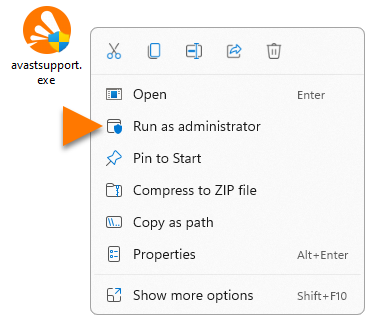
- Klik met de rechtermuisknop op het gedownloade bestand
avastsupport.exeen selecteer Als administrator uitvoeren in het contextmenu. Als het niet lukt om toestemming te geven voor de installatie van Avast Support Tool, raadpleegt u het volgende artikel: Beheerdersaccounts beheren op uw Windows-pc.
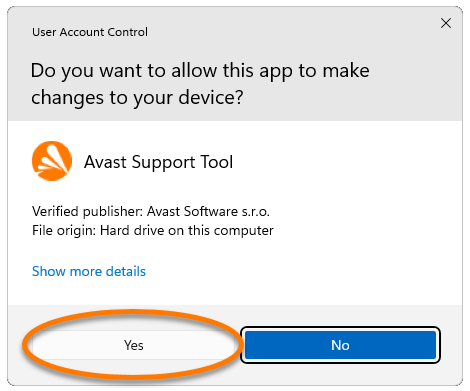
 - Klik op Ja wanneer in het dialoogvenster Gebruikersaccountbeheer om toestemming wordt gevraagd.
Volg de instructies in het volgende gedeelte van dit artikel om een logbestand naar de ondersteuning van Avast te sturen.
- Open Avast Premium Security en ga naar
☰Menu ▸ Instellingen. - Selecteer Algemeen in het linkerdeelvenster en klik op Probleemoplossing.
- Scrol naar Logboeken verzenden naar ons ondersteuningsteam en klik op Logboeken verzenden.


Volg de instructies in het volgende gedeelte van dit artikel om een logbestand naar de ondersteuning van Avast te sturen.
Een logbestand verzenden naar de ondersteuning van Avast
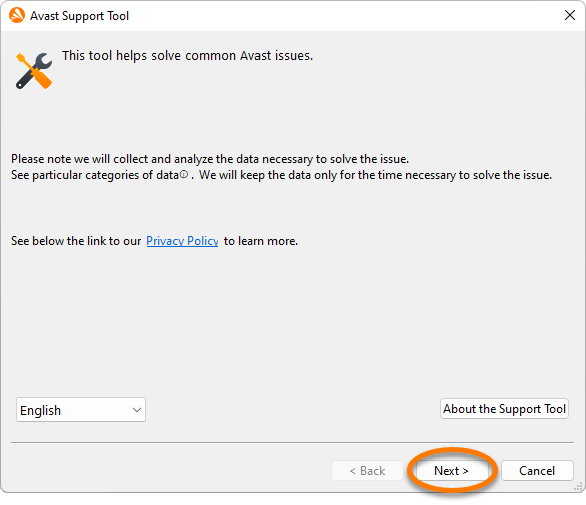
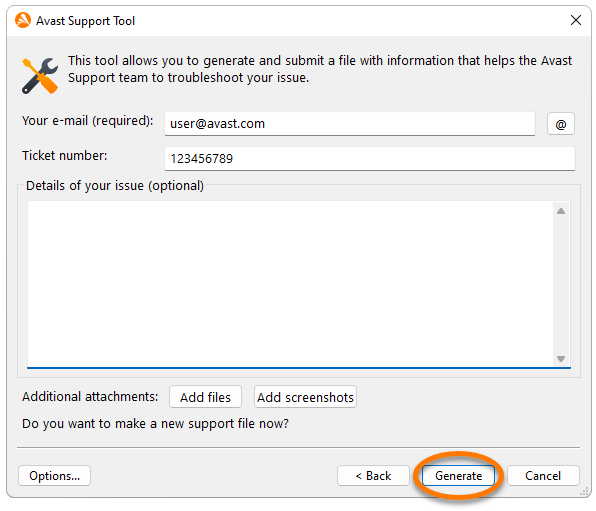
- Nadat u bovenstaande instructies hebt gevolgd om Avast Support Tool te starten, klikt u op Volgende om een ondersteuningslogbestand te maken.
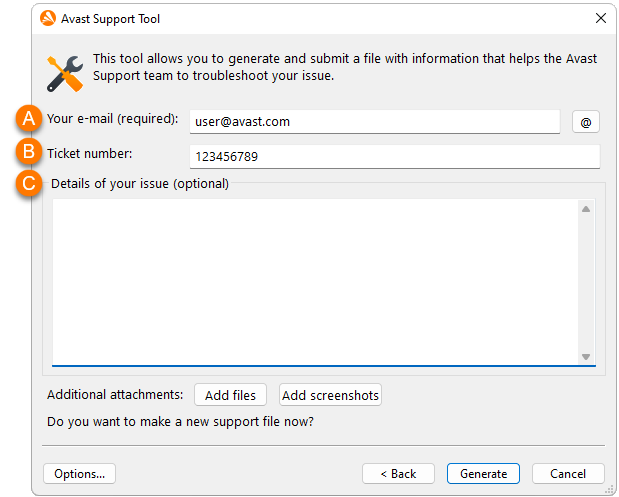
- Vul de volgende gegevens in op het scherm dat verschijnt:
- Het e-mailadres dat u hebt opgegeven toen u contact opnam met de ondersteuning van Avast door een ticket te versturen via de ondersteuningsportal.
- Het ticketnummer dat u hebt ontvangen van de ondersteuning van Avast na het versturen van het ticket.
- U kunt eventueel extra informatie over uw probleem toevoegen en/of extra bestanden en schermafbeeldingen toevoegen.
- Klik op Genereren om het programma toe te staan de benodigde bestanden te verzamelen. Dat kan een paar minuten duren.
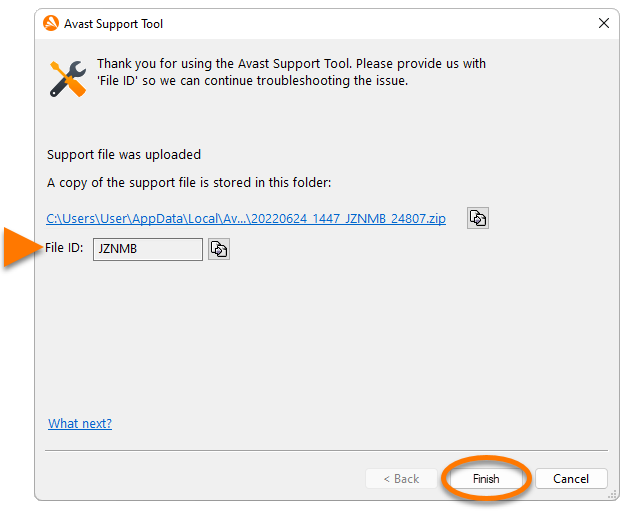
- Het ondersteuningsbestand wordt automatisch naar de ondersteuning van Avast verzonden als u verbinding hebt met internet. Noteer de Bestandsnaam voor later gebruik. Bij uw volgende contact met de ondersteuning van Avast kunt u de Bestandsnaam doorgeven aan onze ondersteuningsmedewerkers.
Klik op Voltooien om het verzenden van het bestand naar de ondersteuning van Avast te bevestigen.
- Avast One 23.x voor Windows
- Avast Premium Security 23.x voor Windows
- Avast SecureLine VPN 5.x voor Windows
- Avast Cleanup Premium 23.x voor Windows
- Avast AntiTrack 3.x voor Windows
- Avast Driver Updater 23.x voor Windows
- Avast BreachGuard 23.x voor Windows
- Avast Battery Saver 23.x voor Windows
- Microsoft Windows 11 Home / Pro / Enterprise / Education
- Microsoft Windows 10 Home / Pro / Enterprise / Education – 32-/64-bits
- Microsoft Windows 8.1 / Pro / Enterprise – 32-/64-bits
- Microsoft Windows 8 / Pro / Enterprise – 32-/64-bits
- Microsoft Windows 7 Home Basic / Home Premium / Professional / Enterprise / Ultimate – Service Pack 1 met Convenient Rollup Update, 32- / 64-bits
Bijgewerkt op: 05-01-2024

 © 2024 Gen Digital Inc.