

Na het installeren van of upgraden naar een betaald product van Avast, moet u uw abonnement mogelijk activeren met behulp van een geldige activeringscode (ook wel abonnementscode of licentiesleutel genoemd) in de toepassing.
Volg de instructies in dit artikel om uw activeringscode op een van de volgende plekken te zoeken:
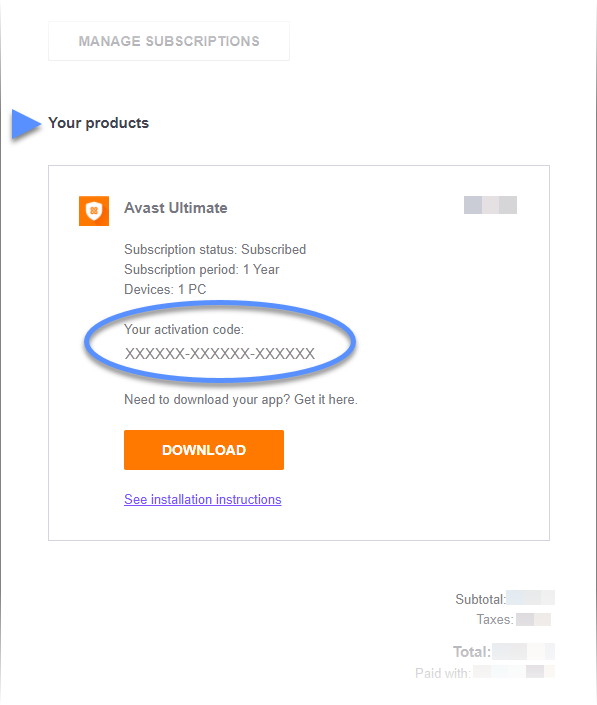
- E-mailbericht met de bestelbevestiging: voor aankopen die online zijn gedaan via de officiële website van Avast ontvangt u een e-mail met bestelbevestiging met daarin uw activeringscode.
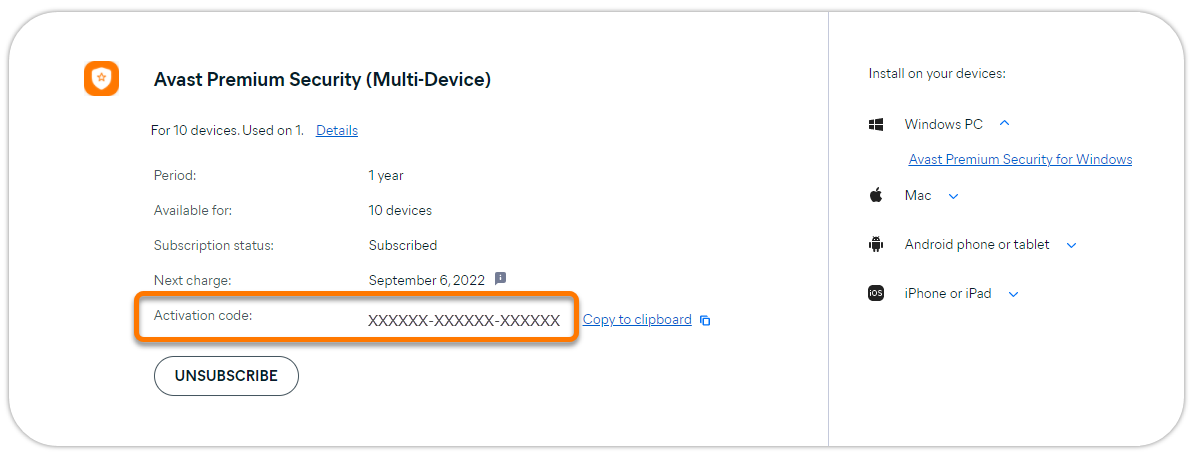
- Avast Account: aankopen die online zijn gedaan via de officiële website van Avast verschijnen in het Avast-account dat is gekoppeld aan het e-mailadres dat u hebt opgegeven bij het afrekenen.
- Een al geactiveerd Avast-product: wanneer een Avast-product al is geactiveerd, is uw activeringscode gewoonlijk zichtbaar in het product. Dat is handig als u uw abonnement geldig is voor meerdere apparaten en u de activeringscode op een nieuw apparaat wilt invoeren.
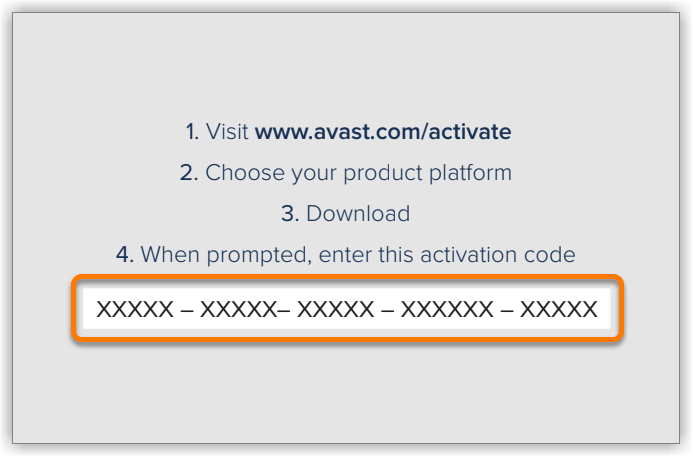
- Activeringskaart: producten die u hebt gekocht in een winkel of via een externe reseller (bijvoorbeeld Staples of Amazon) worden geleverd in een doosje of kunststof verpakking met daarin een kaartje waarop de activeringscode is gedrukt.
E-mailbericht met de bestelbevestiging
Ga als volgt te werk om uw activeringscode te zoeken in een e-mailbericht met de bestelbevestiging:
- Open het e-mailbericht met de bestelbevestiging dat u hebt ontvangen van no.reply@avast.com (of in sommige gevallen , info@customer.avast.com).

- Schuif naar het gedeelte Uw producten. U vindt de activeringscode onder Uw activeringscode.

Avast-account
- Raadpleeg het volgende artikel voor informatie over hoe u zich voor de eerste keer bij uw Avast-account aanmeldt: Uw Avast-account activeren
- Als u het wachtwoord niet weet van uw Avast-account, kunt u dat opnieuw instellen.
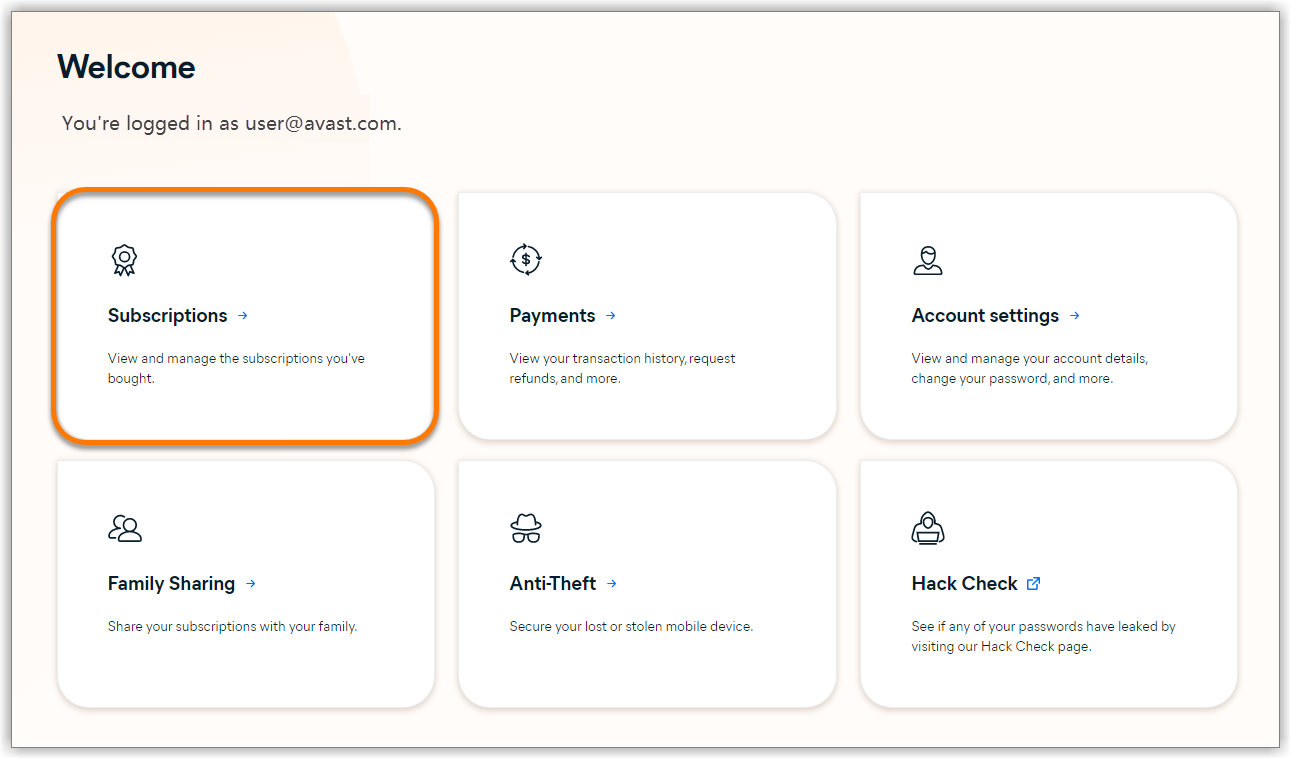
De activeringscode zoeken in uw Avast-account:
- Meld u aan bij uw Avast-account via onderstaande koppeling:
- Klik op de tegel Abonnementen.
- De activeringscode voor elk abonnement is zichtbaar naast Activeringscode.
Een product van Avast
Volg onderstaande instructies voor uw apparaat en product om uw activeringscode te zoeken:
De meeste Avast-producten voor de pc:
- Ga naar
☰Menu ▸ Mijn abonnementen ▸ Abonnementen op deze pc. Klik op de pijl-omlaag naast uw abonnement. U vindt uw activeringscode naast Abonnement.
Avast AntiTrack Premium:
- Ga naar
☰Menu ▸ Instellingen ▸ De status van uw abonnement. U vindt uw activeringscode naast Activeringscode.
Avast SecureLine VPN:
- Ga naar
☰Menu ▸ Abonnement. U vindt uw activeringscode naast Activeringscode.
Avast AntiTrack:
- Ga naar Instellingen ▸ Activeringssleutels. U vindt uw activeringscode onder Licentiesleutel.
Avast Mobile Security Premium:
- Ga naar
☰Menu ▸ Mijn abonnementen. U vindt de activeringscode onder de naam van uw abonnement.
Avast Cleanup Premium:
- Ga naar
☰Menu ▸ Instellingen ▸ Abonnement. U vindt uw activeringscode onder Activeringscode.
Avast SecureLine VPN:
- Ga naar Instellingen (het tandwielpictogram) ▸ Abonnement. U vindt uw activeringscode onder Activeringscode.
 Instellingen (het tandwielpictogram) ▸ Abonnement. U vindt uw activeringscode onder Activeringscode.
Avast Mobile Security Premium en Avast SecureLine VPN:
- Ga naar Instellingen (het tandwielpictogram) ▸ Abonnement. U vindt uw activeringscode onder Activeringscode.
Activeringskaart
Als u een doosje of plastic verpakking van Avast met een activeringskaart hebt, vindt u de activeringscode op de kant van de kaart met de instructies.
Verdere aanbevelingen
Als het niet lukt om uw activeringscode te vinden met behulp van bovenstaande methoden, neemt u contact op met de ondersteuning van Avast.
Raadpleeg onderstaand artikel voor uw Avast-product voor uitgebreide activeringsinstructies:
- Avast Premium Security | Avast Mobile Security Premium | Avast SecureLine VPN | Avast Cleanup Premium | Avast AntiTrack | Avast Driver Updater | Avast BreachGuard | Avast Battery Saver
- Alle betaalde softwareproducten van Avast
- Alle ondersteunde besturingssystemen
Bijgewerkt op: 20-11-2023

 © 2024 Gen Digital Inc.