

Desinstalar o Avast Premium Security
Para desinstalar o Avast Premium Security do Windows, selecione a guia pertinente abaixo de acordo com a versão do Windows.
Desinstalar pelo menu Iniciar
- Clique com o botão direito no ícone
 Iniciar do Windows e selecione Aplicativos e Recursos no menu que será exibido.
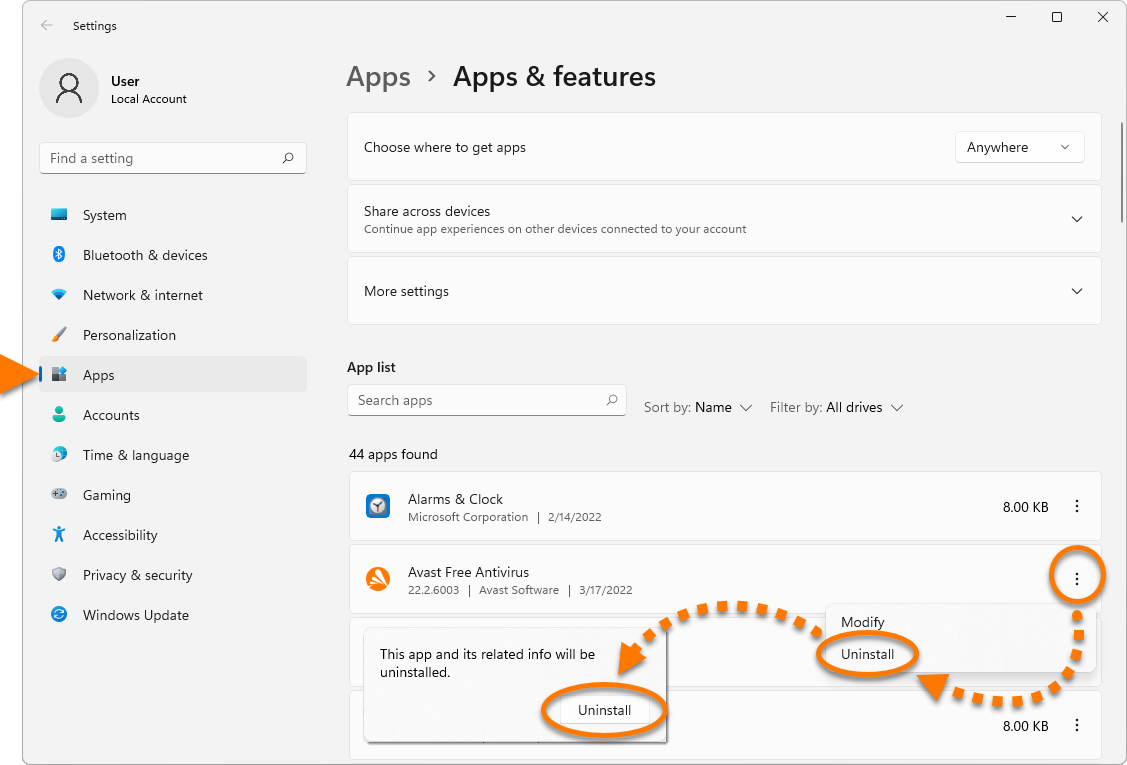
 - Confira se Aplicativos está selecionado no painel esquerdo e depois selecionar em
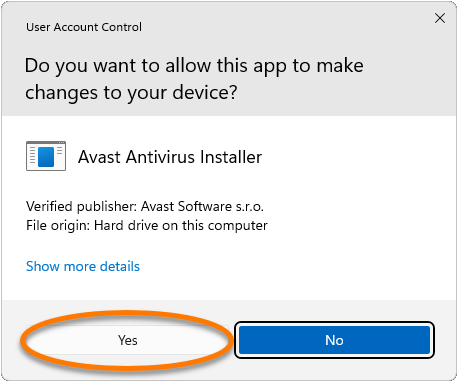
⋮(três pontos) ao lado de Avast Premium Security e clique duas vezes em Desinstalar. - Se a caixa de diálogo Controle de Conta de Usuário solicitar permissões, clique em Sim.
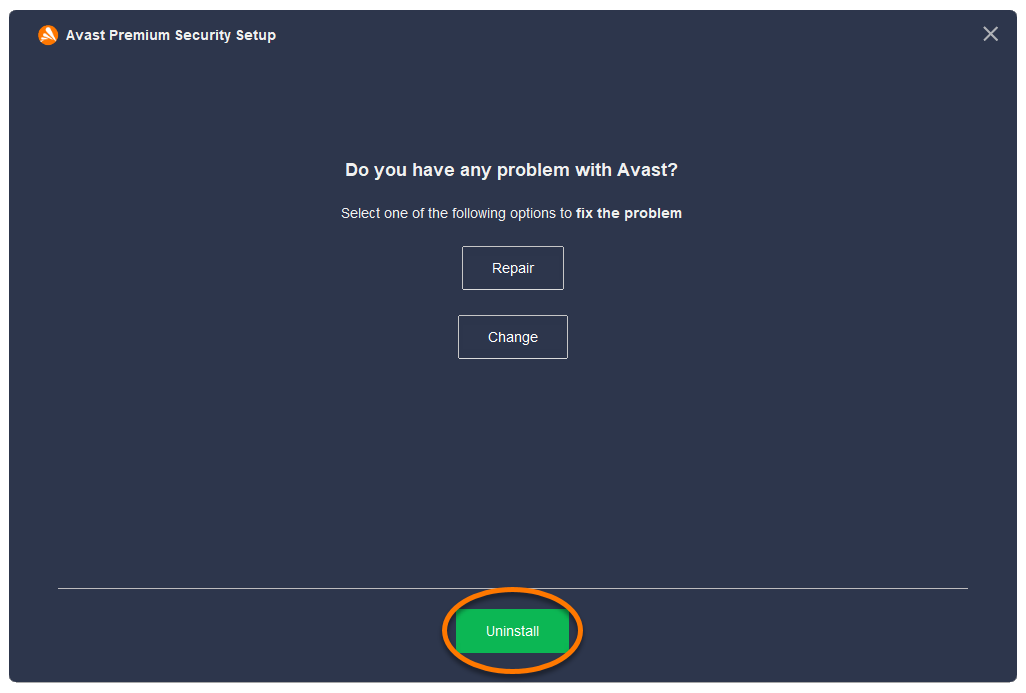
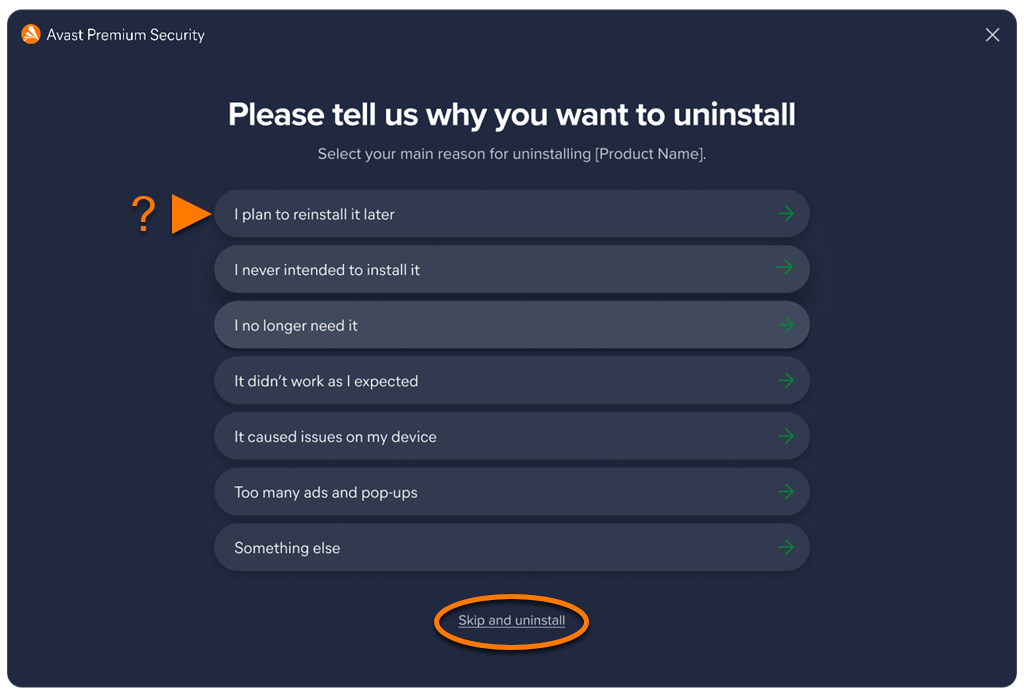
- Quando a janela de configuração do Avast Premium Security aparecer, clique em Desinstalar.
- Você também pode preencher a pesquisa do usuário ou selecionar Ignorar e desinstalar.
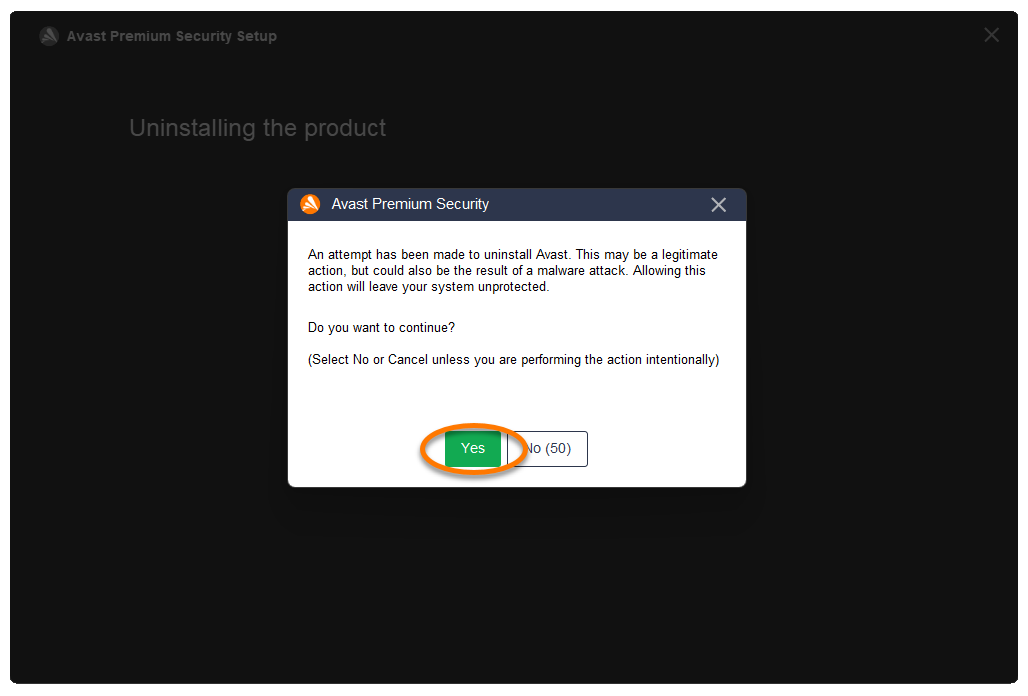
- Selecione Sim para confirmar a desinstalação do Avast Premium Security.
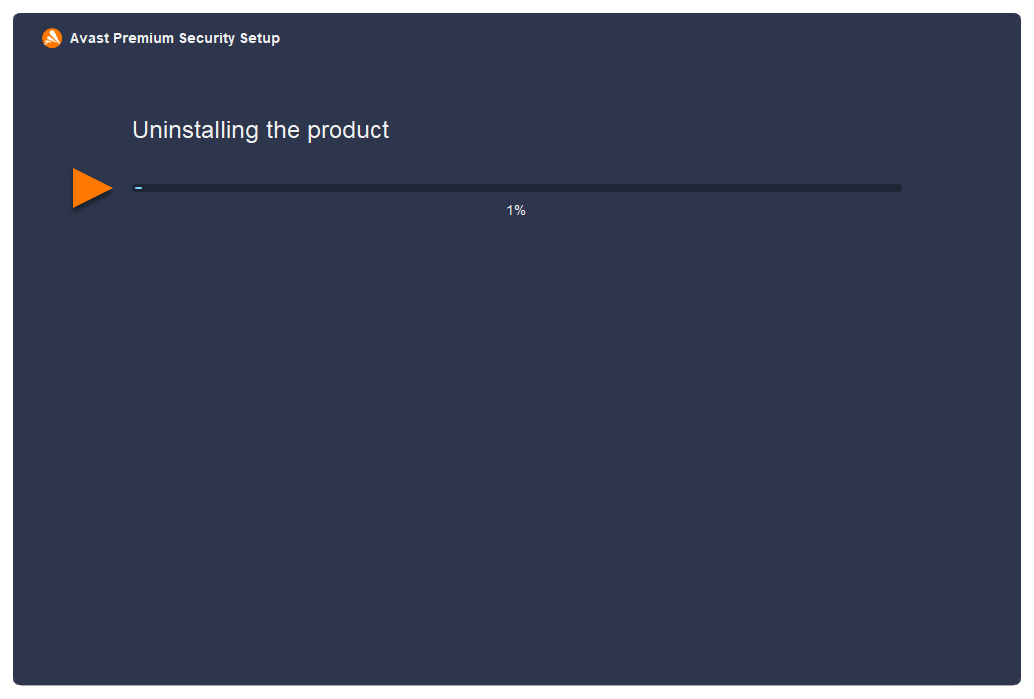
- Espere o desinstalador remover o Avast Premium Security do PC.
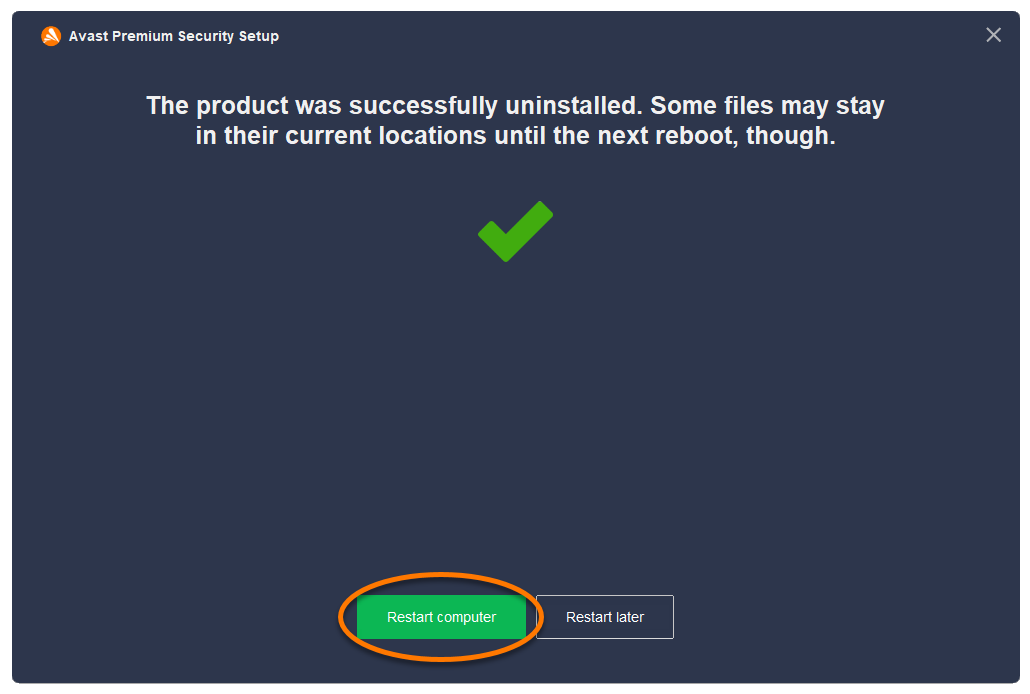
- Quando a mensagem de confirmação for mostrada, clique em Reiniciar o computador para reiniciar o PC imediatamente após a desinstalação.
 Iniciar do Windows e selecione Aplicativos e Recursos no menu que será exibido.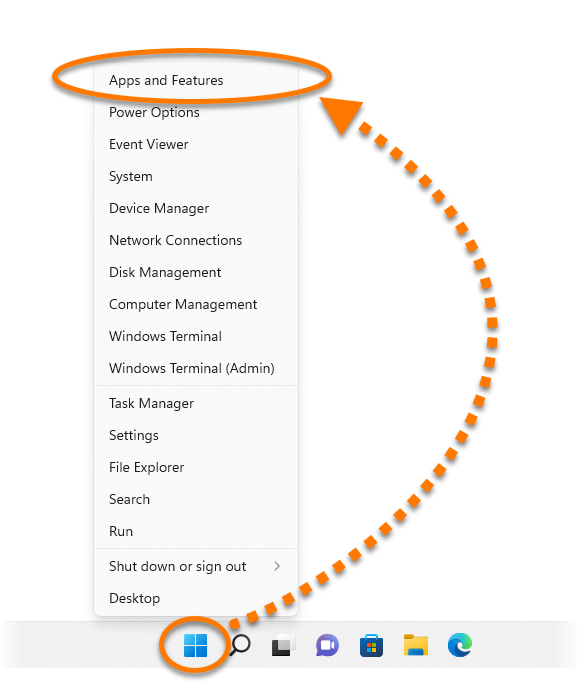
- Clique com o botão direito no ícone Iniciar do Windows e selecione Aplicativos e Recursos no menu que será exibido.
- Confirme se a opção Aplicativos e Recursos está selecionada no painel esquerdo, depois clique em Avast Premium Security e selecione Desinstalar, duas vezes.
- Se a caixa de diálogo Controle de Conta de Usuário solicitar permissões, clique em Sim.
- Quando a janela de configuração do Avast Premium Security aparecer, clique em Desinstalar.
- Você também pode preencher a pesquisa do usuário ou selecionar Ignorar e desinstalar.
- Selecione Sim para confirmar a desinstalação do Avast Premium Security.
- Aguarde a desinstalação do Avast Premium Security do PC.
- Quando a mensagem de confirmação for mostrada, clique em Reiniciar o computador para reiniciar o PC imediatamente após a desinstalação.
 Iniciar do Windows e selecione Aplicativos e Recursos no menu que será exibido.


- No teclado, pressione a tecla do logotipo do Windows e a tecla
Xsimultaneamente. - Selecione Programas e Recursos no menu que aparece.
- Clique com o botão direito em Avast Premium Security e depois selecione Desinstalar no menu suspenso.
- Se a caixa de diálogo Controle de Conta de Usuário solicitar permissões, clique em Sim.
- Quando a janela de configuração do Avast Premium Security aparecer, clique em Desinstalar.
- Você também pode preencher a pesquisa do usuário ou selecionar Ignorar e desinstalar.
- Selecione Sim para confirmar a desinstalação do Avast Premium Security.
- Aguarde a desinstalação do Avast Premium Security do PC.
- Quando a mensagem de confirmação for mostrada, clique em Reiniciar o computador para reiniciar o PC imediatamente após a desinstalação.
 logotipo do Windows e a tecla


- Clique no ícone Iniciar do Windows e selecione Painel de Controle.
- Siga a opção A ou B de acordo com sua visualização:
- Opção A (Exibição padrão de categoria): Em Programas, clique em Desinstalar um programa.
- Opção B (Exibição de ícones grandes/pequenos): Clique em Programas e Recursos.
- Opção A (Exibição padrão de categoria): Em Programas, clique em Desinstalar um programa.
- Clique com o botão direito em Avast Premium Security e depois selecione Desinstalar no menu suspenso.
- Se a caixa de diálogo Controle de Conta de Usuário solicitar permissões, clique em Sim.
- Quando a janela de configuração do Avast Premium Security aparecer, clique em Desinstalar.
- Você também pode preencher a pesquisa do usuário ou selecionar Ignorar e desinstalar.
- Selecione Sim para confirmar a desinstalação do Avast Premium Security.
- Espere o desinstalador remover o Avast Premium Security do PC.
- Quando a mensagem de confirmação for mostrada, clique em Reiniciar o computador para reiniciar o PC imediatamente após a desinstalação.
 Iniciar do Windows e selecione Painel de Controle.


O Avast Premium Security foi desinstalado do PC. Se não conseguir desinstalar o Avast Premium Security seguindo as etapas acima, consulte a seção Ferramenta de desinstalação abaixo.
Desinstalar pela ferramenta de desinstalação
Se tiver problemas ao tentar desinstalar o Avast Premium Security pelo menu Iniciar, recomendamos usar a Ferramenta de desinstalação da Avast para excluir completamente os arquivos do Avast Premium Security do PC enquanto o Windows está no Modo de Segurança.
Para obter instruções, consulte o artigo a seguir: Usar a Ferramenta de desinstalação da Avast.
Solução de problemas sem desinstalação
Se enfrentar problemas com o Avast Premium Security, recomendamos tentar as opções a seguir antes de desinstalar:
- Atualizar: lançamos regularmente atualizações de versão para o aplicativo e as definições de vírus, que incluem novos recursos e correções de bug. Garantir que o Avast Premium Security esteja atualizado pode resolver os problemas que você enfrenta. Para obter instruções sobre como atualizar o Avast Premium Security, consulte o artigo a seguir: Como atualizar o Avast Antivirus.
- Reparar: Se alguns recursos não se comportarem corretamente, ou uma varredura trava enquanto é realizada, recomendamos tentar reparar o Avast Premium Security em vez de desinstalar o aplicativo. Reparar o Avast Premium Security também é recomendado se uma atualização de aplicativo falhar. Para obter instruções sobre como reparar o Avast Premium Security, consulte o artigo a seguir: Reparar o Avast Antivirus.
- Desativar: Às vezes, os recursos de proteção no Avast Premium Security podem bloquear um site que você quer acessar ou marcar incorretamente um arquivo como maligno. Você pode ajustar as configurações do módulo e o comportamento da varredura para impedir que essas situações ocorram, ou desativar temporariamente o Firewall ou o Avast Premium Security. Para ver mais informações, consulte os artigos a seguir:
Reinstalar o Avast Premium Security
Se precisar reinstalar o Avast Premium Security, consulte o seguinte artigo para obter instruções de instalação: Instalação do Avast Premium Security.
Para desinstalar o Avast Premium Security, siga o procedimento abaixo de acordo com seu método preferido:
- Abra o Avast Premium Security, depois clique em Avast Premium Security na barra de menu da Apple e selecione Desinstalar o Avast Premium Security.
- Quando a janela do desinstalador do Avast Premium Security aparecer, clique em Continuar.
- Digite a senha que usada para o iniciar o Mac e clique em Instalar assistente.
- Aguarde enquanto o desinstalador remove o Avast Premium Security do seu Mac.
- Se solicitado, digite a senha que você usa ao iniciar o Mac e clique em OK.
- Quando a mensagem de confirmação aparecer, clique em Concluir, ou clique em Continuar para preencher a pesquisa do cliente.


- Em seu Dock, clique no ícone do Finder.
- Selecione Aplicativos ▸ Avast Security Uninstaller.
Se não vir Aplicativos no menu do Finder, selecione Ir ▸ Aplicativos na barra de menus da Apple, na parte superior da tela.
- Quando a janela do desinstalador do Avast Premium Security aparecer, clique em Continuar.
- Digite a senha que usada para o iniciar o Mac e clique em Instalar assistente.
- Aguarde enquanto o desinstalador remove o Avast Premium Security do seu Mac.
- Se solicitado, digite a senha que você usa ao iniciar o Mac e clique em OK.
- Quando a mensagem de confirmação aparecer, clique em Concluir, ou clique em Continuar para preencher a pesquisa do cliente.


O Avast Premium Security foi desinstalado do seu Mac.
Solução de problemas sem desinstalação
Se enfrentar problemas com o Avast Premium Security, recomendamos consultar as informações a seguir antes de desinstalar: Solução de problemas comuns com o Avast Premium Security.
Reinstalar o Avast Premium Security
Se precisar reinstalar o Avast Premium Security, consulte o seguinte artigo para obter instruções de instalação: Instalação do Avast Premium Security.
- Avast Premium Security 23.x para Windows
- Avast Premium Security 15.x para Mac
- Microsoft Windows 11 Home / Pro / Enterprise / Education
- Microsoft Windows 10 Home / Pro / Enterprise / Education - 32 / 64-bit
- Microsoft Windows 8.1 / Pro / Enterprise - 32 / 64-bit
- Microsoft Windows 8 / Pro / Enterprise - 32 / 64-bit
- Microsoft Windows 7 Home Basic/Home Premium/Professional/Enterprise/Ultimate - Service Pack 1 com atualização de pacote cumulativo de conveniência, 32/64 bits
- Apple macOS 14.x (Sonoma)
- Apple macOS 13.x (Ventura)
- Apple macOS 12.x (Monterey)
- Apple macOS 11.x (Big Sur)
- Apple macOS 10.15.x (Catalina)
- Apple macOS 10.14.x (Mojave)
- Apple macOS 10.13.x (High Sierra)
- Apple macOS 10.12.x (Sierra)
- Apple Mac OS X 10.11.x (El Capitan)
Atualizado em: 19/12/2023

 © 2024 Gen Digital Inc.