- Security
- Privacy
- Performance
Downtime from cyberattacks or natural disasters can dismantle your company’s IT operations, which is why your business needs a disaster recovery and business continuity plan. Learn why it’s important to keep your business operating while it recovers from a disaster, and how Avast Business Cloud Backup keeps your data available when your business needs it most.




This Article Contains
This Article Contains
What is a disaster recovery plan?
A DRP or Disaster Recovery Plan is a formalized, documented process that explains how IT systems and data are restored after they‘re disrupted by a disaster. A disaster is sometimes referred to as an incident or event, and is anything that stops systems or people from working as intended.
Here are some of the disasters that a good recovery plan can mitigate:
-
Cyberattacks: When a business undergoes a cyberattack, such as an attacker using an exploit that leads to a data breach or ransomware attack, it can be classified as an event and could lead to catastrophic consequences for the business.
-
Natural disasters: If your data is physically stored in a location prone to natural disasters such as fires, floods, hurricanes, or earthquakes, it can be affected by these events, as well as the systems that store the data.
-
Upstream failures: These refer to third-party services that a business relies on to function properly. Services like electricity, ISPs, or cloud service providers failing and causing a disruption to a business’s ability to operate are examples of upstream failures.
-
Human error: Things like system misconfigurations, accidental data deletion, or employees clicking phishing links can all be classified as human error. This type of event is internal to the business and can lead to disastrous consequences that require a plan to recover from.
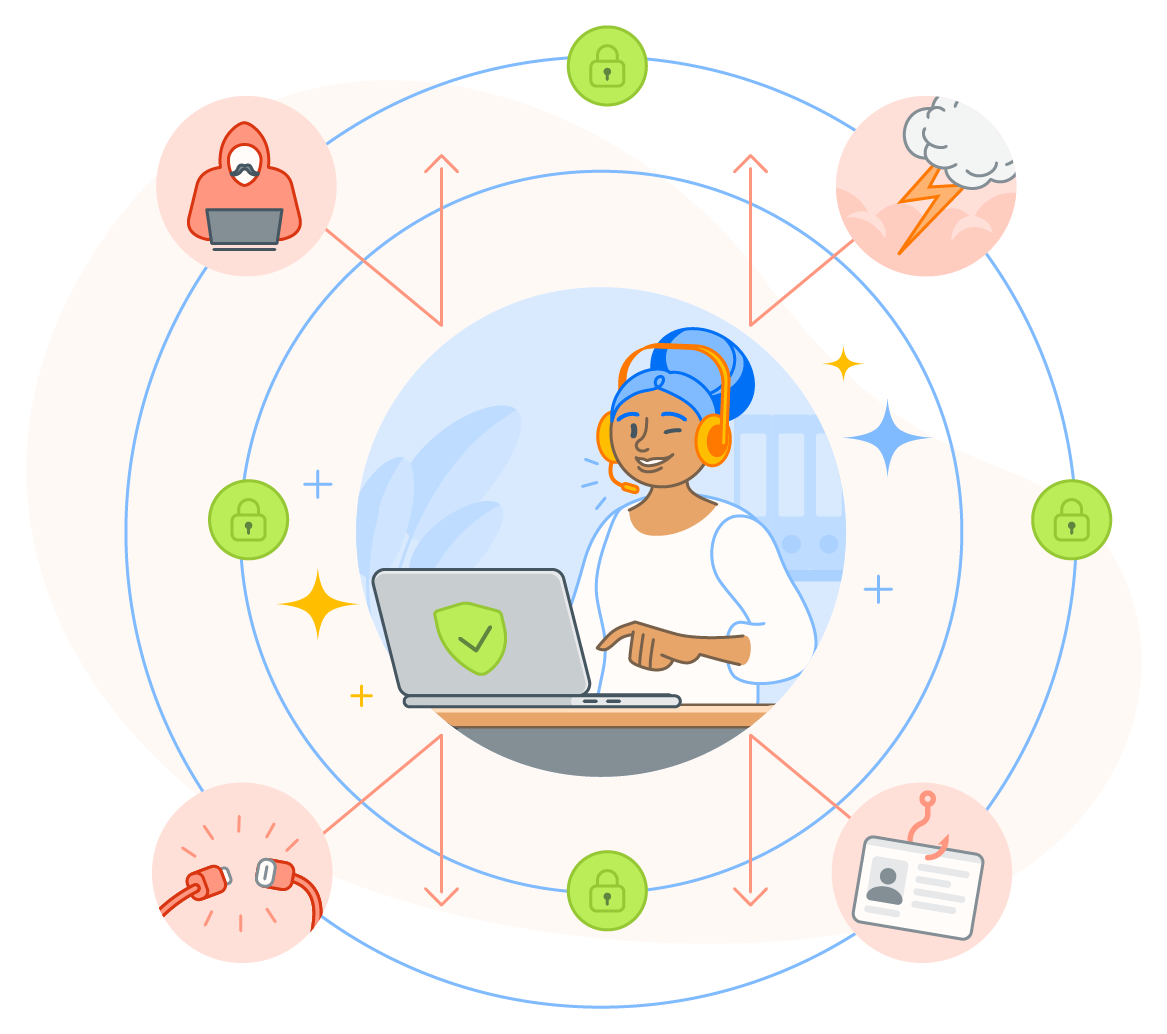 A good DRP protects your business against cyberattacks, natural disasters, third-party failures, and even human error.
What is a business continuity and disaster recovery plan (BCDR)?
A BCDR or Business Continuity and Disaster Recovery plan is a combined strategy that unites disaster recovery and business continuity under one resilience framework. The two are distinct in that disaster recovery encompasses how a business should recover its IT systems and data to a working state, while a business continuity plan specifically outlines how a business can remain operational during a disaster or event.
Let’s take a closer look at the differences between the two plan types:
| Business continuity | Disaster recovery | |
|---|---|---|
| Coverage | People, processes, suppliers, communications, and facilities. | Servers, networking equipment, databases, and applications. |
| Timeframe | Comes into play during an event/disaster and is ongoing throughout. | Generally starts after an event/disaster and is ongoing until recovery has been made. |
| Activities | Manual processing, remote work plans, and alternative vendor use. | Server rebuilds, data restoration, and failover to cloud services. |
| Expected outcomes | Workarounds for employees, alternate working locations, and instructions for staff. | Backup strategies, processes for system recovery, and infrastructure failover mechanisms. |
Modern businesses are reliant on IT to operate and the two plans complement each other well, so they are often bundled together in a BCDR plan to coordinate efforts where they are needed most and help ensure business and technical resilience.
Why disaster recovery and business continuity matter
Disaster recovery and business continuity allow your business to minimize costs and downtime due to an event, as well as permitting your business to keep running while events are taking place. Modern businesses — including small businesses — have a lot to be concerned about when a disaster/event happens.
A recent ITIC report states that 97% of large businesses (of 1,000 employees or more) reported that a single hour of downtime in a year costs their company over $100,000 — a figure that’s likely more if your company isn’t prepared for disaster.
A good disaster recovery plan matters because it can help you mitigate damage against these types of business pressures during and after a disaster:
-
Breached service level agreements: Some companies have legally binding agreements with their customers pertaining to the service they provide, usually outlining the quality, timeliness, acceptable downtime, and the compensation available if these agreements are not kept.
-
Lost revenue: When systems aren’t working as expected, the opportunity to make money reduces. Without a plan in place to recover these systems or to have a failover when an event takes place, revenue can go down for an extended period of time.
-
Staff downtime: A business needs to pay its staff. If the staff are showing up for work but not able to produce the same output they usually would due to an event taking place, then the business will have to bear the costs of staff downtime until they’re fully operational again.
-
Reputational costs: Trust is expensive to rebuild. After an event, the business may experience customer loss, marketing and PR costs, increased complaints, and long-term damage to its reputation.
-
Regulatory and legal penalties: Some events, such as data breaches, can carry hefty regulatory fines and legal action, leading to costs that outweigh the technical recovery of the business. This only adds to the importance of disaster recovery and business continuity by meeting compliance requirements and limiting the impact these penalties can have on a business.
One aspect of disaster recovery that isn’t usually taken into consideration but is still important is the opportunity costs to the organization. Delayed or abandoned projects, missed opportunities, and other important goals that aren’t met during and after can have an impact on your business that can be difficult to quantify.
Key components of an IT disaster recovery plan
An IT disaster recovery plan is only as useful as the components that make it up. There are some industry references, such as the ISO 22301 standard and NIST SP 800-34 guidance, that are helpful when thinking about what makes up a good disaster recovery plan.
Here are some of the key components from those standards that help to build a working IT disaster recovery plan:
-
Event detection and response activation: This component outlines who can declare a disaster, how that disaster can be identified, and any immediate actions that are to take place after a disaster is declared. When recovery begins, and how recovery begins should also be outlined here.
-
Incident response roles and contacts: When a disaster happens, there need to be clear and distinct roles that outline who is responsible for undertaking certain actions. These distinct roles help with communication as they make it clear who is responsible for each part of the disaster recovery.
-
Risk assessment and business impact analysis (BIA): Identifying potential threats, asset and dependency mapping, and pinpointing which systems are critical to your business being able to function properly should be outlined here. You need to know what you have to know how to recover.
-
System criticality, dependencies, and recovery objectives: Outlining which systems take priority, the recovery order of those systems (taking dependencies from the BIA into account), and recovery objectives like Recovery Time Objective (RTO),which answers the question of how long a system can be down before it’s unacceptable, and Recovery Point Objective (RPO), which determines how much data loss, measured in time, is acceptable.
-
Data backup and restoration strategy: When a disaster such as a ransomware attack happens, you need backups in order to recover properly. This component details how frequently backups should be taken, what media those backups are to be stored on, and where those backups are stored. Also outlined here are how databases, application servers, and any other dependent services can be restored to a working state.
-
Testing and maintenance: Your business needs to have confidence in its disaster recovery plan, and one way to provide that assurance is through scheduled testing and continuous improvement. Testing criteria, gap identification, training and staff readiness, and testing frequency are all part of this component of an IT disaster recovery program.
Types of disaster recovery plans
Many different kinds of disaster recovery plans exist, and organizations can adopt different disaster recovery strategies depending on size, risk profile, and infrastructure. No matter what type of disaster recovery plan you use for your business, these eight tiers of disaster recovery are a commonly referenced framework — here are the tiers:
-
Tier 0 (No recovery capability): Businesses operating at this tier have no disaster recovery plan. This means no backups at all, or backups that are only stored on the same system. There is no documentation about what to do when disaster strikes.
-
Tier 1 (Basic backup only; no hot sites): In disaster recovery, a hot site is a secondary environment that’s ready to take over if the primary environment fails. A business operating at this tier means they have basic backups of their data, but nowhere to restore it when systems fail.
-
Tier 2 (Backup with hot sites): This tier is where disaster recovery becomes possible at a basic level. Basic backups exist, and hot sites to restore the data to also exist. Manual configuration is still required for setup and restoration.
-
Tier 3 (Automated offsite backup): Some mission critical data backups are performed automatically to an offsite location. When a disaster happens, a business operating with a disaster recovery plan at this tier needs to manually restore systems and applications before the vaulted backups can be used.
-
Tier 4 (Rapid restore capability): Rather than offline backups (commonly referred to as backups on tape), this tier means that the business is using disk-based backups, which allows for a faster recovery time if required by the business.
-
Tier 5 (Near real-time data replication): When data is critical and requires continuous consistency between backup and production systems, a business needs this tier of protection. Think of financial, healthcare, and government systems when considering tier 5.
-
Tier 6 (Near-zero data loss): When a business has little to no tolerance for data loss and requires rapid restoration to its services. Synchronous replication is typically used to ensure near-zero data loss, and the disaster recovery plan must be designed to support these strict recovery objectives.
-
Tier 7 (Automated recovery): Including everything at tier 6, but also adding in automation for recovery, tier 7 allows for the fastest and most reliable recovery for a business’s IT systems.
It’s important to understand the needs of a business when considering what tier a disaster recovery plan should map to. Once a tier has been decided, you can begin to think about the recovery approach that is best suited to your business needs.
Main recovery approaches
Organizations often take one or more of the following disaster recovery approaches so they’re prepared when a disaster hits:
-
Cloud disaster recovery
This approach to recovery is best for businesses already utilizing the cloud. When a disaster happens, this recovery can often come online automatically with a pay-as-you-go service model, making this a cost-effective and fast way to scale up a recovery system. As an added benefit, this system can be paired with a cloud-based security service for added protection when the business is already compromised by a disaster. -
Network disaster recovery
Systems often need to communicate with each other and the world, and networks are the way this occurs. So, network disaster recovery is an added layer of disaster resilience that focuses on how systems are connected and how to recover them. Usually, these plans involve redundant network paths and failover mechanisms, all while keeping disruption to a minimum. -
Virtualized disaster recovery
When a business needs to be able to rapidly recover systems without relying solely on physical infrastructure, this disaster recovery approach may be used. Virtualized environments allow for system snapshots, are hardware-independent, and can rapidly be implemented into a working state, meaning this approach offers a great recovery time that can support a business’s recovery objectives. -
Data center disaster recovery
Sometimes a business is bound by regulations, has legacy equipment in its systems, or can’t use the cloud. A data center recovery approach often involves maintaining secondary physical sites where systems and infrastructure can be replicated and restored; it’s a reliable (though expensive) approach for a business that offers redundancy for entire on-prem systems.
Modern approaches to disaster recovery usually implement ideas from all of these in a hybrid approach to disaster recovery. It’s important to consider what kind of disaster recovery will work best for a business from financial, operational, regulatory, and security-based perspectives.
How to test and improve your disaster recovery plan
The only way your business can know if its disaster recovery plan will work is to test it. DRP tests should be done regularly, or as needed when businesses implement new systems and infrastructure evolves. With each iteration of the test, the DRP should be refined with each iteration of the tests, helping to ensure the best possible outcome for the business.
There are a few ways tests can be done, and businesses usually have a range of testing types that best suit their environment, while resulting in minimal downtime and performance impact.
Some of the ways that a business can test its disaster recovery plan are:
-
Documentation review: This test is there to ensure documentation is up to date, including contact details, recovery-step documentation, vendor details, and other necessary records when a disaster recovery plan is enacted. This is a great test as it’s simple to perform and requires no disruption to services for your business.
-
Tabletop exercises: A low-risk way to test how communication, escalation, and decision making works when a disaster happens is to have employees act out the response in a meeting. This won’t help with testing your technical infrastructure recovery, but can help call attention to any gaps in coordination and serve as employee training.
-
Parallel technical test: Testing your recovery in a technical sense is essential, and a parallel test involves bringing your recovery systems online while keeping production systems running. Performing this test has no customer impact. It helps to make sure that your recovery systems are working and can be implemented efficiently.
-
Controlled technical test: In this simulation of a disaster, production systems are kept working, but the recovery testing is carried out as if they’re down. This sort of test is great for identifying shortcomings in failover mechanisms and requires careful planning, but doesn’t carry a very high risk, as production systems are still running and can be reverted to if the recovery test fails.
-
Live failover test: This is as real as it gets. Live systems are shut down, and your people, processes, and technology are all tested at the same time to see if disaster recovery works. Testing like this is high impact, and carries a lot of risk so should be used with proper planning, and only when the business has the utmost confidence in its disaster recovery plans.
There is no one best test for every business. Regulations or service level agreements may prevent some tests from being performed without some tweaking. It’s important to select the best tests for a business’s needs, and it’s just as important to test regularly to ensure that disaster recovery plans perform under pressure, not just on paper.
Integrating business continuity into your recovery strategy
Business continuity plans and disaster recovery plans are complementary components of a holistic resilience strategy. Business continuity focuses on keeping critical operations running during a disruption, while disaster recovery restores systems and data to full functionality.
When implemented together, these plans form a unified BCDR framework, which aligns operational priorities with technical recovery efforts. For example, during a ransomware attack, business continuity enables essential services to continue functioning, while disaster recovery guides the restoration of affected systems. Integrating both ensures recovery efforts support business objectives and minimize disruption.
Keep your network safe with cloud backup
Disaster can strike your network anytime or anywhere, and even the best protected networks need to plan for recovery. No disaster recovery plan would be complete without backups that are stored at an offsite location — safe from threats like ransomware. Avast Business Cloud Backup provides a backup solution that’s secure, simple, and easy to manage.
FAQs
Is BCP the same as DRP?
No, but they complement each other well. A business continuity plan (BCP) allows for a business to continue essential operations during a disaster, while a disaster recovery plan (DRP) focuses on restoring IT systems and data after a disruption.
What should a disaster recovery plan include?
A disaster recovery plan should include strategies for backups, roles and responsibilities of people in the organization, recovery objectives, and procedures to restore systems and data to a working state after a disastrous event.
How often should I test my DRP or BCP?
Your business should test its recovery and continuation plans annually. Backup procedures, tabletop exercises, and documentation review can be done more often. They should be tested alongside any major changes your business undergoes.
What customers say

More Security Articles

What Are Intrusion Detection Systems (IDS) and How Do They Work

What is SOC 2? Your Guide to SOC Certification and Compliance

What Is a Security Operations Center (SOC)?
%20-%20SMB/What-is-cybersecurity-Thumb.jpg)
What is cybersecurity?

What Is an IT Disaster Recovery Plan and Why Business Continuity Matters

What Is a Wildcard Certificate and How Does It Work?

Business Continuity Plan (BCP): What Is It and How to Make One

OPSEC: What Is It and How Does It Work?

What Is the Cyber Kill Chain and How Does It Work?
%20-%20SMB/How-to-Keep-Your-Facebook-Business-Page-Secure-Thumb.jpg)
How to Keep Your Facebook Business Page Secure
%20-%20SMB/What-is-a-data-breach-Thumb.jpg)
What Is a Data Breach?

What Is Cloud Security?
Business
Security
Harrison Gough
18-05-2022