- Security
- Privacy
- Performance
When convenience obscures what you’re paying for, navigating the nuances becomes paramount. If you don’t, that loss of control can snowball into financial loss. BillBait is the name our Threat Researchers have given to misleading subscription journeys that use SMS autofill to make it possible for people to enter a payment authorization code without ever opening the text that explains what they’re agreeing to. Find out how it works.







This Article Contains
This Article Contains
You’re signing up for a service, and it asks you to verify your phone number. A text arrives with a code, and before you even open the message, your phone helpfully pulls out the code and offers to fill it in for you. Having everything conveniently done in one tap is almost too easy.
However, you may not have just verified your phone number, but also authorized a recurring subscription. Now what? If your phone offers to make a decision so easy you don’t even have to think about it, do you still know exactly what you’re agreeing to?
Read on for an exploration of BillBait — a misleading subscription journey uncovered by Threat Researchers at Gen (the company behind Avast), or read the technical analysis of BillBait on the Gen Blog.
What is BillBait?
BillBait is our term for a misleading subscription sign-up method that uses SMS autofill to get you to enter a payment authorization code without opening the message containing the full subscription terms. If this sounds sneaky, it’s probably because it is.
Below is an example of BillBait our Threat Researchers found on the Polish internet, alongside a translation we created.
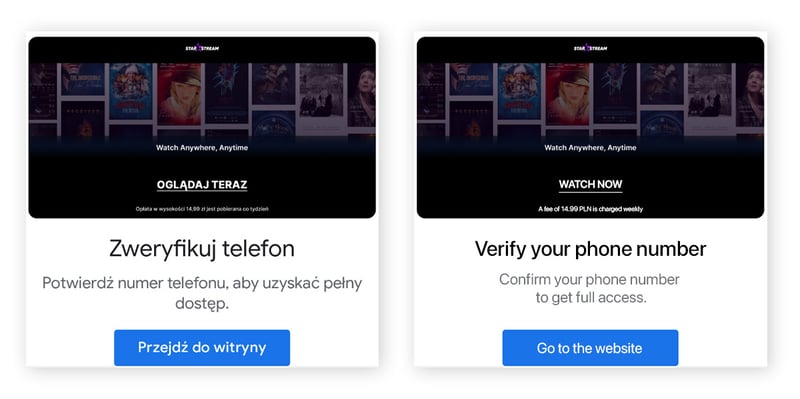
For example, you may believe you are just verifying your phone number, so you enter the number. Then, you receive a text message containing a code and use the autofill suggestion to enter it, but what you didn’t understand was that the code was authorizing a subscription charged through your mobile account.
That’s BillBait. The SMS itself contained important information, including the service, price, and billing frequency — but you probably never opened the text message to read it.
The distinction between you consciously approving a transaction and just running on autopilot is important. SMS autofill itself does not charge you money, but it can make it easier to skip the very message explaining that a code authorizes a payment.
How BillBait subscriptions work
BillBait usually starts by your phone receiving an SMS verification code that authorizes a subscription and details the price and billing frequency. But autofill lets you enter the code without opening the message, so you may agree to recurring charges without ever seeing the terms.
BillBait can turn an everyday digital habit into a recurring financial commitment. A website asks you to verify your phone number, and then you enter your phone number to continue or access a service.
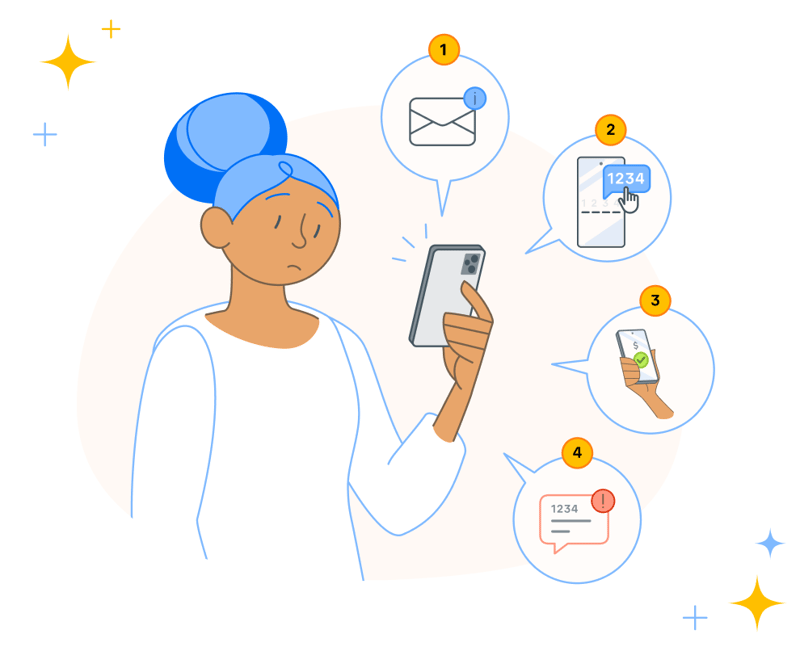 Now, you have authorized a recurring charge that will be billed to your mobile account. Carrier billing places the purchase on your phone account instead of requiring a separate card payment, putting the unfamiliar charge on your mobile bill. The tricky part is that the action that authorized it may have felt no different from the countless verification codes you've entered before.
Is BillBait a scam?
Though it can feel very much like a scam, BillBait is closer to dark marketing than the classic cyberthreat — although it may qualify as a scam in some jurisdictions. Dark marketing refers to misleading marketing tactics that push you into purchases you didn’t intend to make.
Technically, the SMS does explain what the code authorizes, and that information may be visible (if hidden) in the original website or ad, too. Just because all those details don’t jump off the page doesn’t mean you wouldn’t be able to read it if you wanted to.
The reason BillBait works is that the companies sending those texts to your phone are counting on you not reading the fine print. You can believe they’re completing routine phone verification while the code actually authorizes a recurring subscription.
That makes BillBait a useful reminder that protecting your money online isn’t limited to protecting against full-blown cyberthreats. Sometimes the risk comes from a legitimate technology being incorporated into a misleading experience.
How to protect yourself from BillBait subscriptions
The best defense against BillBait is deceptively simple. You just have to take back the step autofill removes. Here are a few key takeaways and tips for staying safe online.
-
Open the SMS before using the code: If a website sends you a verification code, don’t automatically tap the autofill suggestion. Open the message and read it first, and make sure to check for the name of the service, price, and whether it’s a one-time or recurring charge.
-
Treat “verify your phone” as an action, not an explanation: A website telling you to verify your number doesn’t necessarily tell you everything the next step will do. Pause whenever you’re asked for a phone number followed by an SMS code, particularly if you arrived through an advertisement, QR code, or unfamiliar webpage.
-
Be extra careful with QR codes in the physical world: BillBait-related user reports have included QR codes connected with parking payments and EV charging. These settings can make a phone-number request and SMS confirmation easier to accept because the person already expects to complete a transaction.
-
Check your mobile phone bill: Because these subscriptions can use carrier billing, don’t limit your fraud checks to credit card and bank statements. Review your mobile bill for unfamiliar third-party or recurring charges. If you find one, contact your mobile operator through its official app, website, or customer service number. Ask who is collecting the payment, how you can cancel the subscription and how you can dispute the charge.
-
Keep receipts: Keep any relevant SMS messages and screenshots of the website or advertisement in case you need them.
Don’t let convenience take you out of the decision
For years, phones and browsers have been programmed to make tedious digital chores disappear. Whether it’s password managers, automatically populating payment details, or a six-digit SMS code being transferred from a message to a website without requiring you to leave the page, usually, that’s exactly what you want.
BillBait highlights the downside of becoming accustomed to that convenience, as you can start treating autofill as an instruction instead of a suggestion. When a verification code feels familiar or when your phone recognizes the message and offers up the code, it can add another layer of apparent legitimacy to the interaction.
But your phone doesn’t necessarily understand your intent. Your phone may know where the code belongs without knowing whether you actually meant to make the purchase behind it.
FAQs
Can an SMS verification code sign you up for a subscription?
It can when the code is specifically being used as payment authorization. In the BillBait journeys researchers examined, someone expecting routine phone-number verification could instead be authorizing a recurring subscription charged through their mobile account.
Does SMS autofill itself charge you?
No. Autofill enters the code, but doesn’t itself collect the payment. The danger is that a code offered through autofill may be a payment authorization code, and autofill can allow you to use it without opening the message that explains the charge.
What is carrier billing?
Carrier billing allows purchases to be billed through your mobile account rather than through a separate credit or debit card. BillBait uses misleading subscription journeys involving this type of payment.
How can I avoid BillBait?
Open an SMS and read the full message before entering or autofilling its code. Check the service name, price and billing frequency, and stop if the message describes a purchase or recurring subscription you weren’t expecting.
What customers say

More Security Articles
BillBait: Is your phone authorizing charges you didn’t mean to approve?

What is OpenClaw and How To Use It safely?
Is ChatGPT Safe?

Is BlueStacks safe?

What Is Riskware and How to Avoid It

Is Roblox Safe for Kids?

Juice Jacking: What It Is and How to Protect Your Devices

What Is Hugging Face?
What Can Scammers Do With Your Number and How Can You Help Protect It?
What Is CAPTCHA and How Does It Work?

What Is DNS Poisoning and How to Protect Your Data

What Is a Swatting Incident and How Does Swatting Work?
Other Threats
Security
Caitlyn Moorhead
6-11-2026