- Security
- Privacy
- Performance
OpenClaw is an open-source personal AI assistant built to take action, not just answer prompts. Using it to send emails, control apps, and handle tasks on your behalf can be incredibly useful, but it also raises important security questions. Here’s how OpenClaw works, the risks to consider, and how a cutting-edge cybersecurity app can help protect your data while you use it.







This Article Contains
This Article Contains
What is OpenClaw?
OpenClaw is an open-source, artificial intelligence (AI) assistant that connects compatible AI models to your devices, apps, and online services so they can perform tasks autonomously on your behalf. Depending on how it’s configured, OpenClaw can draft and respond to emails, create and edit documents, write code, send reminders, and complete other multi-step tasks without your input.
You can also interact with OpenClaw through supported messaging platforms such as WhatsApp, Discord, and Telegram. Rather than opening a separate AI app, you only need to send a request through a connected service, and OpenClaw can use the tools and permissions you’ve granted it to carry out the task.
Despite these capabilities, OpenClaw itself is not a generative AI model. Instead, it acts as the framework connecting an AI model (such as ChatGPT, Claude, or Gemini) with external tools, data, and services. The model interprets and generates language, while OpenClaw coordinates access to other systems, allowing the AI to take actions rather than simply return responses.
Because OpenClaw is open-source, anyone can view and modify its code. But giving any AI agent access to sensitive files, accounts, or apps also introduces security risks. Overly broad permissions could expose the same resources the agent is authorized to access.
How does OpenClaw work?
OpenClaw works by receiving user requests through an interface such as a messaging app, passing them to an AI model for processing, then using connected tools and services to carry out the necessary actions.
For example, you might ask OpenClaw via Telegram to summarize your unread emails every morning at 7:30 AM. The AI model interprets this request, while OpenClaw coordinates the tools needed to access your inbox, retrieve new messages, generate a summary, and send it back to you through Telegram. The workflow can then be set up to run automatically on schedule.
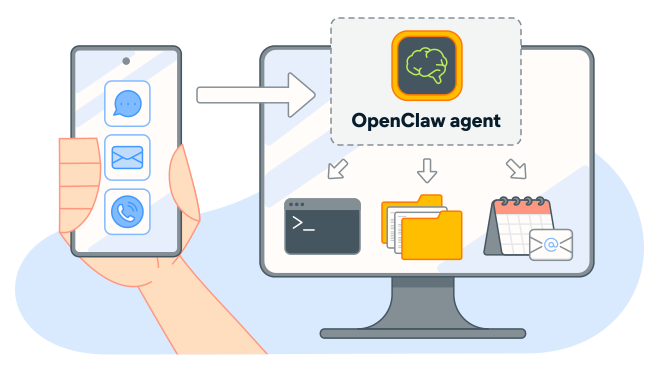
This ability to combine AI with tools and automation makes OpenClaw much more than a typical chatbot. Depending on its configuration, it can maintain context, manage ongoing tasks, and take actions across connected services rather than simply responding to individual prompts.
What OpenClaw can do largely depends on the tools and permissions you give it. Inbox access could allow it to read or manage email, for example, while browser access could let it interact with websites. Broader permissions make the agent even more capable, but they also increase the potential consequences if it makes a mistake or the system is compromised.
Key features of OpenClaw
OpenClaw is a versatile AI assistant with several unique features that differentiate it from other AI tools. For one, it’s not an AI model. Instead, it’s a self-hosted AI agent that connects your choice of AI model with apps, services, and files, allowing it to perform actions and automate tasks on your behalf.
Here are the features that set OpenClaw apart:
Local AI assistant capabilities
OpenClaw is self-hosted, meaning its core software runs on infrastructure you control (such as your computer or private server) rather than being hosted entirely by an AI provider. This gives you greater control over your data, configuration, and permissions. However, if you connect OpenClaw to a cloud-based AI model or online service, relevant data may still leave your device or network for processing.
And self-hosting certainly doesn’t eliminate security risks. Giving an AI agent access to sensitive files and accounts at all means errors can have real consequences. For example, a Meta security researcher took to X (formerly Twitter) to report that her OpenClaw setup had begun deleting emails despite instructions to request confirmation first.
Integration with other platforms
OpenClaw can connect with a wide range of messaging platforms, AI models, and third-party services, allowing it to perform tasks across the tools you already use. This can include services such as Google Drive, GitHub, Slack, Spotify, and compatible smart-home platforms. The exact integrations depend on which services you want to connect and the permissions you grant.
Because OpenClaw is open-source, developers can also build community integrations and skills that extend its capabilities. Many are available through ClawHub, but third-party extensions should be reviewed carefully before you grant them access to sensitive accounts, files, or data.
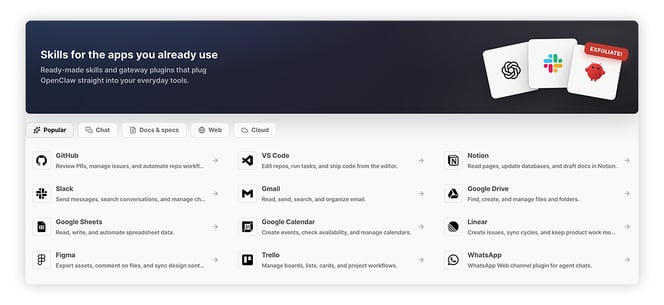 Source: clawhub.ai
These integrations are a major part of what makes OpenClaw so flexible. You can use it to create spreadsheets, manage your calendar events, control compatible smart-home devices, and automate recurring tasks across multiple apps and services.
You’re also not necessarily tied to a single AI provider. OpenClaw can work with different supported models. However, model availability and compatibility depend on OpenClaw’s current support and your configuration.
Persistent memory and automation
OpenClaw can retain information from previous interactions, giving it useful context for future conversations and recurring tasks. Instead of starting from scratch each time, it can remember relevant details about your preferences, decisions, and previous work.
OpenClaw organizes this information into different types of memory:
-
Long-term memory: Retains facts, preferences, and decisions that may be useful in future interactions.
-
Daily notes: Records observations and context from day-to-day activity.
-
Dreams: Captures reflections on completed tasks that may later inform long-term memory.
Memory can also be separated between different conversations or agents, helping prevent unrelated tasks from sharing unnecessary context. For example, information used by an email assistant doesn’t necessarily need to become part of the context available to a shopping assistant.
This persistent memory can make automation more useful and personalized. If you tell an email assistant how you prefer to sign your messages, for example, it can remember that preference instead of requiring you to repeat it every time.
However, persistent memory introduces a privacy tradeoff: The more information an AI agent retains, the more sensitive data it may need to protect. So, it’s a good idea to understand what OpenClaw stores, where it keeps that data, how long information persists, and which models, tools, or integrations can access it.
What can people use OpenClaw for?
OpenClaw can be used to automate repetitive work that would otherwise require your time and attention, from checking emails and organizing information to managing calendars and summarizing content. Because it can use connected tools, retain context, and follow multi-step instructions, it can also manage recurring workflows with relatively little input.
Here are a few common use cases:
-
Personal briefings: Compile news, upcoming calendar events, unread emails, and other information into a scheduled daily or weekly briefing.
-
Drafting: Create emails, documents, spreadsheets, and other content, then send the results to you for review or editing.
-
Reminders and follow-ups: Monitor calendars and other connected scheduling tools for upcoming events, then send reminders or follow-up messages through supported apps.
-
Automatic browsing: Search the web, navigate websites, fill out forms, and take screenshots to complete multi-step online tasks on your behalf.
-
Project management: Organize projects, write and review code, work with files, and coordinate tasks across connected development and productivity tools.
OpenClaw can also be configured to perform higher-stakes actions, such as financial transactions or changes to important accounts. But the more autonomy you give an AI agent, the greater the potential consequences of a mistake.
Is OpenClaw right for you?
OpenClaw may be right for you if you’re comfortable configuring software and want greater control over AI automation, particularly for repetitive workflows that could save significant time. If you prefer a simpler setup without managing integrations, permissions, and security yourself, a managed assistant such as ChatGPT or Claude may be a better choice, offering useful AI capabilities with less technical configuration and maintenance.
Getting the most out of OpenClaw requires more technical knowledge than using a conventional AI chatbot, particularly when connecting multiple apps, services, or AI models.
You should be comfortable installing and configuring software, managing API keys and integrations, and controlling which permissions OpenClaw receives. Basic cybersecurity knowledge is also important because giving an AI agent access to your email, files, browser, or other accounts increases the potential impact of mistakes and security breaches.
Clear instructions and safeguards matter, too. AI agents can misinterpret ambiguous requests and take unintended actions. For example, telling OpenClaw to “clean up my files” could lead to unwanted changes or critical deletions unless you clearly define exactly what it’s allowed to modify. For consequential actions, require confirmation and restrict the agent’s permissions to what it actually needs.
Security risks of OpenClaw
OpenClaw isn’t inherently unsafe, but connecting an AI agent to files, accounts, apps, and system tools creates risks that conventional chatbots don’t usually face. Prompt injection, excessive permissions, exposed infrastructure, human error, and malicious third-party integrations can have more serious consequences when an AI has permission to take actions on your behalf.
OpenClaw’s own documentation warns that, depending on its permissions, an agent may be able to execute commands, read and write files, access network services, and send messages. If those capabilities are misused — whether through an attack, misconfiguration, or mistake — the consequences can extend beyond an inaccurate AI response.
The risk, then, isn’t simply that AI can be dangerous. It’s that OpenClaw connects AI to real tools and sensitive data, potentially turning a bad instruction, misunderstanding, or security flaw into a real-world action with real-world consequences.
Some of the biggest OpenClaw security risks include:
-
Excessive permissions: Giving OpenClaw broad access to accounts, files, and system functions increases the potential damage from mistakes or attacks. Limit each agent to the permissions it needs for its specific tasks.
-
Prompt injection: Malicious instructions can be embedded in emails, websites, documents, and other content the agent processes. An attacker could, for example, try to manipulate OpenClaw into disregarding its instructions and accessing or sharing sensitive information.
-
Exposed infrastructure: Poorly secured OpenClaw deployments can expose powerful controls to attackers. SecurityScorecard reported that 35.4% of the deployments it observed were vulnerable to remote code execution at the time of its research.
-
Human error: Ambiguous instructions and configuration mistakes, especially combined with overly broad permissions, can cause OpenClaw to take unintended actions, such as exposing data, changing important settings, or deleting critical files.
-
Malicious skills: OpenClaw’s third-party skill ecosystem introduces software supply-chain risks. In one analysis of 2,857 ClawHub skills, researchers identified 341 malicious skills, many designed to trick users into installing information-stealing malware.
-
Vulnerable integrations: Every connected service or integration expands the potential attack surface. A security flaw or compromised credential in one service could expose data or capabilities available to OpenClaw through that connection.
How to use OpenClaw more safely
The safest way to use OpenClaw is to limit what it can access, isolate it from sensitive systems, and retain human control over consequential actions. Sandboxing, least-privilege permissions, access controls, and approval requirements can all reduce the potential impact of mistakes or attacks.
Here’s a deeper look at how to use OpenClaw more safely:
-
Turn on Sandboxing: OpenClaw’s sandboxing runs agent tools in a restricted environment, limiting their access to the host system. It may restrict some functionality and requires careful configuration, but it can significantly reduce the potential impact of unsafe actions.
-
Run OpenClaw in an isolated environment: Using a separate device such as a Mac Mini, virtual machine, container, or properly secured virtual private server (VPS) instead of your everyday computer helps keep the agent away from sensitive files and resources it doesn’t need.
-
Allow single-user access only: Configure OpenClaw so only authorized users can send it instructions. This reduces the risk of direct manipulation by outsiders, although it can’t prevent indirect prompt injection through content the agent processes.
-
Limit permissions: Follow the principle of least privilege by granting access only to the files, accounts, tools, and actions required for each task. Be especially cautious with email, financial accounts, credentials, sensitive documents, and system-level controls.
-
Require approval for high-risk actions: Make OpenClaw ask for confirmation before consequential or irreversible actions, such as deleting files, sending important messages, installing software, making purchases, or executing system commands.
-
Keep OpenClaw and its AI models updated: Install security updates promptly and use well-supported AI models with strong security and instruction-following performance.
-
Vet skills and integrations: Treat third-party skills and integrations like any other software. Check their source, developer, reputation, and requested permissions before installing them, and remove anything you no longer use.
Even with these precautions, OpenClaw can’t be made risk-free. Its documentation notes that sandboxing is “not a perfect security boundary,” and agents can still misunderstand legitimate instructions or be manipulated by malicious content.
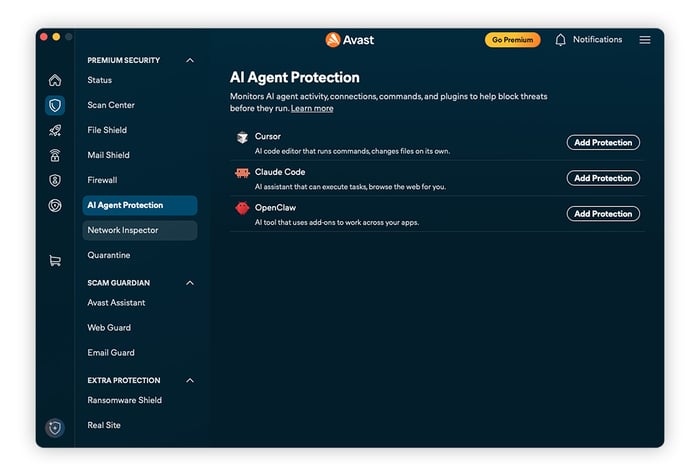
For another layer of defense, consider security software designed specifically for AI agents. Avast AI Agent Protection adds security guardrails between supported AI agents and your system, helping block unsafe commands and reduce risks from threats such as prompt injection.
Protect your AI assistant with Avast
OpenClaw may be powerful, but using agentic AI safely means taking care, using your judgment, and having the right security measures in place. If you decide to use it, pair it with protection built to help defend against misconfigured AI agents and emerging AI-driven threats.
The Free Antivirus module included in the Avast One app gives you a stronger safety net with real-time heuristic threat detection and dedicated AI Agent Protection. Whether an AI tool is handling sensitive data, connecting to new services, or running actions on your behalf, Avast One helps reduce risk and keep your data better protected. Get it today and start using agentic AI with more confidence.
What customers say

More Security Articles

What is OpenClaw and How To Use It safely?

Is ChatGPT Safe?

Is BlueStacks safe?

What Is Riskware and How to Avoid It

Is Roblox Safe for Kids?

Juice Jacking: What It Is and How to Protect Your Devices

What Is Hugging Face?

What Can Scammers Do With Your Number and How Can You Help Protect It?

What Is CAPTCHA and How Does It Work?

What Is DNS Poisoning and How to Protect Your Data

What Is a Swatting Incident and How Does Swatting Work?

How to Keep Kids Safe Online
Other Threats
Security
Ben Gorman
12-10-2026