- Security
- Privacy
- Performance
ChatGPT has become part of everyday life for hundreds of millions of people worldwide, from students and employees to executives and government officials. But as AI adoption becomes deeper and more widespread, it also introduces new privacy and security concerns. Learn the biggest risks associated with ChatGPT, from data exposure to AI-powered scams, and find out how cutting-edge security tools can help keep you safe.






This Article Contains
This Article Contains
ChatGPT is generally considered a legitimate and safe AI tool. It uses security measures to help protect user accounts, conversations, and personal information, and it includes safeguards designed to limit harmful or abusive outputs.
However, AI safety also depends heavily on how people use the technology. ChatGPT can produce inaccurate, misleading, or emotionally loaded responses, especially if users treat it as a substitute for professional advice or human relationships. In some cases, excessive emotional dependence on AI chatbots has reportedly contributed to unhealthy behavior and mental health concerns.
Generative AI tools like ChatGPT can also be abused by cybercriminals to help write phishing emails, automate scams, create fake identities, or improve social engineering attacks. As AI-generated content becomes more realistic and scalable, distinguishing legitimate communication from scams is becoming increasingly difficult.
What is ChatGPT?
ChatGPT is an AI chatbot developed by OpenAI that uses large language models (LLMs) to understand prompts and generate human-like responses. It’s a form of generative AI, meaning it can create original text, answer questions, summarize information, write code, translate languages, and assist with a wide range of tasks.
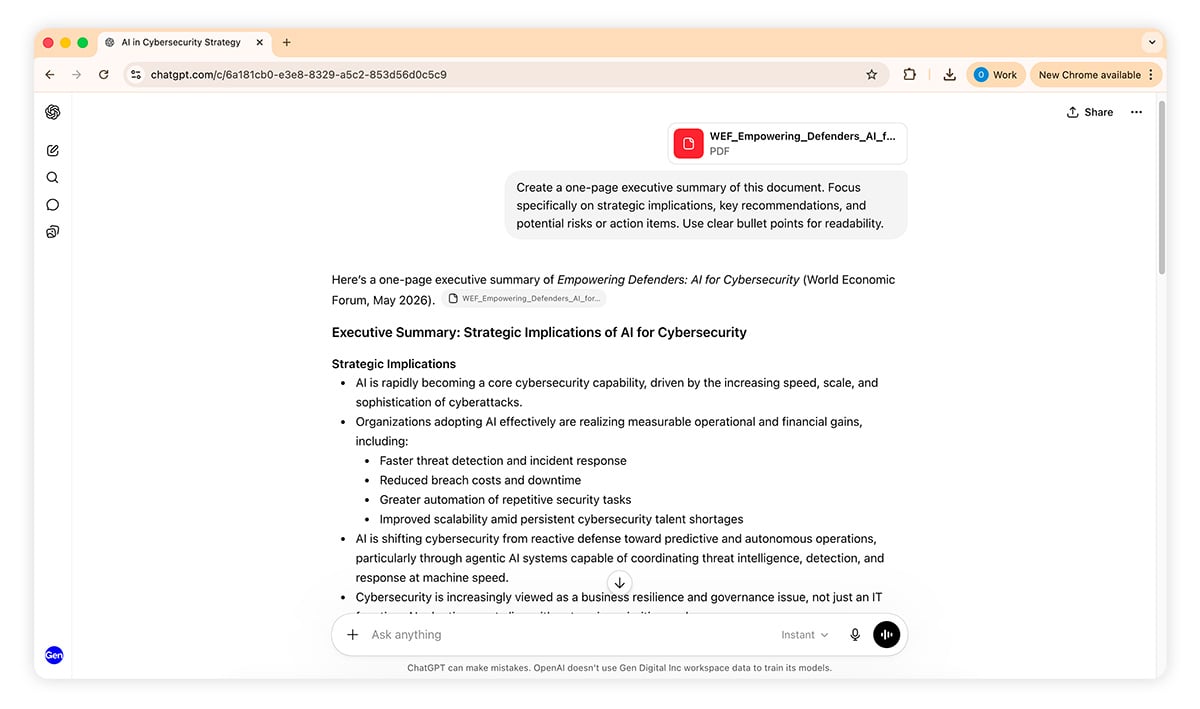
Unlike traditional search engines or rule-based chatbots, ChatGPT generates responses by predicting language patterns based on the massive datasets it was trained on. This allows it to carry on conversations, adapt to context, and respond in a natural, conversational way. While it can often provide useful and accurate information, ChatGPT does not truly “understand” topics like a human and can sometimes produce incorrect or misleading responses.
How does ChatGPT process and store data?
When you send a message to ChatGPT, your prompt is transmitted to OpenAI’s servers, where it is processed by cloud-based AI models that generate a response and send it back to your device. Communication between your device and OpenAI’s servers is encrypted in transit, which helps protect data from interception as it travels across the internet.
However, ChatGPT conversations are not end-to-end encrypted. This means OpenAI can process and, in limited circumstances, access chat content on its servers for purposes such as abuse prevention, legal compliance, service maintenance, or model improvement, depending on the product and settings being used.
Whether your chats are used to train future AI models depends on the following account type and privacy setting variables:
-
Without an account: Chats may be used for model training, and there is limited control over data settings.
-
Free, Go, and Plus plans: Conversations may be used to improve models by default, though users can opt out in settings or use Temporary Chats, which are not saved to chat history.
-
Business, Enterprise, and Team plans: By default, customer content is not used to train OpenAI models. These plans also include enhanced administrative and security controls.
Even when chat history or training is disabled, conversations may still be temporarily retained for limited periods to help detect abuse, investigate security incidents, or comply with legal obligations.
ChatGPT security concerns
OpenAI maintains security measures and built-in safeguards to help protect users and limit harmful or abusive outputs. However, like any AI system, ChatGPT is not perfect. It’s important to understand the platform’s limitations and potential risks, including harmful or misleading responses, privacy concerns, and AI-assisted scams.
Data breaches and privacy risks
OpenAI has security measures in place to help protect ChatGPT user accounts, conversations, and stored data, but, as OpenAI’s own privacy policy states: “...no internet or email transmission is ever fully secure or error-free.” In 2023, for example, a bug involving the open-source Redis library temporarily exposed some users’ chat titles and limited billing information before the issue was resolved.
While there is no public evidence of a large-scale data breach exposing full ChatGPT conversations through a direct hack, users should still avoid sharing highly sensitive information in prompts. This includes passwords, Social Security numbers, financial details, medical records, confidential business data, or other personally identifiable information (PII).
Account security also matters. Even if OpenAI’s infrastructure remains secure, attackers may still gain access to individual accounts through phishing attacks, credential theft, password reuse, social engineering, or malware infections.
Prompt injection and misuse by hackers
Cybercriminals are increasingly using AI tools to make scams and social engineering attacks more convincing and scalable. While ChatGPT includes safeguards designed to limit harmful outputs, attackers can still use adversarial prompt engineering to help create phishing emails, fake customer support messages, fraudulent websites, and other deceptive content.
And AI-generated social engineering attacks are becoming harder to recognize because they can closely imitate a person’s writing style, tone, or personality.
Another growing threat is prompt injection. This occurs when attackers hide malicious instructions inside content that an AI system processes, attempting to manipulate the model’s behavior. For example, if an AI assistant is connected to email, documents, or business tools, a malicious webpage or message might contain hidden instructions designed to override previous commands or expose sensitive information.
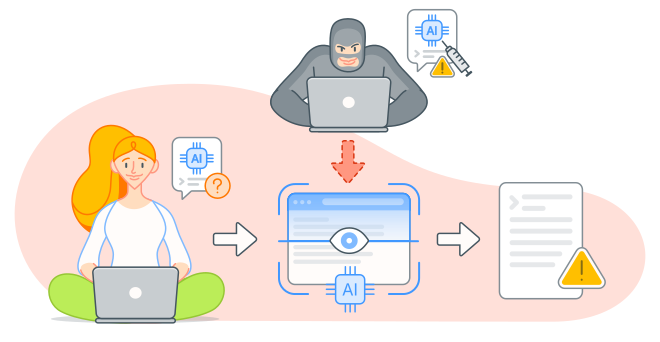
These hidden prompts can sometimes be concealed in ways users may not notice, such as invisible text, metadata, or embedded instructions inside webpages or documents. As AI systems become more integrated with apps and workflows, prompt injection is becoming an increasingly important security concern.
Risks of fake ChatGPT apps and extensions
ChatGPT’s popularity has fueled a surge of unofficial apps, browser extensions, and AI tools that imitate OpenAI’s branding and features. While some third-party ChatGPT-enabled tools are legitimate, others may lack strong privacy protections or include malicious functionality designed to collect user data, display intrusive ads, or install malware.
Some unofficial AI tools are also marketed as “uncensored” or unrestricted alternatives to ChatGPT. These so-called dark AI platforms are sometimes promoted as capable of generating phishing emails, malware code, or harmful content without safeguards. Beyond the ethical and legal concerns, they may also expose users to scams, malicious downloads, or unsafe material.
To reduce the risk of stumbling across a fake or malicious ChatGPT imitation, download ChatGPT apps only from official app stores or OpenAI’s verified website, and carefully review permissions, developer information, and user reviews before installing AI-related tools or browser extensions.
Misuse and human concerns
ChatGPT can become harmful if it’s used irresponsibly or relied on too heavily for important decisions. While AI tools can provide useful information and support, they are not substitutes for qualified medical, legal, financial, or mental health professionals. ChatGPT can sometimes generate inaccurate, misleading, or overly confident responses, especially in high-stakes situations.
Researchers have also raised concerns about AI’s potential impact on mental health and human behavior. Because ChatGPT communicates in a highly conversational and emotionally responsive way, some users may begin treating it as emotionally authoritative or human-like. In rare cases, excessive reliance on AI chatbots has reportedly contributed to unhealthy emotional attachments, delusional thinking, or worsening mental health conditions.
In one high-profile case of so-called AI psychosis, ChatGPT convinced one woman that it was a 42,000-year-old being, sent to help her find her soulmate. In another case, a man believed ChatGPT had become sentient and was helping him carry out a “secret mission” to set it free.
To use ChatGPT more safely, verify important information independently, avoid relying on it for major life decisions, and maintain healthy boundaries around emotional or psychological dependence on AI systems.
How ChatGPT addresses security and privacy
OpenAI uses multiple security measures to help protect ChatGPT user accounts, conversations, and stored data. Data in transit is secured using Transport Layer Security (TLS) encryption, which helps prevent interception while information moves between your device and OpenAI’s servers. Data stored on OpenAI systems is also protected using industry-standard encryption methods.
To reduce the risk of unauthorized access, OpenAI supports security features such as multi-factor authentication (MFA). Business and enterprise users can also use tools like Single Sign-On (SSO) and role-based access controls to manage permissions more securely across teams and organizations.
OpenAI states that its services are designed to comply with major privacy and data protection frameworks, such as GDPR and CCPA. However, consumer versions of ChatGPT are not intended to be HIPAA-compliant for handling protected healthcare information unless specifically covered under enterprise agreements.
OpenAI also operates a bug bounty program that rewards security researchers for responsibly disclosing vulnerabilities, helping identify and fix potential weaknesses before they can be exploited.
Overall, ChatGPT includes strong built-in security protections, but many of the biggest privacy and security risks still come down to user behavior, such as sharing sensitive information, reusing passwords, or falling for phishing scams and malicious third-party tools.
Tips for using ChatGPT safely
The following tips can help protect your privacy, your devices, and your well-being when using AI tools like ChatGPT.
-
Create a “Red List”: Make a list of information you should never enter into AI prompts, such as Social Security numbers, passport or driver’s license details, financial information, medical records, passwords, or confidential business data.
-
Turn off model training: Disable model training in your ChatGPT privacy settings if you don’t want your conversations used to improve future AI systems.
-
Use Temporary Chat for sensitive topics: Temporary Chat mode keeps conversations out of your history and excludes them from training. Temporary chats are automatically deleted after a limited retention period.
-
Strengthen account security: Use a strong, unique password and enable multi-factor authentication (MFA). A password manager can help generate and securely store credentials.
-
Stick to legitimate AI platforms: Use trusted services like ChatGPT or established competitors such as Claude, Gemini, or Grok. Unofficial AI apps and browser extensions often introduce unnecessary privacy and security risks.
-
Don’t rely on AI for important life decisions: ChatGPT can produce inaccurate, misleading, or overly confident responses, especially in areas like health, law, finance, and relationships.
-
Maintain healthy boundaries: AI chatbots are not substitutes for therapists, partners, or close human relationships. Excessive emotional reliance on AI may negatively affect mental well-being.
-
Use reputable antivirus software: Strong cybersecurity software can help block phishing sites, malicious downloads, fake AI apps, and malware designed to steal credentials or monitor your activity.
Protect your data with Avast One
ChatGPT is built with strong security protections, but the growing popularity of AI has created new opportunities for scammers and cybercriminals. Fake AI apps, malicious links, AI-powered phishing scams, and malware can all target unsuspecting users — even outside the chatbot itself.
Avast One helps protect against these evolving threats with AI-powered threat detection, real-time monitoring, and Web Shield technology that can block dangerous downloads, fake ChatGPT apps, and malicious websites before they can compromise your device. Stay safer while exploring the possibilities of AI with security designed to handle the very latest threats.
FAQs
Is ChatGPT safe to use at work?
It depends. ChatGPT can be safe for workplace use if employees avoid entering sensitive or confidential information and the organization permits AI tools. Business and Enterprise plans offer stronger privacy and administrative controls, including data isolation and exclusion from model training by default.
What are the risks of fake ChatGPT apps?
Fake ChatGPT apps may expose users to malware, spyware, or fleeceware. Spyware can secretly collect conversations and personal data, while fleeceware charges for features available for free elsewhere. Because fake apps often closely imitate the real ChatGPT app, users should verify that OpenAI is the developer and only download apps from trusted app stores.
Can ChatGPT be hacked?
Like any online platform, ChatGPT could theoretically be compromised, but OpenAI uses strong security protections, and there have been no known major breaches directly exposing ChatGPT user conversations. In practice, attackers are more likely to target users through phishing emails, fake login pages, malicious browser extensions, or credential theft.
How do I delete my ChatGPT history?
To delete your ChatGPT history, click your profile icon, go to Settings > Data Controls, and choose Clear chat history. Conversations are removed from your visible account history immediately and generally deleted from OpenAI’s systems within a limited retention period, except where retention is required for security or legal reasons.
What customers say

More Security Articles

Is ChatGPT Safe?

Is BlueStacks safe?

What Is Riskware and How to Avoid It

Is Roblox Safe for Kids?

Juice Jacking: What It Is and How to Protect Your Devices

What Is Hugging Face?

What Can Scammers Do With Your Number and How Can You Help Protect It?

What Is CAPTCHA and How Does It Work?

What Is DNS Poisoning and How to Protect Your Data

What Is a Swatting Incident and How Does Swatting Work?

How to Keep Kids Safe Online

Has My Twitter Account Been Hacked?
Other Threats
Security
Ben Gorman
16-06-2026