- Security
- Privacy
- Performance
Is your device slowing down or playing up out of nowhere? The cause could be riskware — legitimate software that becomes risky when misused, exploited, outdated, or poorly configured. Learn more about what riskware is and how you can help protect yourself from the associated risks, and other online threats, with trusted cybersecurity software.






This Article Contains
This Article Contains
What is riskware?
Riskware is legitimate software that isn’t intended to be malicious but may pose security risks. Whether it’s a program, tool, extension, or app, users often download riskware willingly. What makes it “risky” is its potential for misuse, which follows when software isn’t properly designed, installed, or updated.
Some everyday apps and tools with features like remote access or deep system permissions that can be abused by cybercriminals are particularly prone to becoming riskware. While these programs aren’t designed to cause harm, they can unintentionally open the door to malware, data theft, or unauthorized access.
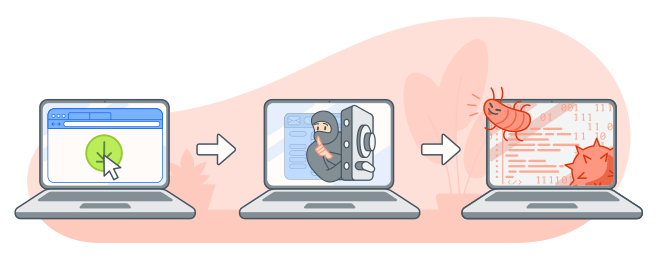 Riskware starts as legitimate software, but may be misused by bad actors.
How riskware differs from malware and PUPs
Riskware differs from malware and potentially unwanted programs (PUPs) in both intent and behavior. Malware is deliberately created for nefarious purposes, such as stealing data or damaging systems, and PUPs are typically known for their undesirable or annoying behaviour, rather than malicious intent. In contrast, riskware is legitimate software that isn’t inherently harmful but becomes a threat if exploited.
Sometimes, riskware comes in the form of PUPs, which are often pre-installed on a device or as part of a software bundle you download. Malware, however, often sneaks onto your device after a social engineering attack if you click a suspicious link or open an infected attachment.
How riskware works and the risks it creates
Having riskware on your device is, well, risky. It can create vulnerabilities, such as backdoors for malware or data theft, which could lead to identity theft. Because riskware isn’t itself illegitimate, there’s no guarantee that something will go wrong — but it could. Here’s how.
Outdated or unsupported software
Most riskware often starts out posing no threat. However, when software isn’t regularly updated — or when it’s no longer supported by modern operating systems — it can be exploited by attackers.
For instance, Windows 10 is no longer supported by Microsoft. That means that any new vulnerability in the operating system will not get patched proactively, potentially leaving devices more open to attacks. Update to Windows 11, if you haven’t already, to receive the latest security patches and any new features Microsoft releases.
It’s not just Windows devices that need updating. Make sure you update your iPhone, your Android apps, and your macOS.
Insecure configurations
Software defenses don’t just erode over time — some software has poor security from day one. Insecure configurations that might lead to a data breach include weak password requirements, misconfigured APIs, and login credentials that are left on their default or factory settings.
In the age of artificial intelligence (AI), an increasing number of apps are “vibe-coded” (developed using AI). This technique allows people lacking technical expertise to create programs but, without the knowledge to audit the code, they could unintentionally release an app with vulnerabilities baked into it, meaning it’s now riskware. Another danger of AI is cybercriminals misusing it to find and exploit these security risks.
Excessive or sensitive permissions
Apps with broad access to sensitive permissions, such as your location, camera, file system, or contacts, can create an opportunity for misuse. You can mitigate these risks by only granting permissions that are strictly necessary for an app or program to function. For example, a simple flashlight or wallpaper app has little reason to access your microphone or contacts.
Even if apps that request unnecessary permissions are legitimate, granting access can make them “attack vectors” for cybercriminals, potentially allowing them to access personal data or move laterally to infect other parts of your device.
Deep system access or admin-level capabilities
Some forms of riskware, like outdated or compromised remote access tools, allow deep system access through functionality like Remote Desktop Protocol (RDP) connections.
Remote access software enables tech support to access your desktop remotely, which can be useful if you want an IT expert to troubleshoot an issue, but if a tech support scammer abuses this level of access, they could install malware, change system settings, or create backdoors on your system without your knowledge.
Riskware examples
Riskware is a broad category for legitimate software that can increase your exposure to security threats, depending on how it’s designed, configured, or used. It comes in many forms, including file-sharing programs, browser extensions, and media players. While these tools aren’t inherently malicious, they can create opportunities for attackers if misused or exploited.
Peer-to-peer file-sharing apps such as BitTorrent and Soulseek are popular with people looking to access digital content for free. These programs connect users directly to one another, which makes it difficult to verify whether files shared by “peers” are safe. As a result, risky files can sometimes be distributed alongside legitimate content.
Here are some meaningful real-life examples of riskware:
-
In 2025, the security firm GreyNoise tracked hackers attacking Remote Desktop Protocol services from more than 100,000 IP addresses.
-
In 2023, Google removed 32 malicious extensions from the Chrome Web Store, but they had already been installed 75 million times. The extensions were adware used to hijack search results or sometimes served malicious links.
 Browser extensions, programs, and remote access software can be considered riskware.
How to protect yourself from riskware attacks
To help protect yourself from riskware, be cautious whenever you download software and apps, and make sure to keep your programs updated. Also, limit permissions so apps only have access to what they need.
-
Only download from trusted sources: Stick to official app stores and trusted developer websites when downloading software. Files from unofficial, third-party, or P2P torrenting sites are more likely to be bundled with unwanted programs or unverified code.
-
Monitor app permissions: Many apps request access to more data than they actually need. Review what permissions you’re giving up before installing new software and regularly check existing apps to make sure they only have access to information that’s essential for their function.
-
Remove unused apps: Regularly review your devices to remove unused apps and programs to reduce your device’s vulnerability to attacks that exploit outdated or compromised software.
-
Watch out for bundled software and PUPs: Some installers include additional programs you may not want, often hidden behind default installation settings. Always choose custom or advanced install options so you can deselect any extra software before it’s added to your device.
-
Be alert to excessive pop-up ads: A sudden increase in pop-ups, browser redirects, or unexpected ads can be a sign that riskware or adware has been installed on your device or browser.
-
Use antivirus software: A trusted antivirus program can sometimes detect and remove riskware before it’s exploited. Regular scans also help identify malware and other threats that arise as a result of hidden security vulnerabilities.
Protect your devices from riskware today
Avast Free Antivirus provides valuable protection against riskware by monitoring programs in real time, alerting you to risky app behavior or finding and removing malware installed on your system. Combined our award-winning antivirus with safe digital habits and regular software updates to help stay in control of the apps running on your device and one step ahead of riskware threats.
FAQs
How do I get rid of riskware?
Review your device’s apps and remove any programs you don’t remember installing or no longer use. You should also download a trusted antivirus to monitor your apps for risky behavior going forward.
How do I remove riskware from Chrome?
If you think you’ve got riskware in a Google Chrome extension, you should remove it immediately. To do so, open Chrome, click the three-dot icon > Extensions > Manage Extensions, then select Remove to delete the suspicious extension.
How can you avoid spyware?
To help avoid spyware, stay away from unexpected attachments and links in emails or texts, which could be phishing or smishing attempts. Online pop-ups can also contain spyware and other forms of malware, so be cautious when interacting with them.
What customers say

More Security Articles

Is ChatGPT Safe?

Is BlueStacks safe?

What Is Riskware and How to Avoid It

Is Roblox Safe for Kids?

Juice Jacking: What It Is and How to Protect Your Devices

What Is Hugging Face?
What Can Scammers Do With Your Number and How Can You Help Protect It?

What Is CAPTCHA and How Does It Work?

What Is DNS Poisoning and How to Protect Your Data

What Is a Swatting Incident and How Does Swatting Work?

How to Keep Kids Safe Online

Has My Twitter Account Been Hacked?
Other Threats
Security
Adam De Gree
13-02-2026