- Security
- Privacy
- Performance
Whether you’re a creator building a digital business or a subscriber seeking connection, OnlyFans can expose you to scams. Fake profiles, bogus managers, and payment scams can all put your money and personal information at risk. Learn how common OnlyFans scams work, the warning signs to watch for, and how a comprehensive security tool can help you spot and avoid scams before they cause harm.






This Article Contains
This Article Contains
OnlyFans is built around direct, private interactions between creators and subscribers, which can make scams particularly convincing. A request for money, personal information, or a quick click can feel more believable when it appears to come from someone you already follow or regularly interact with.
Scams on OnlyFans target both subscribers and creators alike. For example, you sometimes hear stories of OnlyFans models blackmailing their married subscribers in sextortion scams, or subscribers receiving content from models and later calling their bank to request chargebacks, claiming fraud.
But scams that happen through OnlyFans don’t always look like traditional cybercrime. Some scams go after your wallet directly, while others target your personal information, which scammers may use for fraud, impersonation, or extortion.
How OnlyFans scams begin
Scams on OnlyFans rarely depend on sophisticated hacking. More often they rely on social engineering: manipulating the person rather than the technology. This can be particularly effective on a platform where private, one-to-one interaction is a major part of the experience, because messages may feel more personal and trustworthy than they would elsewhere.
Scammers can exploit that sense of familiarity to make unusual requests seem more believable. A request for personal information or a message asking you to “update” your payment details might raise suspicions elsewhere but feel more plausible when it appears to come from someone you already interact with — and pay — privately. That sense of intimacy might encourage you to share information or click something you normally wouldn’t.
Identifying common OnlyFans scams
Scams on OnlyFans can target both creators and subscribers. A scammer might pose as a fan to target a content creator's earnings, or pretend to be a creator to steal information or money from a subscriber. The tactics vary, but they usually depend on creating a convincing reason for you to click a link, hand over information, or send money.
 Account takeovers
 are a serious cybersecurity risk because once a scammer has your login credentials, the consequences can extend far beyond one malicious message.
An attack might start with a phishing email disguised as a partnership opportunity, payment problem, or OnlyFans security warning. You click a link, enter your details on a convincing-looking fake login page, and the scammer now has your username and password. Both creators and subscribers can be targeted this way.
For creators, losing control of an account can mean being locked out of income, subscriber relationships, and private content. As well as changing the password, an attacker may alter recovery details, making it more difficult to regain control of the account.
For subscribers, a compromised account can expose private messages, account information, and other data accessible through the profile. Reusing passwords increases the risk because stolen credentials may also work on your email or other accounts, leaving you vulnerable to additional password attacks.
 Payment fraud
 can take different forms depending on whether a creator or subscriber is being scammed. Creators, for example, can lose money through chargeback or custom request scams, where someone purchases custom content, receives it, and then disputes or reverses the payment, potentially leaving the creator unpaid for work they’ve already delivered.
Subscribers are more likely to encounter payment fraud through fake offers or requests to pay outside OnlyFans. A scammer might promise exclusive content, a discount, or some other private arrangement in exchange for an off-platform payment. Paying elsewhere removes many of the protections and records available through OnlyFans, potentially making it harder to dispute fraudulent transactions.

OnlyFans-themed scams can also extend beyond the platform itself. In 2026, Gen threat researchers — the threat intelligence team behind Avast — identified a notable increase in coinminer activity linked to a coordinated campaign luring victims with OnlyFans bait.
The attackers disguised malicious scripts as leaked OnlyFans databases and Bitcoin wallets, then hosted them on legitimate-looking file-sharing links, with names like “onlyfans_full_db_drive.google.com.” Victims who downloaded and opened the files unknowingly launched cryptominers, which secretly used their device’s computing resources to mine cryptocurrency for the attackers.
 Sextortion schemes
Other OnlyFans scams exploit the highly personal nature of the platform more directly. In romance scams and sextortion, someone may build trust with a target, gradually move the conversation off-platform, and then demand money, using private images and information as leverage.
In one high-profile public case, OnlyFans creator Bethany Guy was convicted of blackmail in 2024 after threatening to reveal a married subscriber’s OnlyFans activity to his wife unless he paid her. The case illustrates just how easily private interactions can be weaponized for financial extortion.
And creators can also become targets of sextortion from the other side of the platform. A subscriber may pose as a loyal fan, build trust over time, and then use screenshots, payment records, or private messages as leverage to demand more money, additional content, or free access.
 Fake content or profiles
Not every questionable interaction constitutes a black-and-white scam. Some creators use agencies or professional chatters to manage their DMs. And while this isn’t necessarily fraudulent, it can mislead subscribers who believe they’re speaking directly with a creator. The practice has prompted lawsuits from subscribers who allege they were deceived about who they were paying to interact with.
Similarly, OnlyFans creators have reported being targeted by scammers using their content to create deepfakes for impersonation accounts that lure subscribers into paying for fake or stolen content.
And if you think you’d be able to tell that what you’re seeing is AI, you might be overconfident. The 2026 Avast Safe Tech Report found that 56% of adults say they can tell when something is AI-generated or manipulated, while 13% reported falling victim to a scam in the previous 12 months.
 Fake managers
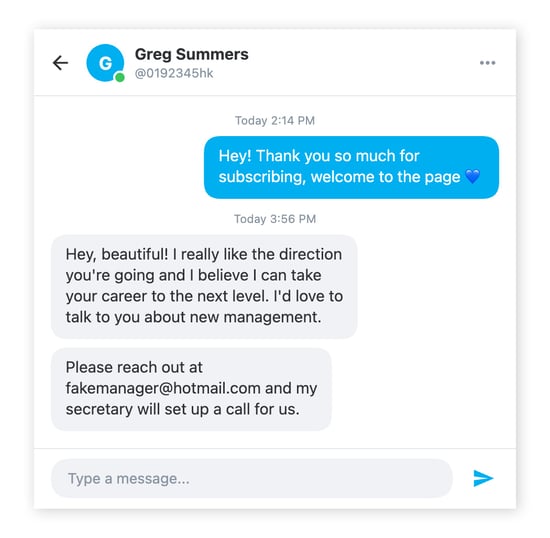
OnlyFans creators should also be wary of fake manager or promoter scams. Creators may be approached by people promising to grow their audience, increase their earnings, or secure brand and modelling opportunities in exchange for a fee or percentage of their income.
Some are simply scammers seeking money, personal information, or account access. Others may operate legitimate agencies but offer unfavorable contracts or seek excessive control of your earnings or content.
Be cautious of unsolicited offers, guaranteed income, pressure to sign quickly, or requests for login credentials. Research the person or agency carefully, verify their claims, and review any contract closely before signing.
Practical ways to protect yourself from OnlyFans scams
Whether you’re a subscriber or a content creator, basic cybersecurity rules are the same. Enable two-factor authentication (2FA), use a strong, unique password, don’t reuse login details, and check links before you click them. A separate email address that isn’t connected to your real name or other online accounts can also give you an extra layer of privacy.
There are a few other precautions worth taking for both creators and subscribers:
-
Check that an account is genuine: Before subscribing, look for links from the creator’s established social media accounts and check that usernames and profiles match. Impersonators often create similarly named accounts on other platforms and use them to direct people to fake pages.
-
Keep payments on the platform: Be suspicious if someone asks you to pay through another site, cryptocurrency, gift cards, or an unfamiliar payment service. Creators should also be careful with payment methods that reveal personal information; some P2P apps, for example, may show your real name or other identifying details.
-
Don’t spend big straight away: If you’re subscribing to someone for the first time, start small before paying for expensive custom content. It won’t protect you from every scam, but it limits what you stand to lose if the account isn’t what it appears to be.
-
Be careful what you share: Creators in particular need to think about how much personal information appears in photos, videos, and private conversations. Details about where you live, work, or spend your time can contribute to doxxing or stalking, including cyberstalking.
-
Remove location clues from your content: Metadata attached to photos can reveal more information than you realize, so remove it before uploading. It’s also worth looking at your wider digital footprint to see what somebody could piece together about you from information that’s already public. A VPN can hide your IP address and make it harder for websites and services to identify your approximate location.
-
Take payment before producing custom content: If you’re a creator, don’t spend hours making something before you’ve been paid for it. Even then, be aware that chargebacks may occur after content has been delivered.
-
Keep gifts away from your home address: If someone wants to send you something, use a wishlist service that protects your details or consider a separate P.O. box or other secure delivery option that doesn’t expose your home address. There’s no reason for a subscriber to need your home address.
-
Don’t assume a private conversation is what it seems: Instant, generic, or strangely repetitive replies can be a sign of automation, although they’re not proof on their own. And, as we’ve already seen, some accounts use professional chatters or agencies, so the person replying may not be the creator themselves.
How to report an OnlyFans scammer
If you think someone is scamming you on OnlyFans, don’t just block them. Report the account so the platform can investigate it:
-
Go to the suspected scammer’s profile, or open a DM or post.
-
Tap the three-dot menu (•••) and select Report.
-
Choose the reason that best describes what happened and provide any additional information requested.
OnlyFans says reports are handled under its complaints process, and accounts found to violate its rules may face enforcement action. You can also contact OnlyFans support directly if the issue is more complicated or you need to provide additional evidence.
If money has been stolen or a payment was genuinely unauthorized, contact your bank or payment provider as quickly as possible. Don’t use a chargeback simply because you regret a purchase or don’t like the content you received. Chargebacks are intended to dispute eligible transactions, and filing an improper dispute could have consequences for your account.
For more serious cases involving fraud, blackmail, sextortion, or threats, contact your local law enforcement agency or appropriate cybercrime-reporting service. In the U.S., you should also report scams to the FTC or cybercrime involving fraud to the FBI’s IC3.
Add an extra layer of protection on OnlyFans
Good security habits are your first line of defense, but the right tools can help with harder-to-spot scams. Avast Free Antivirus combines scam detection and anti-malware protection to help protect your devices, flag suspicious messages and links, and block phishing sites and malicious downloads.
Whether you’re creating content or subscribing to it, get Avast Free Antivirus and add an extra layer of protection before the next suspicious message, link, or download reaches you.
FAQs
Is OnlyFans safe?
OnlyFans is a legitimate platform, but using it is not risk-free. As with other online social platforms, scammers can exploit fake profiles, phishing links, payment requests, and private conversations to target both creators and subscribers. The safest approach is to keep payments and conversations on-platform, protect your account with a strong password and 2FA, avoid sharing personal information, and don’t click suspicious links sent in DMs.
How can you tell if an OnlyFans account is a bot?
Look for a very new profile, thin profile content, generic bios, repetitive promotional posts, suspicious links, or content that doesn’t feel consistent from one post to the next. Once you start messaging, instant, repetitive replies that don’t really answer your questions can be another sign that you’re dealing with automation. While none of these signs proves that an account is a bot on its own, taken together, they may indicate automated activity.
How can you tell if an OnlyFans account is fake?
Check for a verified badge, look for links to established social media accounts, and check whether usernames and photos are consistent across platforms. Be cautious of accounts that quickly push you toward external links, off-platform payments, or private messaging elsewhere.
A polished profile isn’t proof that an account is genuine, so if something feels off, verify it independently before spending money or sharing personal information.
Is it safe to have a conversation off OnlyFans?
Moving a conversation off OnlyFans means you may lose access to some of the platform’s protections and make suspicious activity harder to document or report through OnlyFans. As with most social platforms, reporting tools and records of your interactions generally only apply to activity that takes place on the platform. Be particularly wary if someone pressures you to move to another app, click an external link, or make a payment outside of OnlyFans.
How can I protect myself from chargeback fraud?
As an OnlyFans creator, keep all transactions strictly within the OnlyFans billing system, keep records of relevant communications and content delivery where permitted, and avoid moving payments or deposits off-platform. This can help support your position if a transaction is later disputed.
Are all OnlyFans management agencies scams?
No, but you should vet them carefully before agreeing to work together. Research the agency and the people behind it, speak to other creators where possible, and insist on a written contract that clearly explains fees, account access, content rights, payment arrangements, and how the agreement can be terminated. Consider getting independent legal advice before signing a significant or long-term contract.
What customers say

More Security Articles

OnlyFans or Only Scams: Signs You’re Getting Hustled by a Fake Fan or Creator
The AI Confidence Trap: Most People Think They Can Spot AI Content. Scams Are Still Getting Through

How To Work With Your Grandparents To Keep Them Safe From Scams
Grindr Scams: How to Spot Sextortion and Stay Safe

Brushing Scams: What Are They and How Do They Work?

What is the Nigerian Prince scam?

Block Mobile Scams Instantly with AI-Powered Scam Guardian Pro

How to Avoid eBay Scams: A Comprehensive Guide

How to Spot and Avoid Fake Emails Supposedly from Avast

Is Ticketmaster Legit?
Scam Likely Calls: What Are They and How Can You Block Them
Signal App Scams: How to Identify Them and Protect Yourself
Scams
Security
Ellie Farrier
20-11-2026