

Download free antivirus software for your Windows 10 PC or laptop
Even though Microsoft no longer supports Windows 10, Avast One keeps your device protected from viruses and other malware, giving you peace of mind with innovative security tools.


January 2026
Top–Rated Product 2025
AV-Comparatives: “Top–Rated Product 2025” for Avast Free Antivirus (the award-winning protection from Avast Free Antivirus is also available in the Avast One app)

December 2025
Top Product
AV-Test: “Top Product” in December 2025 for Avast Free Antivirus (the award-winning protection from Avast Free Antivirus is also available in the Avast One app)



January 2026
Top–Rated Product 2025
AV-Comparatives: “Top–Rated Product 2025” for Avast Free Antivirus (the award-winning protection from Avast Free Antivirus is also available in the Avast One app)
December 2025
Top Product
AV-Test: “Top Product” in December 2025 for Avast Free Antivirus (the award-winning protection from Avast Free Antivirus is also available in the Avast One app)




January 2026
Top–Rated Product 2025
AV-Comparatives: “Top–Rated Product 2025” for Avast Free Antivirus (the award-winning protection from Avast Free Antivirus is also available in the Avast One app)
January 2026
Top–Rated Product 2025
AV-Comparatives: “Top–Rated Product 2025” for Avast Free Antivirus (the award-winning protection from Avast Free Antivirus is also available in the Avast One app)

You get more than just Windows 10 antivirus
Microsoft is ending support for Windows 10, but Avast isn’t. While you’ll stop getting security updates from Microsoft, Avast continues to deliver the latest protection with powerful tools built for today’s threats.

Get protection that goes above and beyond
Windows 10 provides very basic protection but adding Avast’s antivirus software gives you powerful real-time protection against viruses and other malware, and it even includes advanced features, like home Wi-Fi security, all completely free.

Safely shop, bank, and browse
Keep your sensitive, personal, and financial information private and secure. Get alerts and block potentially fake or malicious websites, programs, and applications to help ensure nobody is stealing your data or infecting your PC or laptop with malware.

Stop ransomware attacks
Keep your sensitive information safe and for your eyes only. Secure your personal photos, files, and documents so hackers can’t access them, lock them, change them, or hold them hostage in ransomware attacks.


Outsmart scams with AI-powered tech
If you suspect an online message or offer seems off, ask our Avast Assistant if it’s a scam. It gives you easy-to-read guidance fast. Our smart AI-powered Web Guard can also help you block hidden scams online, plus dangerous downloads.

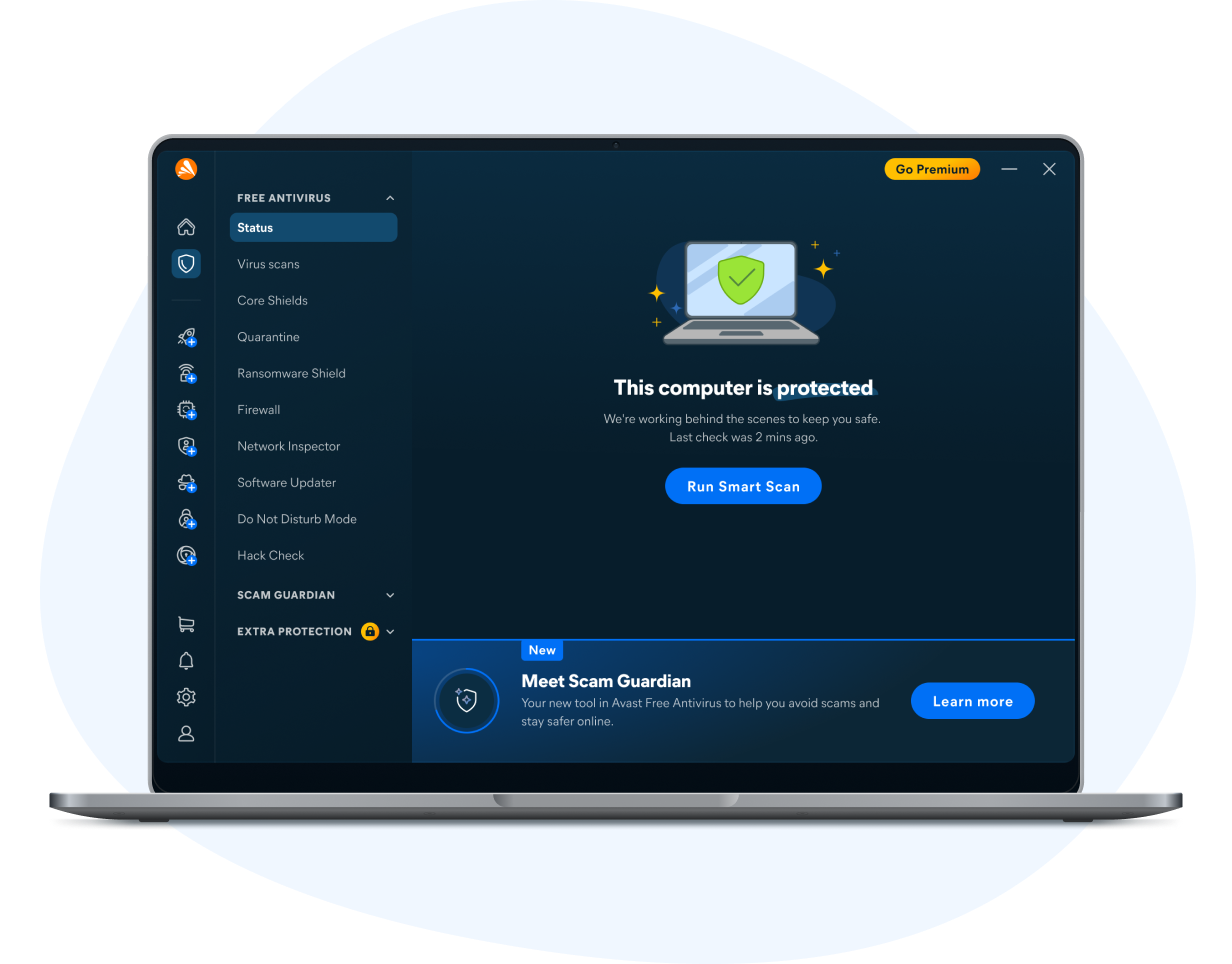
Here’s why Avast is one of the most trusted, reliable, and experienced cybersecurity experts in the world.

Award-winning protection
We’re proud to offer our users world-class protection against cyberthreats, supported by the many awards our antivirus has earned.

Millions of users worldwide
Our vast global user base means we have the largest threat detection network in the industry, so we catch new threats fast.

30+ years of experience
When it comes to creating an antivirus that protects you from all angles, we know exactly what it takes.
Get free, trusted protection
Get free virus protection for Windows 10, plus protection against other types of malware. We offer extra security features such as behavior shield, remote assistance, browser cleaning and more, for free.

Around-the-world, around-the-clock protection
We’re proud to protect millions of Windows PCs and laptops with our antivirus software. Our experts work 24/7 to keep you safe from virus attacks and other cybersecurity threats.
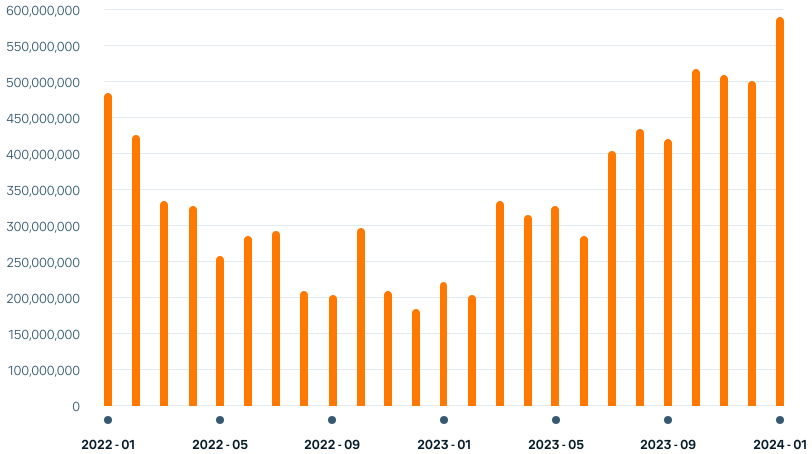
8.6 billion virus attacks prevented against Windows 10 PCs and laptops:
Around-the-world, around-the-clock protection
We’re proud to protect millions of Windows PCs and laptops with our antivirus software. Our experts work 24/7 to keep you safe from virus attacks and other cybersecurity threats.
8.6 billion virus attacks prevented against Windows 10 PCs and laptops:
We’re award-winning by nature, not just by name
We can help protect you against advanced online threats, backed by one of the world’s largest consumer Cyber Safety networks. And we’ve been proud winners of different awards over the years. Check out some of our more recent ones below. The award-winning protection from Avast Free Antivirus is also available in the Avast One app.

2025
“95% phishing-page detection rate, no false alarms”
AV-Comparatives
Anti-Phishing Comparative Test
2025
“100% real-world threat samples detected and blocked”
AV Test
Home User Protection Test
2025
“Total Accuracy Rating: 100%, False Positives: 0%”
SE Labs
Security Evaluation Test: Home Anti-Malware
2025
“95% phishing-page detection rate, no false alarms”
AV-Comparatives
Anti-Phishing Comparative Test
2025
“100% real-world threat samples detected and blocked”
AV Test
Home User Protection Test
2025
“Total Accuracy Rating: 100%, False Positives: 0%”
SE Labs
Security Evaluation Test: Home Anti-Malware
Find and fix security issues with Windows fast
Avast’s antivirus scans for security and performance issues and helps you to fix them instantly. It also protects you in real time by analyzing unknown files long before they reach your Windows 10 PC. And it’s free, so give it a try.
Already have Avast? Protect all your devices
Keep more than just your PC safe. You can install Avast on your Android, iOS, and Mac devices too, all with one account.
Just make sure you’re using the latest version for the best protection across every device.


You might be also interested in...
Sometimes you just need an individual tool for an individual purpose. Learn more about some of our privacy tools, below.


 © 2026 Gen Digital Inc. All rights reserved.

You're almost there...
Find and click the downloaded file {avast.exe}{avast.dmg} to complete the installation.
Initializing download....
Note: If your download did not start, click here.
Need Help? Call 855-745-3255