- Security
- Privacy
- Performance
Your digital life doesn't stop at your laptop — neither should your privacy. The latest SecureLine VPN update delivers one of its biggest upgrades yet, introducing powerful new privacy features designed to protect everything from mobile browsing to desktop banking. Privacy works best when it feels effortless, and that's exactly what our VPN was built to deliver.




This Article Contains
This Article Contains
If you use a VPN regularly, privacy isn't just about encrypting your connection. It's about controlling how you're identified across devices, websites, and networks. Read on to learn more about how the latest update to SecureLine VPN puts you in the drivers’ seat with new privacy features and smarter connection management.
Double VPN, IP Rotation, and Manual IP Shuffle
Spearheading the latest SecureLine VPN privacy enhancements, we've introduced two new advanced features designed to give users greater control over how their online activity is protected:
-
Double VPN allows you to route your traffic through two VPN servers instead of one, adding an extra layer of separation between your IP address and your online activity, boosting anonymity for sensitive activities that demand enhanced privacy.
-
IP Rotation automatically changes your virtual IP address periodically without disconnecting your session, making it more difficult for third parties to associate your activity with any given IP address over time. By default, the IP rotates every 30 seconds, but you can adjust the interval to every 5, 10, or 30 minutes, if you prefer.
-
Manual IP Shuffle gives you full control over your IP rotation, letting you refresh your public IP address on demand without changing your selected VPN location. This helps you quickly get a new IP if a site triggers CAPTCHAs, blocks your access, or simply won’t load.
These features build on the rock-solid security foundation underpinning SecureLine VPN, including military-grade AES-256 encryption , a kill switch , and DNS leak protection. And for even more flexibility, split tunneling on Windows, Mac, and Android lets you choose which apps use VPN and which connect directly to the internet.
Pause VPN with automatic reconnect
Want to temporarily disconnect without having to remember to turn your VPN back on later? It’s now hassle-free thanks to our all-new Pause VPN feature.
Especially useful when accessing an app or website that blocks VPN connections, Pause VPN gives you one-click flexibility without resetting your VPN configuration or leaving you unprotected longer than necessary.
“A good VPN should adapt to your life, not the other way around. That's the idea behind this release: stronger privacy when you need it, flexibility when you don't, and seamless protection across the devices you use every day. From Double VPN and IP Rotation to smart Pause controls and post-quantum encryption, every update is designed to give you more control over your privacy.”
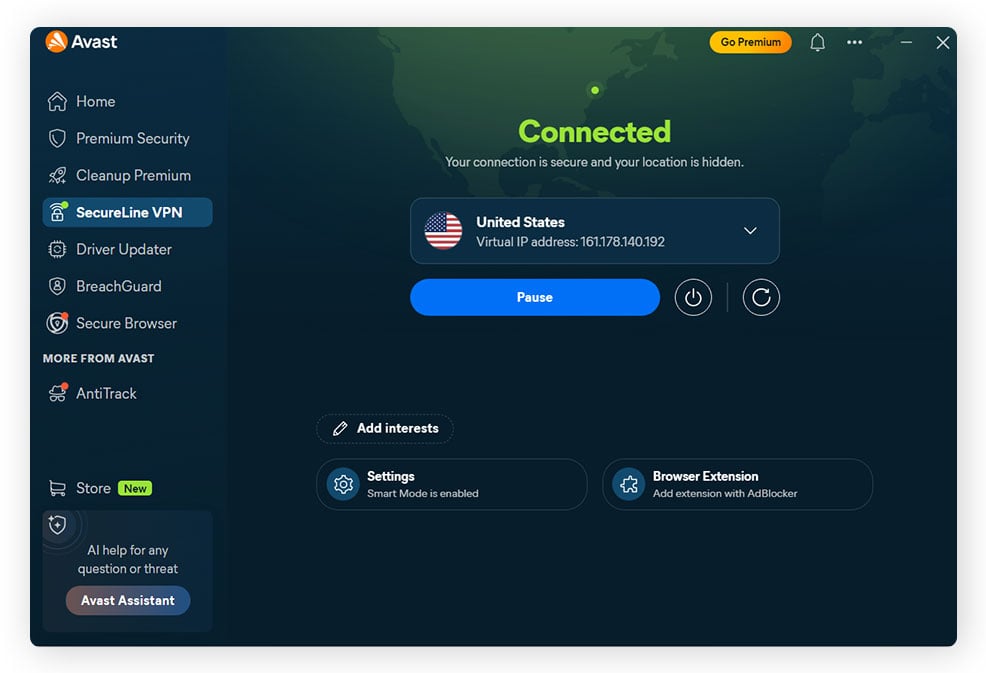
To give it a try, click the Pause button on the app's home screen and choose a pause duration of 5, 15, or 60 minutes. Once the timer expires, SecureLine VPN reconnects automatically, helping minimize the risk of accidentally exposing your online activity later in your browsing session.
And that’s not all…
This release also introduces several smaller but meaningful improvements across the SecureLine VPN experience. On iPhone, Live Activities are now supported through the Dynamic Island, making it easy to check your VPN connection status without opening the app.
The update also adds post-quantum encryption support on Windows and macOS. While you won't notice a difference day-to-day, this cutting-edge encryption technology is designed to help protect your data against future decryption techniques that could emerge as quantum computing advances.
And don’t worry, the features you know and love haven’t gone anywhere. For example, our Smart VPN mode continues to automatically choose the best server location for your connection, while still allowing you to manually select from the full server list whenever you prefer more control.
Upgrade your privacy today
Whether you're browsing on your laptop, banking on your phone, or streaming on your tablet, the latest SecureLine VPN updates are designed to boost your privacy and give you more control over how and where you're protected.
To take full advantage, either update your SecureLine VPN apps to the latest versions, or subscribe to a multi-device premium plan to extend VPN protection to more of the devices you use every day, and start tailoring your privacy without sacrificing convenience.
FAQs
Does using Double VPN or IP Rotation slow down connection speeds?
Double VPN and IP Rotation may have a minor impact on connection speeds because they add extra data-routing overhead. But even with both features enabled, SecureLine VPN's high-performance VPN protocols — such as WireGuard — maintain speedy VPN connections that can easily handle HD streaming, web browsing, and video calls.
How many devices can you use with a SecureLine VPN subscription?
A standard Avast SecureLine VPN multi-device subscription supports up to 10 simultaneous device connections, allowing you to protect your laptops, smartphones, tablets, and streaming devices under a single account.
Can SecureLine VPN access streaming platforms like Netflix and Hulu?
Yes, SecureLine VPN can help you securely access your favorite streaming services, including Netflix and Hulu. By connecting to an optimized streaming server in your home country, you can even change your virtual region to access your usual content library and watch TV online while on the go.
Does SecureLine VPN support P2P file sharing and torrenting?
Yes, SecureLine VPN fully supports peer-to-peer (P2P) file sharing and torrenting via dedicated, P2P-optimized server locations to help ensure fast transfer speeds and maximum privacy while sharing files.
Can you install SecureLine VPN directly on a home router?
SecureLine VPN doesn't currently support installation on home routers. Instead, you can set up the VPN directly on up to 10 supported devices, including Windows and Mac computers, and Android and iOS devices, to protect each device individually.
What customers say

More Privacy Articles

Avast expands SecureLine VPN with Double VPN, IP Rotation, and more
Are free VPNs safe?

Can You Be Tracked While Using a VPN?

What Is VPN Split Tunneling?

VPN Kill Switch: What It Is and Why It Matters

What Is a Replay Attack and How Does It Work?

How to Fix The “Connected Without Internet” Wi-Fi Issue

Understanding AES Encryption: What Is the Advanced Encryption Standard?

Is Telegram Safe? A Guide to the Secure Messaging App
How to Encrypt Email on Gmail, Outlook, iOS, Android, and Other Platforms

VPN Protocols Explained and Compared

How to Use a VPN for Streaming TV Shows and Movies
VPN
Privacy
Oliver Buxton
17-08-2026