- Security
- Privacy
- Performance
Free VPNs may seem like an easy way to protect your privacy online, but sometimes the trade-offs can be costly. Untrustworthy free services may rely on weak security, collect user data, or even share information with third parties, putting your privacy at risk instead of protecting it. Learn about the potential drawbacks of sketchy free VPNs and why choosing a reputable free or paid solution is important to help keep your browsing secure and private.




This Article Contains
This Article Contains
Why do people choose free VPNs?
Many people choose free VPNs because they don't want to pay for a service they'll only use occasionally. Others simply want to hide their IP address, access content libraries, or test out how a VPN works before deciding whether it's worth paying for. But many aren't aware of the trade-offs or potential risks that can come with free services.
According to Security.org, around 28% of VPN users choose free VPNs because, at a glance, free may seem like the better deal. They want the benefits of a VPN — such as more private browsing, the ability to change their virtual location, and added protection on public Wi-Fi — without the added expense.
However, not all free VPNs deliver the same level of performance, security, or privacy as paid services. Free providers often operate with fewer resources, which can lead to data caps, slower speeds, limited server networks, or weaker security features. Some may even use outdated VPN protocols or less robust encryption, potentially reducing the protection they offer.
There's also an important business-model difference. Paid VPNs generate revenue directly from subscribers. Free VPNs, on the other hand, need to monetize their services in other ways, such as displaying ads, collecting analytics, or, in some cases, selling user data. When the user becomes the product, privacy concerns can quickly arise.
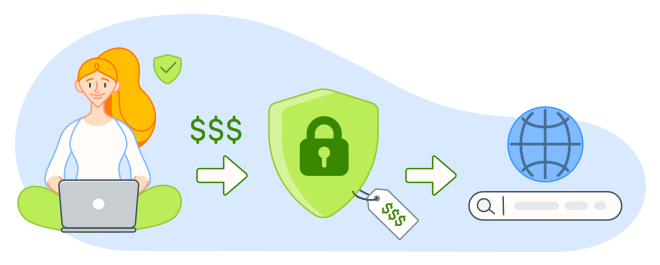
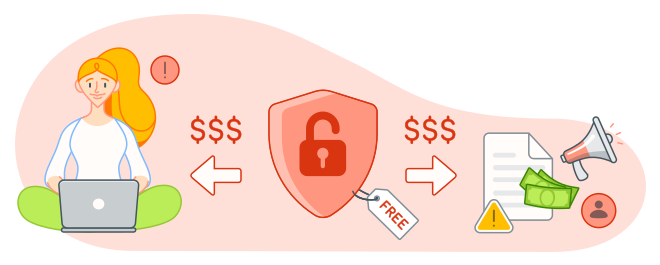
The potential risks of using free VPNs
Some free VPNs from reputable providers are safe to use. However, other free VPNs can expose you to a range of risks, including weaker privacy protections, unreliable connections, data leaks, intrusive advertising, outdated security measures, or even malware.
Understanding the following risks can help you choose a VPN that protects your privacy rather than undermines it.
Unclear data policies
Some free VPNs generate revenue by collecting user data and sharing it with advertisers, analytics companies, or data brokers. Depending on the provider, this information may include browsing activity, device identifiers, IP addresses, and other data points that can be used to build detailed user profiles — defeating the primary purpose of a VPN in the first place.
This data collection creates additional privacy risks. The more information a VPN stores, the more valuable it becomes to attackers in the event of a data breach. Research has repeatedly found that many free VPNs fall short on security and privacy protections. One study conducted by Zimperium found that as many as 40% of free VPN apps for Android leaked user data.
Transparency is another concern. While some VPN providers clearly explain how they collect, use, and share data, others provide little insight into their practices, making it difficult for users to understand what information is collected and how it’s handled.
Reputable VPN providers typically maintain clear privacy policies and often follow a no-logs policy, meaning they collect little or no information about users' online activity. When evaluating a VPN, understanding its data collection practices is just as important as assessing its features or performance.
Bundled security threats
Not every free VPN is what it claims to be. Some are bundled with malware, spyware, adware, hidden backdoors, or other disguised threats that can compromise your privacy instead of protecting it. Once installed, malicious software may monitor your activity, display intrusive ads, steal sensitive information, or even give attackers remote access to your device.
VPNs are particularly attractive targets because they require extensive permissions to function. By design, a VPN can see a significant portion of your internet traffic and interact closely with your device's network settings.
And this risk is more than theoretical. A 2024 analysis of 100 free VPN apps for Android found that roughly one in five was flagged for malware. In 2025, Google also warned users about a surge of fake VPN apps designed to infect Android devices with malicious software while masquerading as legitimate privacy tools.
Before installing any VPN, be sure to research the provider's reputation, review its privacy policy, and then only download the app from a trusted source such as the official website or a first-party app store.
Performance, speed, and reliability issues
Some reputable VPN providers offer free plans or trials with deliberately lower bandwidth, smaller data allowances, or connection limits than their paid tiers while still maintaining strong privacy protections and secure encryption. These limitations can affect streaming, gaming, downloads, or video calls, but they are not inherently security problems.
However, some less-trustworthy free VPNs have more serious technical and performance issues, such as weak encryption, DNS leaks, and unstable connections that can expose your real IP address. If these issues are persistent, they undermine the reason to use a VPN in the first place.
Research suggests these issues are particularly common among lower-quality free VPNs. One analysis conducted by Top10VPN found that 83% of free Android VPN apps experienced DNS leaks, while more than 10% suffered from encryption failures. That's why it's important to choose a VPN that has undergone independent security testing and has a proven track record for privacy, reliability, and transparency.
Limited server locations
Free VPNs typically offer far fewer server locations than paid services, but the number of VPN server locations you need depends on how you use a VPN. For many users, a smaller network may be sufficient if it includes locations near where they live or in the regions they regularly connect to.
However, limited location choices can reduce TV streaming flexibility, and if your VPN only offers servers in only a handful of countries, or doesn’t allow you to choose a server location at all, you may be forced to connect via distant or overcrowded servers, increasing latency and reducing connection speeds.
Free vs. paid VPNs: What’s the difference?
Free and paid VPNs serve the same fundamental purpose: encrypting your internet traffic and masking your IP address to improve privacy and security. The more meaningful differences come down to the provider’s privacy practices, security standards, infrastructure, transparency, and business model. A reputable free VPN can provide strong protection, while a paid VPN may offer more features or fewer usage restrictions.
Here are some of the key distinctions to consider:
-
Provider reputation: Research the company behind the VPN, its ownership, history, and track record for addressing security issues.
-
Privacy practices: Look for a clear privacy policy that explains what data is collected, why it’s collected, and how long it’s retained. Independent audits can provide additional assurance.
-
Business model: A free VPN still needs to generate revenue. Understand whether the provider relies on advertising, premium upgrades, or data collection, and what that means for your privacy.
-
Security features: Check for modern VPN protocols, strong encryption, a kill switch, split tunneling, and DNS leak protection. These features are available from some free providers as well as paid services.
-
Performance and reliability: Compare connection speeds, stability, server availability, and data limits. Free plans may impose restrictions, but those limits vary by provider.
-
Server locations: Consider whether the available locations meet your needs, particularly if you travel or regularly connect to specific regions.
-
Streaming and other uses: VPN compatibility varies by service and provider. Check whether the VPN supports the activities you care about rather than assuming a paid service will always perform better.
-
Customer support: Paid plans commonly include more comprehensive support, but the quality and availability of assistance vary between providers.
Ultimately, free versus paid is not a reliable measure of VPN safety by itself. While free plans with reputable VPN companies often come with limitations, they’re generally a safer choice than standalone free VPNs with unclear ownership, vague privacy policies, or questionable data practices.
How to choose a safe VPN (even if it’s free)
Before installing any VPN, it's worth taking a close look at its privacy and security credentials. Whether a VPN is free or paid, if it’s going to route a significant portion of your internet traffic, trust is a critical factor in the decision-making process.
A reputable provider should be transparent about how it protects your data, secures your connection, and handles user information. Before downloading any VPN, look for the following features and policies:
-
A clear no-logs policy: The provider should clearly state that it does not store browsing activity, your real IP address, or other personally identifiable information. Ideally, these claims should be independently verified.
-
Strong encryption: Look for VPNs that use AES-256 encryption or an equivalent modern encryption standard to help keep your internet traffic private and secure.
-
Multiple server locations: A larger server network provides more connection options, better performance, and greater flexibility when accessing content or finding a nearby server for faster speeds.
-
Independent security audits: Reputable VPN providers regularly undergo third-party audits to verify their privacy, security, and no-logs claims. Recent audit results should be publicly available.
-
A transparent privacy policy: The provider should clearly explain what data it collects, how it uses that data, how long it retains it, and whether any information is shared with third parties.
-
Leak protection: Look out for features like DNS, IPv6, and WebRTC leak protection, which help ensure your internet activity remains hidden from your internet service provider and other observers.
-
A kill switch: A kill switch automatically blocks internet traffic if the VPN connection drops unexpectedly, helping prevent your real IP address from being exposed.
-
Reliable customer support: Responsive support can be invaluable when troubleshooting connection issues, privacy concerns, or account problems.
If you decide to use a free VPN, choose one from a well-established provider that also offers paid plans. While free plans with reputable VPN companies often come with limitations, they’re generally a safer choice than standalone free VPNs with unclear ownership, vague privacy policies, or questionable data practices.
Protect your online privacy with Avast SecureLine VPN
Not all VPNs are created equal. While free VPNs may seem appealing, they often come with trade-offs such as limited speeds, restricted server access, data caps, or privacy concerns that can undermine the very protection you're looking for.
Avast SecureLine VPN delivers fast, reliable privacy without the compromises. With strong encryption, a strict no-logs policy, and high-speed global servers, it helps keep your browsing activity private while delivering the performance you need for streaming, shopping, and everyday browsing. Start your unlimited 60-day free trial today and experience a more secure, seamless way to connect.
What customers say

More Privacy Articles

Avast expands SecureLine VPN with Double VPN, IP Rotation, and more
Are free VPNs safe?

Can You Be Tracked While Using a VPN?

What Is VPN Split Tunneling?
VPN Kill Switch: What It Is and Why It Matters

What Is a Replay Attack and How Does It Work?

How to Fix The “Connected Without Internet” Wi-Fi Issue

Understanding AES Encryption: What Is the Advanced Encryption Standard?

Is Telegram Safe? A Guide to the Secure Messaging App
How to Encrypt Email on Gmail, Outlook, iOS, Android, and Other Platforms

VPN Protocols Explained and Compared

How to Use a VPN for Streaming TV Shows and Movies
VPN
Privacy
Ben Gorman
29-06-2026