- Security
- Privacy
- Performance
Bandwidth-sharing apps offer a simple exchange: You agree to share your “unused bandwidth,” and in return, you might get an ad-free app experience, a free VPN, or a little extra cash. But behind the scenes, you’re enrolling your device in a residential proxy network, which gives unknown third parties access to your home internet connection, allowing them to make it look like their web traffic is coming from you. And some of these parties may be generating traffic you don’t want associated with your IP address, like phishing attacks. Read on to learn how bandwidth sharing really works, the risks it can create, and how to help protect your connection.







This Article Contains
This Article Contains
According to survey research on residential proxies, 29% of U.S. consumers say that at some point, they have installed an app offering rewards, money, or free features in exchange for sharing unused bandwidth. But only 33% of all respondents believe that an app that “shares your unused bandwidth” could create privacy or security risks.
Threat Researchers at Gen, the company behind Avast, analyzed attacks that Gen products blocked on Windows computers between January and mid-September 2026. Their systems counted 20.8 million distinct blocked attacks associated with traffic linked to residential proxies. Their technical analysis identifies an association with residential proxy infrastructure; it does not by itself establish that a proxy provider knew of, authorized, or participated in the underlying activity.
Residential proxy services have legitimate commercial uses, and malicious traffic passing through one of these networks does not mean the provider authorized or knew about it. Like other large online platforms and services, residential proxy networks can be abused by third parties trying to evade safeguards.
Still, that’s a lot of consumers installing software that may be riskier than they realize.
How bandwidth sharing really works
When you agree to “share your bandwidth,” you’re likely enrolling your device into a residential proxy network. These are services that buy access to home internet connections, like yours, and rent them out to third parties.
If you sign up, customers of a residential proxy network can route web traffic through your home connection. The websites they visit see your home IP address rather than the customer’s originating address. This can help those customers access location-specific content or collect public web data. It can also make automated traffic harder for websites to distinguish from ordinary consumer traffic.
Residential proxy networks act as intermediaries. They obtain access to participating users’ internet connections, sometimes through clearly disclosed opt-in programs and sometimes through software where the disclosure may be less prominent, and then provide that access to customers. Here’s a breakdown of how the model works for legitimate providers:

1. You opt in
You install an app that offers money, rewards, or free features in exchange for your “unused bandwidth.” Sometimes the app is transparent. Sometimes details are buried in the terms and conditions.

2. Your IP address is rented out
The residential proxy network adds your connection to a pool of millions of home IP addresses and sells access to paying customers. You’re not told who those customers are.

3. Strangers surf the web as you
Their traffic leaves through your connection. Every site they visit sees your public IP address and may associate the traffic with your internet provider and approximate location.
How you might have joined a residential proxy network
Overtly labeled bandwidth-sharing apps — like Honeygain — are one way your internet connection might get recruited into a residential proxy network. Apps might propose you “sell internet bandwidth,” “share internet for money,” or simply “share your traffic,” marketing it as a passive income scheme.
Bright Data, which describes itself as the world’s largest residential proxy provider, uses a partner-based approach. Third-party app developers may integrate Bright Data’s software development kit (SDK) and offer users a choice between viewing ads or sharing their internet connection in exchange for an ad-free experience. According to Bright Data, it pays developers a monthly fee for each user who opts in, and participating devices are used only when idle, online, and charged.
Another route are free VPNs, like Hola, some of which resell your connection to “peers” instead of charging you a subscription to use a virtual private network. Residential proxy software can also arrive on your device as malware if you download pirated or unverified games, movies, or apps, according to an FBI PSA.
Unfortunately, in our survey on residential proxies, 32% of U.S. consumers said they wouldn’t know what an app means when it offers to “share their unused bandwidth.”
Why companies want to borrow your home IP address
Companies — and murkier entities — want to browse the internet on your home IP address because it makes their traffic look less suspicious. Websites often block traffic from data centers, bots, known VPN providers, or sources of suspicious activity, but they’re much more careful about blocking home connections, since doing so risks shutting out a real customer.
Many companies who rent your bandwidth through residential proxy networks have perfectly legitimate reasons for doing so. These might include a company double-checking that a client’s ads actually appear in the countries they paid for, or performing price comparisons by collecting publicly listed prices online.
A major driver of the residential proxy market is now AI companies, according to a Gen article on the AI data race and home Wi-Fi connections. AI bots are constantly crawling the web: shopping assistants need today’s prices, research agents need to open pages as they work, and AI models need current data to stay useful. All of this means constant visits to websites that would rather not be visited by machines. Several large residential proxy providers even advertise products built specifically for AI training and AI agents.
If you’ve signed up for a bandwidth-sharing app, your home internet could be participating in this AI data race without you ever knowing.
How residential proxy networks can be misused
Not every party using a residential proxy network has a legitimate purpose. A 2026 PSA from the FBI states that criminals use residential proxy networks as a standard tool to conceal the source of malicious activity. That observation concerns criminal misuse of the technology and does not mean that every network, provider, or customer is engaged in wrongdoing.
Residential proxy services can be misused by customers whose activities may not be apparent during onboarding or ongoing monitoring. Providers may use customer-vetting and abuse-prevention measures, but bad actors can attempt to evade those controls and use residential proxy networks for harmful activity:
-
Credential stuffing: Testing stolen passwords across thousands of accounts, rotating through home IP addresses so none get locked out.
-
Bulk buying: Snapping up concert tickets or limited stock before real customers get a chance, bypassing anti-bot safeguards designed to block automated purchases.
-
Creating fake accounts: Signing up for large numbers of accounts by making each registration appear to come from a different home internet connection, which can help evade a platform’s signup limits.
-
Ad fraud: Generating clicks and views that appear to come from real viewers, deceiving organizations that pay for ad performance.
-
Scams, malware, and other forms of cybercrime: Sending people to phishing pages, serving malicious ads, spreading trojans, and running fake online stores — all from an IP address that doesn't initially raise red flags.
What our Threat Researchers uncovered
Our Threat Researchers wanted to better understand the volume of abuse involving residential proxy networks. To do this, they analyzed data on cyberthreats that Avast and other Gen products blocked on Windows computers and identified which attacks had come through the residential proxy networks in our study.
Between January and mid-September 2026, our Threat Researchers’ systems counted 20.8 million distinct blocked attacks on Windows computers associated with residential proxies.
This volume indicates that malicious activity associated with residential proxy networks is not merely occasional. It does not, however, show that residential proxy providers initiated, approved, or were aware of the attacks.
What malicious actors may do through your “shared bandwidth”
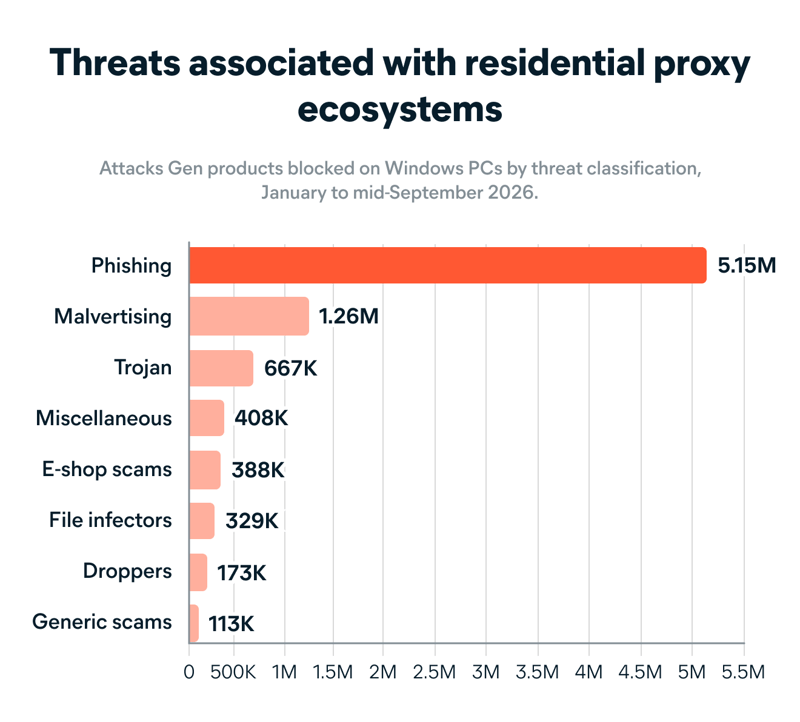
The attacks our products blocked associated with residential proxy traffic were often phishing, with malicious ads and trojans making up much of the rest.
Phishing, which could take the form of deceptive messages pointing to fake login pages or payment portals built to harvest sensitive information, accounted for 5.15 million blocked attacks. Malicious advertising (malvertising), where an ad either carries malware or steers you to a scam site, followed at 1.26 million.
Next came trojans at 667,000 blocked attacks; these are programs that look useful, but quietly open a door to the victim’s device for a cybercriminal. After other miscellaneous threats (comprising 408,000 blocked attacks), the next largest threat category was e-shop scams, which are fake websites disguised as legit online stores; Gen products blocked 388,000 such attacks between January and mid-September 2026. File infectors, droppers, and generic scams accounted for the rest.
Most of the residential-proxy-associated traffic in this dataset was linked to a small number of networks. Bright Data accounted for around 83%, followed by Honeygain, NetNut, Tuxler, and Hola. These figures are not a ranking of provider risk or evidence that a provider authorized, knew of, or benefited from the underlying activity. Larger networks may appear more frequently in the data simply because they carry more traffic. The findings show that malicious actors may route traffic through established residential proxy networks despite providers’ efforts to prevent misuse.
Where we blocked the most attacks
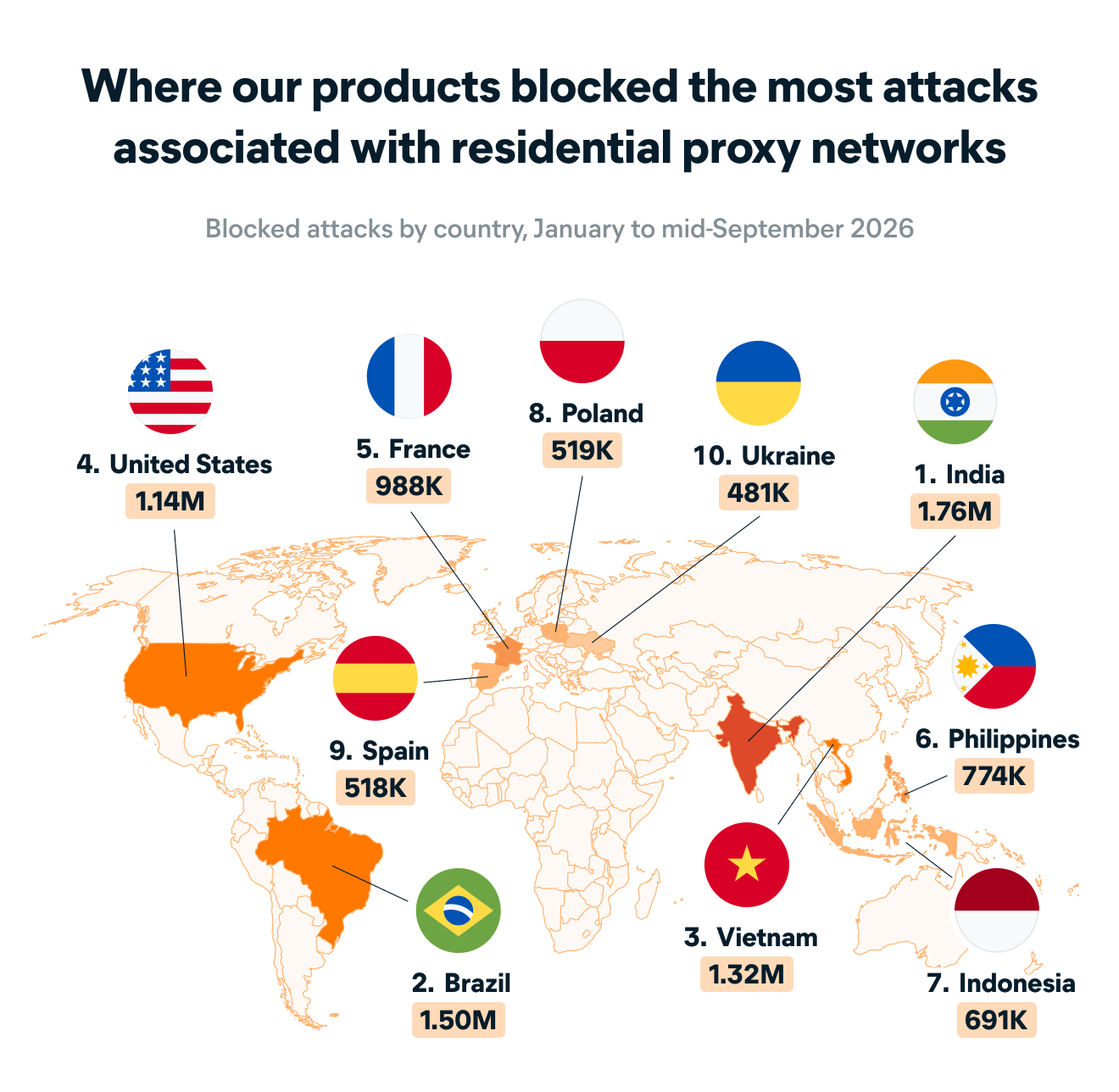
Most devices running proxy software sit outside the West: India, Vietnam, Ukraine, and Brazil lead, with the U.S. only 10th. But the U.S. ranked fourth for attacks blocked, and France fifth. A likely reason is that automated traffic aimed at U.S. services looks far less suspicious arriving from a U.S. home IP address than from a server abroad.
The countries where Gen products blocked the most attacks associated with malicious residential proxy traffic were India (1.76 million blocked attacks), Brazil (1.50 million), and Vietnam (1.32 million).
Why sharing your bandwidth puts you at risk
If you use a bandwidth-sharing app, that traffic leaves through your home IP address, so as far as the rest of the internet is concerned, it came from your internet connection. If that traffic turns out to be shady, your address is the one on record. That carries risks for users:

Your IP address could get blamed for abuse: Abuse reports go to your internet provider, and platforms may block your address outright. The actual person behind the abuse is nowhere in sight.

Your traffic looks suspicious: Banks, retailers, and streaming services check IP addresses against blocklists. If your IP address is flagged, you may start hitting extra verification codes and logins that fail for no clear reason. You might start seeing constant CAPTCHAs or “you’re using a VPN” prompts as you browse the internet — even when you’re not.

Your internet connection takes the load: Other people’s browsing runs through your line, eating bandwidth and, on a capped plan, your data allowance. Unless the bandwidth-sharing app only activates when your computer is idle, this could slow down your internet speed.

Your own service could be at risk: Some ISPs restrict bandwidth sharing. Verizon’s Fios terms, for example, say customers can’t resell or rent their service or let outside parties use it.
Residential proxy abuse doesn’t normally announce itself, since the software is built to sit quietly in the background. So if you’re seeing inexplicable abuse reports, constant CAPTCHAs, and a slower-than-expected connection, it could be worth investigating whether you’re sharing your bandwidth. Any one of these signs alone has other explanations, but several at once warrants a closer look.
How to protect your home internet connection
Protecting your home connection starts with paying attention to which apps you install and what you agree to when you install them.
-
Remember that nothing in life is free: If an app costs nothing and shows no ads, your connection may be what’s funding it.
-
Reconsider paid bandwidth sharing: A few dollars a month might not be worth having your address tied to someone else’s traffic.
-
Avoid pirated software: Cracked apps and unauthorized downloads could carry malware or unwanted software that enrolls your device in a proxy network without your knowledge.
-
Read the terms and conditions: Bandwidth sharing, peer-to-peer networking, traffic routing, and network participation are phrases that matter. Try asking an LLM, like ChatGPT or Claude, to help you decipher convoluted T&Cs. Just remember to double check the output against the actual terms and conditions.
-
Audit what’s already on your devices: Review unfamiliar apps and background services, especially utilities you do not use. Check their descriptions for “passive income,” “traffic monetization,” “bandwidth sharing,” or “network sharing,” which can be bundled into unrelated software. Uninstall the ones you don't recognize or no longer need.
-
Don’t forget your smart TV: Smart TVs, streaming boxes, and other internet-connected devices can run proxy software too. Stick to official app stores and avoid sideloading apps. The FBI calls out side-loaded apps on Android TV boxes in particular, as these can be used for bandwidth sharing.
-
Talk to your household: Anyone who can install an app on the family computer might have accidentally enrolled your connection in a residential proxy network.
-
Keep security software running: Cyber Safety software like Avast One helps block malware, scams, and other cyberthreats, whether your device is part of a residential proxy network or targeted by malicious traffic routed through one.
At Avast, we believe people should be able to explore everything the digital world has to offer fearlessly. That starts with understanding what’s happening behind the technology we use every day — and having the tools to protect ourselves when something isn’t what it seems. A little awareness about what you’re agreeing to can go a long way toward keeping your connection, devices, and digital life in your control.
FAQs
What is bandwidth sharing?
Bandwidth sharing means letting other people or companies route traffic through your connection, so it appears to come from your IP address, usually as part of a residential proxy network. Apps that offer money, rewards, or free features in exchange for your "unused bandwidth" are the most common form of it.
Are Bright Data, Hola, and Honeygain safe?
Bright Data, Hola, and Honeygain are established companies whose products and consumer-facing models differ. Bright Data may reach consumers through SDKs integrated into third-party apps, while Hola and Honeygain offer direct ways to share a connection.
Bandwidth sharing generally involves allowing third-party traffic to use a home IP address, which may consume data and bandwidth, affect the IP address’s reputation, or conflict with an ISP’s terms. Our research measured threats associated with residential proxy traffic; it did not evaluate the safety of individual apps or determine whether a provider knew of or authorized particular activity. Consumers should review each service’s disclosures, controls, and terms before deciding whether to participate.
Is bandwidth sharing safe?
It's broadly legal, and the companies involved often are too. But there are risks. Your IP address can be tied to activity you had nothing to do with, and the abuse reports, blocklists, and account problems that follow all point back to you. ISPs often forbid bandwidth sharing in their terms of service.
Can you really earn money through internet bandwidth sharing?
Yes, but not much. According to Honeygain, a bandwidth sharing app, devices in higher-demand regions can earn users $3 to $10 a month.
What customers say

More Privacy Articles

The Hidden Risks of Bandwidth Sharing

What Americans Know About Residential Proxies

TCP vs UDP: What’s the Difference and Which Protocol Is Better?
How to Change Your IP Address With and Without a VPN

How to Find Your IP Address on Windows
/Public-vs-local-IP-addresses-Thumb.jpg)
Public vs. Private IP Addresses: What’s the Difference?
IPv4 vs. IPv6: What’s the Difference?

How do I Hide My IP Address?
What is an IP Address?
Static vs. Dynamic IP Addresses
What is TCP/IP and How Does it Work?
How to Disable IPv6 Support in Your Router Settings
IP Address
Privacy
Jeremy Coppock
30-09-2026