- Security
- Privacy
- Performance
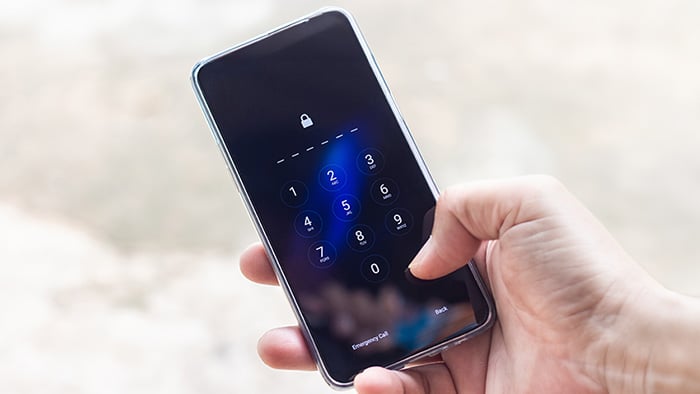
Apple Activation Lock stops thieves from accessing an Apple device without signing in with the associated iCloud account. But it can also lock out legitimate users who’ve misplaced their credentials. We’ll show you legitimate ways to bypass Activation Lock if you’re stranded, and how Avast can help boost your iPhone security.







This Article Contains
This Article Contains
If you’ve bought an iPhone that remains Activation Locked, it may simply still be linked to the previous owner’s Apple Account. If you can’t reach the seller for assistance, contact the marketplace or seller to request a refund and report the transaction. If all else fails, you may need to try to bypass Activation Lock yourself.
When buying a secondhand iPhone, always check that Activation Lock has been removed before paying — if it’s not, it could indicate a stolen device. Meet the seller in a busy, public place and ask them to remove the device from their account. Make sure you can complete the iPhone’s setup without being prompted for the previous owner’s credentials.
What is Activation Lock?
Activation Lock is one of Apple’s key security features, and is automatically enabled when you turn on Find My on your device. With Activation Lock active, you must enter your iCloud password to erase or reactivate the device. Because of this, it’s sometimes called iCloud Activation Lock.
The feature is designed to deter theft and protect your data if your iPhone, iPad, MacBook, or Apple Watch is lost or stolen, by ensuring that only you can reactivate and use the device.
But there are legitimate situations where you may need to remove or bypass Activation Lock — for example, when a company is reassigning a device from a departed employee, or when you’ve inherited or bought a device and the previous owner can’t be reached. In any case, always follow official channels and documented procedures to avoid legal or security problems.
Ways to bypass Activation Lock
The legitimate ways to remove Activation Lock are to sign in with the Apple ID and password originally used to set up the device, have the previous owner remove it from their account, or contact Apple Support to request an activation-lock bypass code.
When submitting an Activation Lock support request to Apple, you’ll need valid proof of purchase, such as an original receipt or invoice showing the device’s identifying details. Apple will review your documentation to determine whether the device is eligible for Activation Lock removal — Apple won't remove Activation Lock simply because you purchased a locked secondhand device.
Third-party tools that claim to permanently bypass Activation Lock are often unreliable and may expose your device to malware, compromise its functionality, or violate applicable terms and restrictions.
We strongly advise against jailbreaking an iPhone to try to circumvent Activation Lock. Jailbreaking doesn’t reliably remove the lock and can introduce security vulnerabilities, cause device instability, and affect Apple's ability to provide support.
1. Use iCloud credentials
The simplest way to bypass Activation Lock is to sign in to the iCloud account associated with the locked device. However, note that you’ll only be able to do this if you know the relevant Apple ID and password.
If you have the relevant credentials, here’s how to bypass Activation Lock by removing the device from your iCloud account:
-
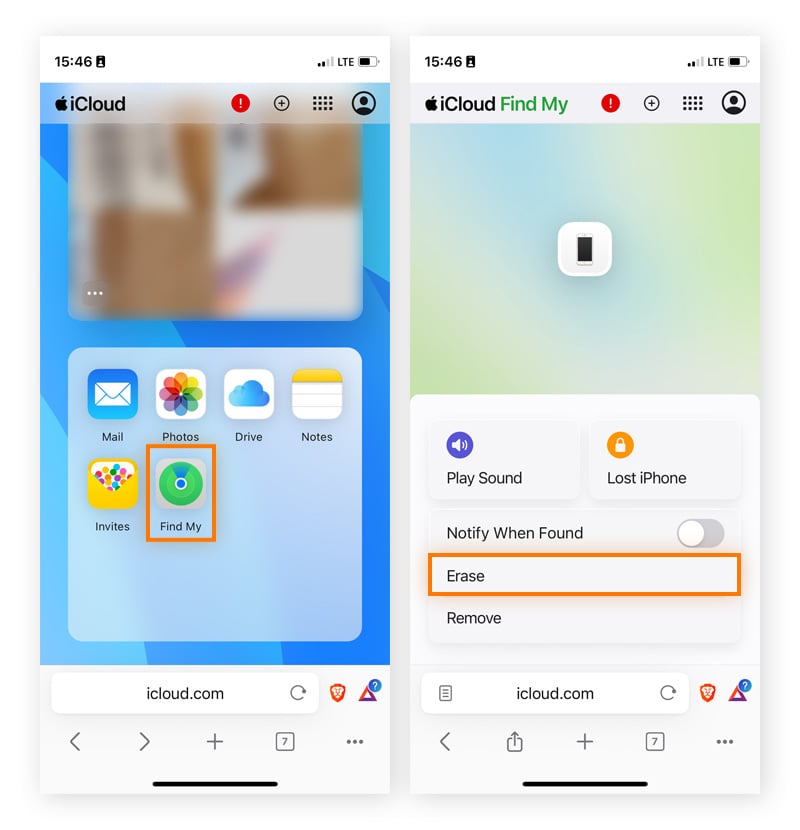
Go to iCloud.com and sign in with the Apple ID and password that were originally used to set up the locked device.
-
Select Find My iPhone (or Find Devices on newer iCloud versions).
-
In the device list, choose the locked iPhone, iPad, or Mac.
-
If the device is online, choose Erase and confirm to wipe it remotely.
-
After erasing, click Remove from Account to completely remove it from your Apple ID.
-
Restart or set up the device. Activation Lock should be gone, and the phone should prompt you for a new Apple ID. If the phone still asks for the original Apple ID and password, the removal didn’t work, and you should repeat steps 1–5.
-
Once you enter the new Apple ID credentials, turn on Find My to reactivate Activation Lock with the updated Apple ID and password.
2. Get an Activation Lock bypass code
If your devices are supervised and enrolled in a Mobile Device Management (MDM) that’s linked to an Apple Profile Manager or Apple Business Manager account, you can generate an Activation Lock bypass code to reset managed devices within your organization’s inventory.
Here’s how to get an Activation Lock bypass code:
-
Log in to Apple Profile Manager (via a macOS device only) or Apple Business Manager.
-
Locate the locked device by serial number or asset tag.
-
Check Activation Lock status in the device’s details.
-
Copy the Activation Lock Bypass Code shown in MDM.
-
Erase or reset the device via MDM or Recovery Mode.
-
Enter the Bypass Code on the Activation Lock screen, and assign a new user during enrollment.
3. Set a permanent bypass
If you have trouble remembering the Apple ID credentials, or need a device that multiple people can use (for testing or shared use), you can set up a permanent bypass by following the steps to bypass Activation Lock using your iCloud credentials. Then, remove the device from the account via Settings, set it up with a different Apple ID, and leave Find My disabled.
However, without Find My enabled, you can't remotely locate, lock, or erase your device if it's lost or stolen, and Activation Lock won't prevent someone else from reactivating it. For personal devices, it's best to keep Find My enabled and only disable it temporarily when necessary, such as when transferring ownership or preparing a device for testing.
4. Use iCloud bypass tools
Third-party iCloud-bypass tools rarely work on recent iOS versions — particularly on devices with A12 chips and later. Tools that claim to work on newer iPhones are generally not legitimate and are known to be fronts for iOS viruses or app scams. In any case, trying to bypass Activation Lock with iCloud bypass tools is high-risk: you may be asked to reveal serial numbers or install unvetted software, which can introduce malware, void support, and expose you to financial fraud.
For these reasons, we do not recommend seeking out an iCloud bypass tool to unlock your iPhone. Instead, contact Apple Support, provide proof of purchase, and they will help you regain access.
5. Reset the DNS server
Many sites claim you can bypass Activation Lock by resetting the DNS server, but that’s misleading. While manually switching DNS can sometimes provide limited, temporary access to web-based content or a restricted interface, it won’t remove Activation Lock.
DNS bypasses won't let you complete the normal iPhone setup process or use the device as a fully functioning phone. Essential features, including the App Store, Messages, and cellular calling, remain inaccessible, and any limited access may disappear after a restart or software update.
How to enable Activation Lock
To enable Activation Lock on your iPhone or iPad, simply set up Find My during setup or in Settings. This ensures your device can be locked or located if it’s ever lost or stolen.
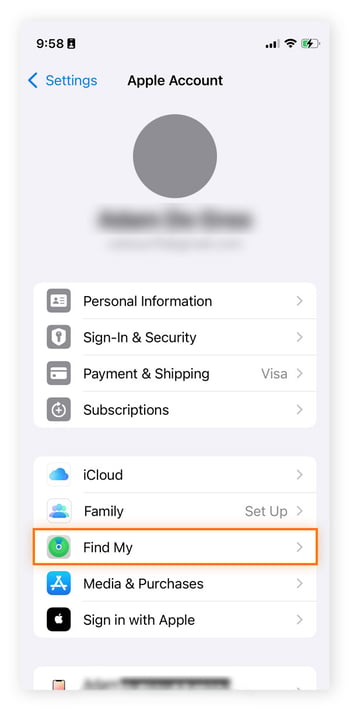
To set up Find My on an iPhone:
-
Open Settings and tap your name (your Apple ID).
-
Select Find My, tap Find My iPhone, and toggle on the feature.
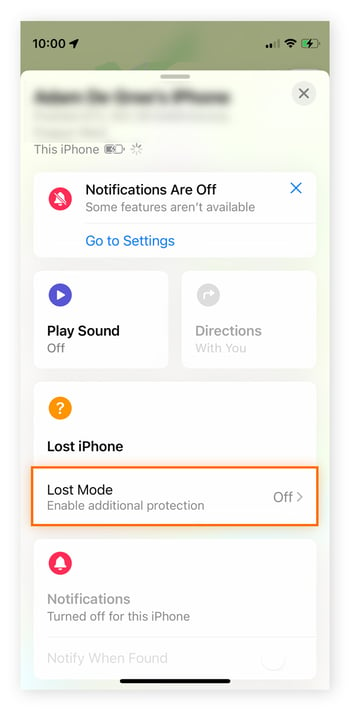
Then, if you ever misplace your device, you can mark it as lost to place it under Activation Lock — here’s how:
-
Open Find My.
-
Tap Devices or Items, then select Lost Mode.
Boost your iPhone security
Bypassing Activation Lock through unofficial channels can leave your device vulnerable to attacks. Let Avast Free Antivirus help by boosting your iPhone’s security and privacy. With Wi-Fi network security and password leak monitoring built in, Avast seamlessly complements your iPhone’s built-in security features.
What customers say

More Security Articles

Phantom Deal: Inside an Imposter Scam Targeting an Avast Employee

What Is UPnP?
Why is My iPhone in SOS Mode?
New Avast One vs Legacy Avast One: What’s Changed?
What Is the New Avast One?

Is Mercari legit? A guide to safe shopping and avoiding scams

Is WeTransfer Safe?

Is Poshmark Legit?
Is WhatsApp Safe?

Is Apple Pay Safe?
How to Bypass Apple Activation Lock (and Which Methods to Avoid)

Is Windows 10 Still Supported? It Is by Avast
Security Tips
Security
Adam De Gree
11-11-2025