- Security
- Privacy
- Performance
UPnP, or Universal Plug and Play, is a networking protocol that allows devices to automatically detect and communicate with each other. But the convenience it offers also introduces some risk. Learn how UPnP works, how it can expose you to hackers, and how to boost your network security with a VPN.






This Article Contains
This Article Contains
Understanding the basics of UPnP
UPnP stands for Universal Plug and Play. “Universal” refers to the fact that the protocol works across practically all devices without requiring setup, and “Plug and Play” refers to the way devices using UPnP configure themselves automatically when they connect.
It’s designed for convenience — without UPnP, local devices on your network generally need to be configured manually to see and interact with each other. But with it, devices on your network can connect with each other automatically and open ports on your router so traffic from the internet can reach them directly.
The first function is how your wireless printer might appear automatically on your computer when they’re connected to the same network, even if you haven’t set up a connection manually. This part of UPnP is relatively safe, because it only involves information sharing between devices already connected to your private network.
The second function, however, involves a little more risk. Automatic port forwarding (the name for the functionality that allows UPnP devices to open ports on your router) means that any device on your network can request a port be opened to the public internet, and your router will generally comply without checking if the request is legitimate.
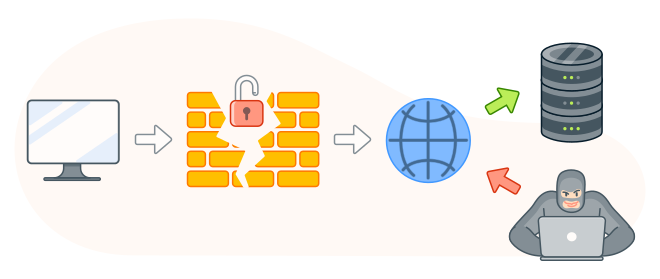
If this is just your game console asking for an open connection to host a match, that’s fine. But, since ports are like doors in your router’s firewall, allowing automatic port forwarding means that an infected device on your network could open it up to a remote attacker, who may then be able to access other devices and steal your sensitive data.
How does UPnP work?
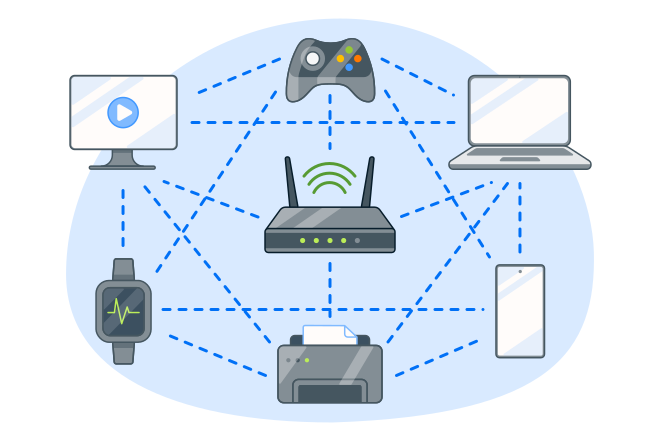
UPnP works by letting devices connected to the same local network communicate with each other openly and request that the network router open and forward specific ports to allow internet traffic to reach the right device. These two elements of UPnP’s functionality — local network compatibility and inbound access from the public internet — work slightly differently in practice.
Here’s a technical breakdown of how the local network device compatibility element works:
-
When a UPnP device joins your network, it gets an IP address from either your router’s DHCP (Dynamic Host Configuration Protocol) server, or an AutoIP process that assigns an unused IP randomly.
-
After it gets an IP, the UPnP device broadcasts NOTIFY messages to a unique address that all UPnP devices on the network can listen to: 239.255.255.250. This message has a URL containing an XML (Extensible Markup Language) document containing all the information other devices need to connect to the broadcasting device. This process is called the Simple Service Discovery Protocol (SSDP).
-
Other devices, called control points, can actively search for broadcasting devices and learn about the broadcasting device from the associated XML document. After connecting, they can also send instructions, for example to play a file, using the Simple Object Access Protocol (SOAP).
And here’s how UPnP works to allow incoming connections from the internet:
-
NAT (Network Address Translation) means your router merges every device on your network into a single public-facing IP address. This works fine for outbound traffic, because the router knows which device sent a request. But inbound traffic has no way of knowing which network device should receive the data.
-
To resolve this issue, UPnP compatible routers use a service called IGD (Internet Gateway Device) that lets individual applications request direct port forwarding. Applications that need to be reachable from the internet (like an online game) send the IGD a port mapping request which tells the router to open a specific port.
-
Incoming traffic entering through the open port is automatically forwarded to the application’s private IP address, effectively adding an entry to the router’s NAT table that maps the public port to that device.
-
With mapping in place, the application can pass information about the router’s public IP and the secured port to peers on the internet so they know where to connect, and the connection runs over TCP/IP like any other internet traffic.
Since UPnP inherently trusts requests for port access from devices on the local network, a device infected with malware can ask for forwarding access that grants cybercriminals a direct line into your network. That’s why it’s important to keep your devices clean and protected using a trusted antivirus solution.
UPnP-enabled devices and applications
UPnP is built into all sorts of home devices and applications, many of which you might use daily. That includes:
-
Google Home and other smart home assistants use UPnP to seamlessly connect to and facilitate data sharing with your phone, doorbell, thermostat, lights, and other IoT (Internet of Things).
-
Gaming consoles generally use UPnP to configure NAT settings and create the best possible connections to other players in online matchmaking, helping solve issues like high ping.
-
Smart TVs can use UPnP to find movies or music on other network devices or applications, like your PC’s media server, and stream them to your TV. However, UPnP streaming is different from how streaming works in general.
-
Home security cameras use UPnP to connect to your network and transmit data via the internet, allowing you to view the camera feed and listen to recorded audio even if you’re away from home.
-
Bittorrent and other P2P (peer-to-peer) applications often use UPnP ports to facilitate file sharing, automatically opening the specific ports that inbound and outbound connections need to download and upload from each other.
Benefits of using UPnP
UPnP is a common protocol in household digital tech because it simplifies home device networking that would otherwise be a relatively complex issue for people who aren’t particularly tech-savvy.
Here’s a summary of the two main benefits it offers:
-
Ease of use: UPnP has zero configuration, hence the “plug and play” part of the name. Without UPnP you would have to manually connect devices to your router by assigning their IPs, log into your network to create forwarding rules, and troubleshoot issues or settings changes yourself. With UPnP, devices generally connect and adapt to network changes instantly.
-
Functionality: Many services only “speak” UPnP. Windows Media Player exclusively uses UPnP, and Xbox and PlayStation recommend a UPnP router for online game matchmaking and chat quality. Plex and other media servers also use UPnP to broadcast files from your PC, and many smart speakers such as Sonos discover your music sources through UPnP, too.
Security risks associated with UPnP
Convenience is one thing, but it’s not always worth it if it comes with serious security vulnerabilities. And, unfortunately, UPnP can pose risks if you don’t take the right precautions, potentially opening up your entire home network to hackers if they’re able to infect just one connected device.
These are the main security risks associated with UPnP:
-
No authentication: UPnP doesn’t verify whether a port forwarding request is legitimate before complying with it. Any device on your network can request a port be opened, meaning a compromised device will have the same access as a clean, trusted one.
-
Persistent backdoors: Hackers can use UPnP exploits to secretly open ports on your router. If a dangerous link in a phishing email, a malicious browser extension, or an infected download compromises just one network device, it can be used as a constant gateway for attacks.
-
Router hijacking: Beyond opening ports with individual devices, cybercriminals can exploit UPnP to take over routers and turn them into malicious proxies. This technique has been used in attacks like Eternal Silence, where attackers compromise thousands of routers to route traffic through compromised networks.
-
Protocol vulnerabilities: Vulnerabilities inherent in some UPnP devices like CallStranger could be used to scan internal networks, spy on communications, or steal data.
Should UPnP be enabled or disabled?
The question then, is should you use UPnP or not? The answer, annoyingly, depends. What you really need to ask yourself is whether you are willing to take on UPnP’s risks in exchange for the convenience and functionality it offers.
If convenience is your priority, enabling UPnP will allow your streaming devices, gaming consoles, and smart appliances to work without friction. Gamers, in particular, can benefit from UPnP being enabled to keep their connections healthy.
If security is your priority, disabling UPnP will protect you against some relatively serious network privacy risks. And, if you’re a gamer, you can always manually forward the ports your console needs, with a little bit of research.
How to secure your network with UPnP
If you’ve decided to keep UPnP enabled for convenience’s sake, you should at least take proactive steps to secure your network (and connected devices) against potential threats. These are some of the key actions to take if you want to upgrade your network security:
-
Update your router firmware: Check your router settings by entering the router’s IP address into a browser, signing in using your network credentials (typically printed on the router itself), and looking for an option to download new firmware in a section like “Admin,” “System Tools,” or “Updates.”
-
Restrict UPnP to LAN: Look for an option in your router settings to restrict UPnP functionality to devices on your Local Area Network (LAN). This avoids UPnP being available on the Wide Area Network (WAN), where most of the risk is carried.
-
Use a firewall: Check in your router’s settings that the built-in firewall is enabled. This can help block unsolicited traffic that hasn’t been explicitly allowed.
-
Whitelist IPs: If you need open ports, check for an option in your router firewall settings to restrict the IPs that can access your network, rather than leaving it open to all incoming traffic.
-
Isolate your devices: To mitigate risk, you can create a “guest” network to host all of your UPnP devices, like home assistants or IoT appliances. This keeps them segregated from devices that might contain more sensitive data, like your PC.
-
Change your router admin credentials: Your router’s default login ID and password might be something easy to guess, like “admin/admin” or “admin/1234.” Change your credentials, choosing a strong password to help protect your network.
-
Use a VPN: Using a VPN encrypts your traffic and routes it through a remote server, making it harder for cybercriminals to identify or target your home network. This doesn’t remove the vulnerability that UPnP introduces, but it helps mask your activity from potential attackers.
-
Protect connected devices: Most UPnP exploits rely on one of your connected devices having been compromised. Protecting your devices with a strong and trustworthy antivirus app can help minimize the risk of them getting infected in the first place, in turn protecting your network.
Protect your network from UPnP vulnerabilities
UPnP has its benefits, but if you’re keen to capitalize on the convenience it offers, you should take appropriate precautions to help protect against the risks. Avast One offers a flexible all-in-one digital security solution that can keep your individual devices better defended against malware, with an optional VPN add-on to safeguard data you transmit on your network.
FAQs
What does UPnP do on a router?
UPnP on a router lets devices automatically change the NAT table to open ports so incoming traffic can connect easily. Your router is a wall between your home network and the internet, with ports in the wall that devices sit in. Those ports need to be open for inbound data. UPnP listens for inbound requests and rewrites router port rules so they can enter.
What does UPnP do on Xbox?
UPnP on an Xbox talks to your router to open and forward the specific ports it needs, usually UDP 3074. This makes your connection “Open NAT.” Open NAT enables both players and Microsoft to connect to you easily, and lets you host party chats without restrictions.
What customers say

More Security Articles
Phantom Deal: Inside an Imposter Scam Targeting an Avast Employee

What Is UPnP?
Why is My iPhone in SOS Mode?
New Avast One vs Legacy Avast One: What’s Changed?
What Is the New Avast One?

Is Mercari legit? A guide to safe shopping and avoiding scams

Is WeTransfer Safe?

Is Poshmark Legit?
Is WhatsApp Safe?

Is Apple Pay Safe?
How to Bypass Apple Activation Lock (and Which Methods to Avoid)

Is Windows 10 Still Supported? It Is by Avast
Security Tips
Security
Domenic Molinaro
20-07-2026