- Security
- Privacy
- Performance
A replay attack happens when an attacker captures a legitimate request you send over a network, such as an account login, and reuses it later. Because the request is real, the system accepts it, locking you out or enabling further fraud. Learn how replay attacks work and how to defend against them. Then get a VPN to help protect data sent and received online.




This Article Contains
This Article Contains
What is a replay attack?
A replay attack is when a hacker intercepts a legitimate piece of online communication, such as a login request or payment approval, copies it, then re-sends it to trick a system into granting access. Thus, the attack “replays” the transmission from the attacker’s device. The goal is usually to take over an account, make an unauthorized payment, or steal personal information.
Instead of cracking your password or using a brute force attack, the attacker simply waits for a successful action and copies it. Different types of hackers with varying skill levels use replay attacks. Low-skill attackers can often pull them off if they target unsecured networks or outdated systems. More secure networks and systems are much harder to trick and require deep technical knowledge.
How replay attacks work
Replay attacks are fairly simple compared to many other cyberattacks, which likely makes them enticing to cybercriminals. Instead of breaking into a system directly or taking the time and resources to guess login credentials, the attacker reuses information that’s already been accepted once.
Replay attackers aim to exploit systems that can’t distinguish between fresh and reused data. Here’s how a replay attack typically happens:
-
A user performs a legitimate action: This could be signing in to a website or secure account, or approving a payment. This generates and sends a piece of data across the internet that confirms the user’s request. The receiving system accepts the data and completes the action requested.
-
The attacker captures the data: An attacker monitoring the network intercepts this data while it’s in transit.
-
The attacker resends the same data: The attacker sends the exact same data from their device, thus “replaying” it.
-
The system accepts the data: Because the data looks identical to the original request, the system recognizes it as a legitimate request and performs the action again, granting the attacker access or repeating a payment.
 A replay attack happens when an attacker intercepts and resends legitimate data to log into a system undetected.
Why replay attacks are a cybersecurity threat
What makes replay attacks especially dangerous is that:
-
The hacker doesn’t need to change the sent data at all.
-
The system often treats the replayed request as if it came from you, which is why it’s successful.
-
There may be no obvious warning signs until damage is already done.
These attacks don’t just affect individuals. Critical infrastructure can also be targeted, like industrial control systems and water distribution systems, which can disrupt social services or compromise public safety.
Businesses are also targeted. Data breaches caused by attacks like these can lead to huge financial losses and compromised sensitive data. The average global cost of a data breach is $4.4 million, according to a recent IBM report. A company’s compromised security can also lead to reputational damage, especially if customer accounts are affected by the attack.
Replay attack prevention strategies
Replay attacks may seem hard to prevent, but there are effective ways to reduce the risk. The key is making sure that captured data can’t be reused, even if a hacker manages to intercept it.
Here are some of the best replay attack prevention strategies.
Encryption and session keys
Encryption is one of the most important defenses against replay attacks. It scrambles the information you send so only the intended recipient can read it. Even if a hacker intercepts the information, encryption makes it more difficult for hackers to misuse — though encryption alone won’t protect against replay attacks. Secure protocols like Transport Layer Security (TLS) encrypt your data while it’s in transit, and are widely used by businesses today.
A session key adds another layer of protection. These are temporary digital keys used for a single session. Once the session ends, the session and key become useless — similar to how a movie ticket is only valid for a specific screening. This means copied data from a previous session won’t work again.
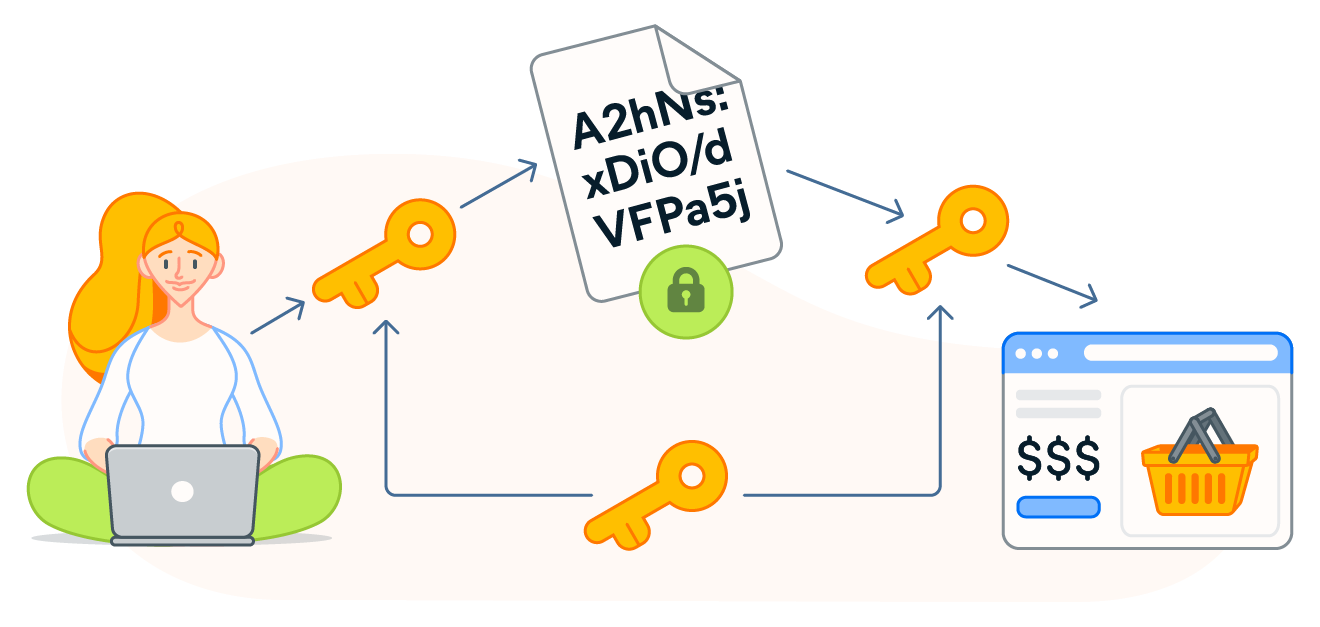 Encryption and session keys help protect your data from being read or reused by attackers.
Timestamps and one-time passwords
Systems can also block replay attacks by making sure requests only work once or within a short time window.
-
Timestamps mark the exact time a request was sent. If someone tries to resend the same request later, the system sees that it’s outdated and rejects it automatically.
-
One-time passwords work in a similar way. These codes are designed to be used once and then expire, which prevents attackers from reusing them. You probably already use these to log in to certain accounts, as it’s a popular form of two-factor authentication.
-
Nonces in this context are “numbers used once.” Some systems also attach a unique, one-time value to each request, ensuring it can only be used once. Even if an attacker captures the data, trying to reuse it won’t work because the system sees that it’s already been used.
Secure routing and firewalls
Replay attacks are more likely to succeed on poorly secured networks, which is why basic network security matters.
-
Secure routing helps ensure your data travels through trusted paths, making it harder for attackers to intercept it in the first place. Keeping your router up to date, using modern Wi-Fi security (such as WPA2 or WPA3), and avoiding unsecured networks all reduce the risk of your data being intercepted as part of a replay attack. When you’re on public Wi-Fi, use a VPN to encrypt your connection.
-
Firewalls act like security guards that inspect traffic entering and leaving your network. They can block suspicious or repeated requests that look like replay attempts. Make sure the built-in firewall on your computer is working and that it’s enabled on your router.
-
Intrusion Detection Systems (IDS) help detect suspicious web traffic, and Intrusion Prevention Systems (IPS) can help block it. These protocols flag patterns of repeated login attempts or use anomaly-based detection to identify suspicious behavior.
Challenges in detecting replay attacks
Replay attacks are particularly difficult to detect and prevent because they rely on legitimate data being reused, so malicious activity isn’t always flagged. The attacker isn’t breaking in or injecting harmful code — they’re copying something that already worked once.
From a system’s point of view, a replayed request often looks exactly like normal behavior. And because most websites and services are designed to prioritize smooth user experiences, they may be hesitant to block activity unless they’re certain of malicious intent.
Modern networks also make detection harder. Data often passes through many layers — including Wi-Fi networks, routers, servers, and cloud services — before reaching its destination. This provides more opportunities for attackers to intercept data.
On top of that, many systems rely on a mix of older and newer technology working together. Differences in security standards, timing delays, and system updates can make it harder to spot when the same data is being reused.
Common examples of replay attacks
Replay attacks are similar in practice, but take on a few variations. Here are some common examples of replay attacks.
-
Credential replay attacks: Attackers reuse captured login data or session information to access an account without needing the user’s password.
-
Replay attacks on smart devices (IoT): Hackers capture and reuse commands sent to connected Internet of Things devices, allowing unauthorized control of smart locks, cameras, or other home systems.
-
Financial transaction replay attacks: A legitimate payment or transfer request is intercepted and resent, leading to unauthorized repeated charges.
-
Remote keyless entry attacks: Attackers capture the signal used to unlock a keyless entry vehicle and replay it later to gain access.
-
Voice command replay attacks: A recorded voice command is played back to trigger the same action, bypassing basic voice recognition systems that can’t detect recordings.
Protect your network against replay attacks
Replay attacks may be difficult to detect and prevent — but the right security measures can significantly reduce the risk. Protecting your data starts with securing the networks and connections that your devices rely on every day.
Avast SecureLine VPN encrypts your connection, making it harder for attackers to intercept your data and reuse it later. It also boosts your online privacy with bank-grade encryption, keeping your online activity hidden from your internet service provider, hackers, and snoops. Try it free for 60 days.
What customers say

More Privacy Articles

Avast expands SecureLine VPN with Double VPN, IP Rotation, and more
Are free VPNs safe?

Can You Be Tracked While Using a VPN?

What Is VPN Split Tunneling?

VPN Kill Switch: What It Is and Why It Matters

What Is a Replay Attack and How Does It Work?

How to Fix The “Connected Without Internet” Wi-Fi Issue

Understanding AES Encryption: What Is the Advanced Encryption Standard?

Is Telegram Safe? A Guide to the Secure Messaging App

How to Encrypt Email on Gmail, Outlook, iOS, Android, and Other Platforms

VPN Protocols Explained and Compared

How to Use a VPN for Streaming TV Shows and Movies
VPN
Privacy
Danielle Bodnar
20-02-2026