- Security
- Privacy
- Performance
VPNs are excellent privacy tools, but they don’t make you totally invisible online. Websites, advertisers, and other trackers may still be able to collect data about your activity through cookies, browser fingerprinting, and other techniques. Learn how VPN tracking works, what a VPN actually hides, and how to use a VPN for maximum online privacy.




This Article Contains
This Article Contains
What is VPN tracking and how does it work?
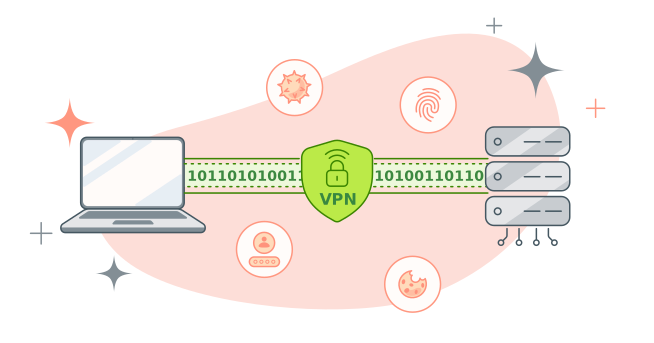
VPN tracking refers to methods used to identify VPN usage or gather information about your online activity while you’re connected to a VPN. In most cases, a VPN encrypts your internet traffic and hides your real IP address, making it much harder for internet service providers (ISPs), hackers, or network administrators to monitor what you do online.
However, detecting that someone is using a VPN is another matter. Websites, streaming platforms, and networks can sometimes recognize VPN traffic patterns or identify IP addresses associated with VPN servers. But while they may know a VPN is being used, they typically can’t see the encrypted browsing activity inside the connection.
Some forms of tracking also happen outside the VPN tunnel itself. Websites and advertisers can still track users through cookies, browser fingerprinting, account logins, and tracking scripts. For example, signing in to a Google or social media account can allow those services to associate activity with your profile regardless of whether a VPN is active.
Spyware or other forms of malware can also bypass VPN protections entirely because they operate directly on your device rather than monitoring your network traffic. Once installed, malicious software may record keystrokes, capture screenshots, monitor browser activity, or steal login credentials, even while your VPN is active.
VPN tracking risks can also increase if the VPN itself is unreliable. Poorly configured or free VPNs may leak IP addresses, log user activity, or use weak encryption. That’s why using a trusted VPN offering bank-grade encryption and a strict no-logs policy is important for maintaining stronger online privacy.
What does a VPN actually hide?
A VPN works by encrypting your internet traffic and routing it through a remote server, which masks your real IP address and provides ironclad protection from network-level monitoring. This makes it much harder for third parties to see what you do online, but other data not obscured by a VPN can still be used to piece together a picture of your browsing activity.
Here’s a quick breakdown of what a VPN can and can’t hide:
 A VPN can hide:
-
Your real IP address from websites and online services.
-
Your approximate location based on your IP address.
-
The websites you visit and other browsing activity from network observers.
-
Your traffic on public Wi-Fi, helping protect data from interception on unsecured networks.
 A VPN does not hide:
-
Account identities, such as Google, Facebook, or email logins.
-
Cookies and tracking data stored in your browser.
-
Device and browser characteristics that can be used for fingerprinting.
-
The VPN server’s IP address, which websites can still see.
-
The amount of data transferred, even if the content is encrypted.
-
The fact that you’re using a VPN, since VPN traffic can usually be easily identified.
If you use a VPN, can you still be tracked?
Yes, under some circumstances, it’s still possible to be tracked while using a VPN. A VPN primarily protects your privacy at the network level by encrypting your traffic and hiding your real IP address, but it does not stop all forms of online tracking. Websites, apps, advertisers, and malicious software can still identify or monitor you through other methods.
Free or poorly configured VPNs may also increase privacy risks if they log user activity, leak data, or use weak security protections.
Here are some of the main ways tracking can still happen while using a VPN:
-
Logging into personal accounts: If you sign into services like Google, Facebook, Amazon, or email accounts, those platforms can still associate your activity with your identity, regardless of your IP address.
-
Cookies and website tracking: Many websites use cookies and embedded tracking scripts to follow users across sessions and websites. Accepting tracking cookies can allow advertisers and analytics platforms to continue monitoring your activity even when connected to a VPN.
-
Persistent browser fingerprinting: Websites can collect information about your browser and device — such as screen resolution, installed fonts, browser version, language settings, and extensions — to create a unique “fingerprint” that may identify you across sessions.
-
Malware or spyware: Malware operates directly on your device, meaning it can capture keystrokes, login credentials, screenshots, or browsing activity before your data is encrypted by the VPN.
-
VPN connection drops: If your VPN disconnects unexpectedly and a kill switch is not enabled, your real IP address and internet traffic may become temporarily exposed until the VPN reconnects.
-
Misconfigured VPN settings: Incorrect settings — such as DNS leaks, IPv6 leaks, or improperly configured split tunneling — can cause some traffic to bypass the VPN tunnel and expose parts of your activity or IP address.
A VPN is an essential online privacy tool, but it’s not a silver bullet. Combining a trustworthy VPN with good browsing habits, anti-track tools, strong passwords, and device security measures can help reduce the amount of information that websites, advertisers, and other third parties can collect about what you get up to online.
Can you be tracked if you use a free VPN?
Most free VPN providers offer weaker privacy protections than reputable paid services and may rely on data collection or advertising to support their business model, which increases the risk that your activity can be monitored and tracked. In some cases, providers may log user activity, share certain data with third parties, or use less secure infrastructure and outdated protocols.
Common risks associated with some free VPNs include:
-
Logging user activity or connection data.
-
Sharing or monetizing user data through advertising partnerships.
-
Weaker encryption or outdated VPN protocols.
-
Embedded trackers or aggressive advertising.
-
IP, DNS, or WebRTC leaks caused by poor network configuration.
That said, not all free VPNs are unsafe. Some reputable VPN providers offer limited free plans or free trials with strong security protections but restricted speeds, server access, or data allowances.
When evaluating a VPN, look for clear privacy policies, transparent logging practices, support for modern protocols like WireGuard or OpenVPN, independent security audits, and a strong reputation within the cybersecurity community.
Can Google and websites track you if you use a VPN?
Yes, Google, websites, and other platforms may still be able to use your data to track or identify you using browser-based tracking methods, even when you’re connected to a VPN. And if you sign into services like Google, YouTube, Facebook, Instagram, or Gmail, those platforms can still associate your activity with your account regardless of whether a VPN is active.
Websites also rely heavily on browser-based tracking technologies that operate independently of your network connection. Cookies, tracking pixels, advertising IDs, and analytics scripts can monitor how you move between pages, remember your preferences, and build profiles based on browsing behavior. Because these trackers are stored and processed within the browser itself, a VPN generally doesn’t block them.
Even if you delete cookies and log out of all your accounts, websites may still recognize you through browser fingerprinting. This technique collects technical details about your device and browser — such as screen resolution, installed fonts and extensions, language settings, browser version, and rendering behavior — to create a distinctive digital profile. Combined, these signals can allow websites and advertising platforms to identify your device across sessions.
DNS leaks and their impact on privacy
The Domain Name System (DNS) translates website names into IP addresses so your device can connect to websites and online services. Normally, when you use a VPN, DNS requests are routed through the encrypted VPN tunnel. However, if a DNS leak occurs, some of those requests may bypass the VPN and be sent directly to your ISP instead.
While DNS leaks are possible, they’re generally a vanishingly rare occurrence with reputable, modern VPN services thanks to built-in DNS leak protection, IPv6 handling, and kill switches specifically designed to prevent these issues.
When DNS leaks do happen, they’re often caused by outdated VPN software, browser features like WebRTC, improperly configured split tunneling, or systems using IPv6 traffic that the VPN isn’t handling correctly.
If you want to check whether your VPN is leaking DNS requests, you can:
-
Connect to your VPN.
-
Visit a DNS leak testing website such as dnsleaktest.com.
-
Compare the reported DNS servers to your ISP and VPN provider’s servers.
If the test shows your ISP’s DNS servers instead of your VPN’s, it may indicate a DNS leak, which could be exposing some of your browsing-related metadata.
Can VPNs be tracked by governments or ISPs?
Governments and ISPs can often detect that you’re using a VPN, but that doesn’t usually mean they can monitor your browsing activity.
ISPs and governments monitoring their networks can typically see:
-
That a VPN connection is active
-
The IP address of the VPN server
-
How much data is being transferred
-
Connection timing and duration
Some governments and network operators use techniques such as Deep Packet Inspection (DPI) to identify VPN traffic patterns. DPI analyzes network packets more closely than normal routing systems and may detect certain VPN protocols or encrypted traffic signatures.
But detecting VPN usage is very different from seeing what someone is actually doing online. With strong encryption — such as industry-standard AES techniques — in place, it’s practically impossible for third parties to view or track activity inside the VPN tunnel.
Why some VPNs are more traceable than others
Not all VPNs offer the same level of privacy. Some providers are more traceable because they collect user data, use weaker encryption, or lack protections against leaks and tracking. Factors like logging policies, shared IP infrastructure, security audits, and company jurisdiction all affect how well a VPN protects your identity and browsing activity online.
Here are some of the factors that can make a VPN more traceable:
-
Logging policies: VPNs that store connection logs, browsing activity, or real IP addresses create records that could potentially be exposed through breaches, legal requests, or internal misuse. Some may even sell user information to data brokers. Providers with independently audited no-logs policies generally offer stronger privacy assurances.
-
Weak encryption: Older VPN protocols or poorly implemented encryption can increase the risk of traffic leaks or interception. Reputable VPNs typically support modern protocols such as WireGuard, OpenVPN, or IKEv2/IPSec.
-
Static IP addresses: Shared IP addresses improve privacy because many users appear to come from the same VPN server IP. By contrast, dedicated or static IP addresses are tied to a single user, making activity easier to associate with one account over time.
-
Lack of independent audits: Third-party security audits help verify a VPN provider’s privacy claims and security practices. Providers that don’t offer independently audited no-log policies or transparency reports may not live up to their claims.
-
Jurisdiction: The country where a VPN company operates can influence how it handles legal requests, data retention requirements, or government investigations. Even seemingly robust privacy policies may still be negated by intrusive laws and regulatory obligations.
-
Misconfigurations: Poorly configured VPN apps can expose DNS requests, IPv6 traffic, or other network data outside the encrypted tunnel. Quality VPNs usually include leak protection features and kill switches to reduce these risks.
What happens if your VPN disconnects?
If your VPN disconnects unexpectedly, your device may automatically revert to your normal internet connection through your ISP. When that happens, your internet traffic is no longer protected by the VPN tunnel, which can temporarily expose your real IP address and browsing activity.
This can lead to situations where:
-
Websites suddenly see your real IP address
-
Background apps continue syncing outside the VPN
-
Downloads, torrents, or streaming traffic bypass the VPN connection
-
Active sessions detect an IP address change mid-connection
VPN disconnects can happen for several reasons, including unstable Wi-Fi, switching between networks, overloaded VPN servers, software crashes, or temporary ISP interruptions. In many cases, reconnecting only takes a few seconds — but even brief exposure may reveal your real IP address to websites or online services.
This is why many top VPNs include a feature called a kill switch, which automatically blocks all internet traffic if the VPN connection drops, preventing apps and browsers from reconnecting through your regular ISP connection until the VPN is restored, and significantly reducing the privacy risks associated with temporary connection failures.
How to prevent VPN tracking
Reducing VPN tracking starts with choosing a provider that offers strong technical protections and transparent privacy practices. Review a VPN’s logging and data collection policies carefully — especially with free or low-cost services — and understand that VPNs have limitations, including browser-based tracking, jurisdictional issues, and potential configuration weaknesses.
A VPN alone does not guarantee total privacy. Your protection depends both on the service you choose and how you use it. The following features and privacy habits can help reduce tracking and strengthen your overall anonymity online.
 Features to look for in a VPN
To get the full privacy and security benefits of a VPN, look for these key features:
-
Audited no-logs policy: A trustworthy VPN should clearly state that it does not store identifying activity logs, ideally backed by an independent audit.
-
DNS leak protection: Helps ensure DNS requests stay inside the VPN tunnel instead of being exposed to your ISP.
-
IPv6 and WebRTC leak protection: Prevents common technical leaks that can reveal your real IP address even while connected to a VPN.
-
Kill switch: Automatically disconnects your internet if the VPN connection drops, helping keep your IP address hidden.
-
Strong encryption protocols: Modern VPN protocols like WireGuard and OpenVPN provide strong security and reliable performance.
-
Obfuscation capabilities: Some VPNs offer stealthy proprietary VPN protocols or other obfuscation techniques to help disguise VPN traffic as normal HTTPS traffic, making VPN use harder to detect on restricted networks.
-
Shared IP addresses: Shared IPs route multiple users through the same address, making individual activity harder to distinguish than with static or dedicated IPs.
-
Multiple server options: A broad network of servers across multiple countries can improve both connection speeds and privacy flexibility.
 Best practices for staying anonymous
A VPN is a great start, but improving anonymity online also requires careful browsing habits and privacy-focused settings beyond the VPN itself.
Here are some ways to reduce tracking and strengthen your privacy online:
-
Use separate identities when possible: Different emails and usernames for different activities can help limit the impact of a data breach.
-
Avoid oversharing personal information: Details like your location, routines, or contact information can be combined to build detailed profiles.
-
Use strong, unique passwords: Long, random passwords with a mix of characters help protect accounts from compromise.
-
Enable multi-factor authentication (MFA): Two-factor authentication adds a second layer of verification beyond your password, making unauthorized access more difficult.
-
Keep devices and software updated: Updates patch security vulnerabilities that attackers may exploit.
-
Clear cookies regularly: Removing cookies can reduce persistent behavioral tracking across websites.
-
Use private browsing modes: Incognito or private browsing modes help limit local storage of browsing history and cookies, though they don’t provide full anonymity.
-
Avoid unnecessary logins: Signing into personal accounts ties browsing activity directly to your identity.
-
Use privacy-focused search engines: Some search engines, such as DuckDuckGo, minimize tracking and avoid building advertising profiles.
-
Use tracker blockers: Browser extensions that block ads, trackers, and tracking pixels can reduce cross-site monitoring.
-
Combine VPNs with other privacy tools: secure browsers, encrypted messaging apps, and tracker blockers provide important additional layers of protection.
Ultimately, even the very best VPN can’t protect all aspects of your online activity. Stronger anonymity comes from combining multiple privacy practices and tools together.
Protect your privacy with Avast Premium VPN
A VPN can dramatically improve your online privacy, but only if it’s built to protect you properly. Weak or unreliable VPNs may leak data, log activity, or leave gaps that trackers can still exploit.
Avast Premium VPN helps keep your browsing more private with ultra-strong AES-256 encryption, DNS leak protection, a strict no-logging policy, and a built-in kill switch. Whether you’re browsing, streaming, gaming, or using public Wi-Fi, it’s designed to help keep your activity and identity better protected across your devices.
FAQs
Can your employer track you while using a VPN?
Yes, a personal VPN may hide activity at the network layer, but employers can still monitor activity on company-managed devices using endpoint monitoring tools. Corporate VPNs may also log activity for security and compliance purposes.
Can a VPN hide you from your ISP completely?
No, a VPN doesn’t make you “invisible” to your ISP. Your ISP can usually see that you’re connected to a VPN, along with connection times and data usage. However, it generally cannot see the websites you visit or the contents of your encrypted traffic.
Are VPNs traceable by police?
Law enforcement generally cannot view encrypted VPN traffic in transit, but they may request records from VPN providers through legal processes. If a VPN keeps logs, activity could potentially be traced through those records. This is why independently verified no-logs policies matter.
Can you be tracked on public Wi-Fi if you use a VPN?
While a VPN significantly reduces the risks associated with unsecured public Wi-Fi, it can’t eliminate all forms of online tracking. A VPN encrypts your traffic to help protect it from interception, but websites and platforms may still track you through cookies, browser fingerprinting, account logins, or VPN misconfigurations.
What customers say

More Privacy Articles

Avast expands Premium VPN with Double VPN, IP Rotation, and more
Are free VPNs safe?
Can You Be Tracked While Using a VPN?

What Is VPN Split Tunneling?

VPN Kill Switch: What It Is and Why It Matters

What Is a Replay Attack and How Does It Work?

How to Fix The “Connected Without Internet” Wi-Fi Issue

Understanding AES Encryption: What Is the Advanced Encryption Standard?

Is Telegram Safe? A Guide to the Secure Messaging App
How to Encrypt Email on Gmail, Outlook, iOS, Android, and Other Platforms

VPN Protocols Explained and Compared

How to Use a VPN for Streaming TV Shows and Movies
VPN
Privacy
Anthony Freda
5-06-2026