- Security
- Privacy
- Performance
Ever wonder how your software communicates with hardware? The answer is “firmware.” By bridging the gap between hardware and software, firmware allows your devices to function. Learn what firmware is, how it can malfunction, and why using a driver updater can also help ensure your computer hardware runs smoothly.


 Contains AI modified or generated content.

This Article Contains
This Article Contains
Firmware definition and meaning
Firmware is software that’s embedded in hardware devices to control how they operate. These include home appliances, connected devices, automobiles, and more. Without firmware, the device wouldn’t know how to work.
Firmware vs software: key differences
Firmware is a type of software, but differs from application software (apps/programs). In this context, firmware and software have distinct purposes and functions — and the way they interact with hardware differs accordingly. Firmware typically runs beneath or alongside the operating system (OS), providing low-level control that the OS relies on.
Unlike firmware, software operates at a higher level, which means that it’s designed for user interaction and helps you complete specific tasks. Common software types include word processing programs, games, and slideshow-creating apps.
Drivers also play a key role as they sit between the operating system and firmware, enabling the OS to communicate correctly with hardware devices, like the graphics card.
In short:
-
Firmware provides built-in instructions that tell hardware how to work.
-
Drivers translate between the hardware devices and OS.
-
Software are the apps you use to perform tasks, browse the web, or play games.
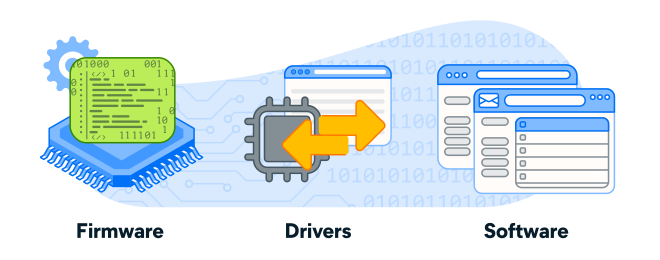 Firmware runs the device, drivers help it communicate, and software powers the user experience.
Types of firmware
There are three basic types of firmware: low-level firmware that starts up your computer, high-level firmware that keeps your computer running smoothly, and subsystem firmware that controls individual hardware parts.
Low-level firmware
Low-level firmware is the most fundamental type and performs essential tasks. It’s usually stored in Read-Only Memory (ROM) or Programmable Read-Only Memory (PROM) chips and cannot be updated. It’s programmed once with unchangeable instructions for integral operations like initializing hardware and booting up systems.
High-level firmware
High-level firmware runs more complex operations and is typically stored on flash memory chips, which can be erased and updated. It controls many device behaviors, like a phone or computer’s trackpad or touchscreen, fingerprint sensor, Wi-Fi and Bluetooth modules, and display color calibration.
Subsystem firmware
Subsystem firmware runs individual hardware components of a larger device — like the battery, CPU, and GPU in a computer. It allows each part to manage its own specialized functions and operate semi-independently while still communicating with the rest of the system to keep the device (e.g., computer) functioning smoothly.
Common firmware examples
Firmware is present in virtually all electronic devices, from gaming consoles and computers to Internet of Things (IoT) devices and modern automobiles. It manages functions such as running wash cycles in washing machines, controlling router traffic, loading operating systems, managing microwave settings, and operating a smartphone’s camera and sensors.
Firmware in computers and smartphones
One of the most common types of firmware in computers is the Basic Input/Output System (BIOS) or the newer Unified Extensible Firmware Interface (UEFI). This system firmware initializes the hardware components needed to start a computer. Firmware also supports computer peripherals. For example, firmware enables printers to handle page rendering and color conversion.
Smartphones also rely on firmware to boot up, but they don’t use BIOS or UEFI. Instead, they use firmware specific to their operating system. Phone firmware also enables individual components to function properly and interact with each other. For example, it instructs the camera on how to take a picture, process the image, and display it on the screen.
Firmware in appliances, IoT devices, and automobiles
Firmware also has many applications in home appliances and IoT devices. For instance, your washing machine has firmware that allows you to select a cycle, adjust the water temperature, or select a start time. And routers use firmware to manage data traffic and security settings.
Outside the home, many other connected devices rely on firmware to operate. For example, self-checkouts depend on it for their scanners, RFID systems, and network connectivity. Modern streetlights use firmware to schedule when lights turn on or off, detect faults, and control brightness.
In automobiles, firmware runs critical systems such as engine control units (ECUs), or engine control modules (ECM), which regulate functions like fuel injection and air intake. Modern cars often contain dozens of firmware-driven modules that coordinate safety, performance, and infotainment features.
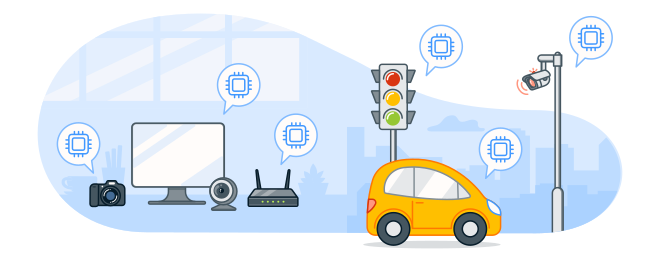 Many appliances, automobiles, and connected devices depend on firmware.
Firmware security challenges
Firmware security is critical, but it can be difficult to get right. Manufacturers often rely on third-party vendors to provide individual hardware components, and verifying that each vendor follows security best practices can be challenging. Even if high-level or subsystem firmware is secure when released, it will eventually become outdated if it doesn’t receive ongoing firmware updates.
Risks associated with outdated firmware
Outdated firmware can contain known vulnerabilities that hackers may exploit to gain access to a device. If they hack into firmware, they could inject malware, steal sensitive information, or gain remote control.
For instance, in 2015, a pair of American security researchers took over a Jeep Cherokee by using a zero-day exploit to hack into the car’s infotainment system. They then remotely disabled acceleration, causing the engine to stall. That specific fault has since been repaired, but the story is a stark example of how a vulnerability in firmware-controlled components can have serious real-world consequences.
Why keeping your firmware updated matters
Regular firmware upgrades can provide bug fixes, close security gaps, and improve performance. Ignoring or missing firmware updates doesn’t always cause immediate issues, but it could make you more vulnerable to attacks.
Besides security, keeping your firmware current can help:
-
Extend the lifespan of your hardware, saving money in the long run.
-
Avoid compatibility issues that can lead to crashes, errors, and poor performance.
-
Provide new features or functionality released with an update.
How to update firmware
Firmware updates vary by device and manufacturer, so check out the device’s user manual or the manufacturer’s website for instructions. But generally, the process will be done:
-
Automatically: Many devices automatically update firmware as long as they’re connected to the internet.
-
Through the device’s settings: Some devices require you to manually check for updates. For example, you may need to log in to your router’s settings and look for updates.
-
Using a companion app: Devices like fitness trackers often have a companion app, which will notify you when an update is available.
-
From the manufacturer’s website: The only way to update older devices is often by downloading updates from the manufacturer’s website.
Protect your devices with up-to-date drivers
Outdated firmware can expose your devices to security risks and performance issues. Avast Driver Updater helps ensure your firmware-dependent drivers are always current, boosting performance and security. Try Avast Driver Updater today and keep your device drivers fresh and your hardware running smoothly.
What customers say

More Performance Articles

How to Fix Stuck Windows Update
What Is Firmware?

How to Update Apps on an Android Phone

How to Start Your Mac in Safe Mode

What Exactly Is a Virtual Machine and How Do They Work?

Best Duplicate File Finders & Remover Tools for Windows

How to Stop, Change, or Remove Mac Startup Programs and Apps
/Academy-The-best-cleaning-software-for-Mac-Thumb.jpg)
The Best Mac Cleaner Software

Windows Issues — How to Start Your PC in Safe Mode

What Is a Bot?
/Academy-How%20to%20check%20storage%20on%20Mac-Thumb.jpg)
How to Check Storage on Mac
/Academy-The-best-cleaning-software-for-Windows--Thumb.jpg)
The Best PC Cleaner Software for Windows
Software
Performance
Adam De Gree
9-01-2026