- Security
- Privacy
- Performance
Smishing is a scam message received via text; the term is a combination of the words “SMS” and “phishing.” Smishing attacks are a common threat that cause hundreds of millions of dollars in losses each year. Learn more about smishing and how to spot it. Then, protect your devices with powerful cybersecurity software that can help alert you to phishing, scams, and malicious websites.






This Article Contains
This Article Contains
What is Smishing?
Smishing is phishing via an SMS text message: it is a social engineering scam where someone sends you a message pretending to be someone you might trust, such as your bank or a loved one, in order to fool you into revealing personal information, sending money to scammers, or clicking dangerous links.
There are many smishing scams, and they can be costly. In 2024, Americans lost nearly half a billion dollars to smishing scams. And in the first half of 2025, the number of smishing reports more than doubled compared to the same period in 2024. As such, educating yourself about them is vital for your financial well-being.
How smishing works
Smishing works by fooling targets into clicking dangerous links embedded in text messages. The ultimate aim is to get you to reveal personal information, like your login credentials, or send money directly to a scammer.
To send you smishing messages, all a scammer needs is your phone number. And it’s often pretty easy for them to get: your phone number might be listed on your social media pages, data broker sites, or it may have leaked in a data breach.
Once a scammer has your number, they compose a message to trick you into acting without thinking. They may use emotional tactics like fear and urgency to accomplish this. For example, they might tell you that your Instagram account will be permanently locked if you don’t act now. Or, they might tell you that a large amount of money was deducted from your bank account.
Clicking a link in a smishing message may send you to a fake login page or payment portal that captures your credentials or credit card information. Or, it could trigger a malware download that installs spyware onto your device, hijacking your personal info and sending it to the attacker. Alternatively, a smishing scammer may impersonate a loved one and ask you to send money via Cash App or Venmo.
Scammers can falsify their sender ID to make it seem like the message is from a trusted source. This is called phone spoofing; it could make a text look like it’s from your mom or your favorite streaming service.
Types of smishing scams
Common smishing scams include fake banking messages, account verification hoaxes, prize notifications, delivery scams, fake toll fees, and tax agency scams.
Financial institution impersonation
Scammers pose as banks, credit card companies, debt collectors, and others to scare you into taking action. They might report a suspicious transaction on your card or threaten to close your account unless you act immediately.
In a recent case in Australia, scammers impersonated Commonwealth Bank, a major financial institution with millions of customers. Targets received SMS messages informing them that their reward points were about to expire. To redeem the points, victims were urged to click a malicious link.
Account verification and service cancellation threats
Most people are used to account verification messages, so it doesn’t seem out of the ordinary to receive one from a social media account, streaming service, or other trusted entity. Scammers take advantage of your tendency to automatically click links in these messages.
They may also send messages regarding the cancellation of services or subscriptions, which could be for critical tools you need for work or managing finances. Or, they could be warnings that seemingly come from entertainment apps.
In 2025, Netflix warned its 90 million subscribers in the US and Canada of service cancellation smishing messages. The scam texts threatened users that their accounts would be closed if they didn’t update their payment info.
Prize, lottery, and reward scams
Instead of using fear, these smishing scams use hope to convince victims to click for a reward. Scammers promise anything from Starbucks gift cards to life-changing lottery wins. The message asks victims for personal information or to pay a processing fee or shipping to claim a prize. If the recipient complies, the scammers take the money and disappear.
Delivery and shipping notification texts
Around 75% of Americans receive at least one package a week in the mail. So, most people are used to receiving shipping and delivery notifications via SMS.
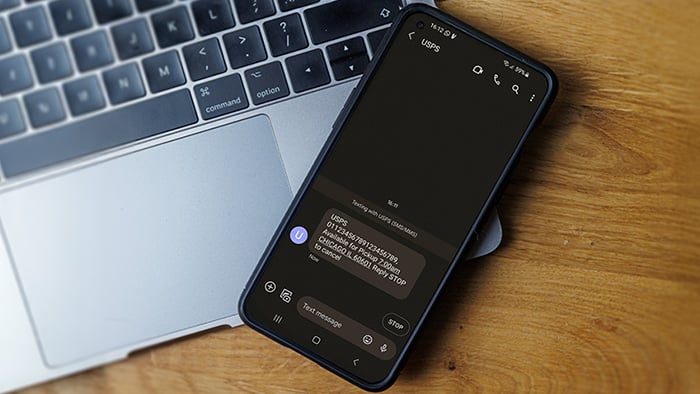
For scammers, it’s easy to slip fraudulent messages in with the legitimate ones. They impersonate USPS and private couriers like FedEx and UPS. Messages often inform you of failed delivery attempts, asking you to click a link to update your personal details or choose a new delivery date. Or, they claim you need to pay an outstanding fee to receive the package.

Fake toll road fees
If you get a text about unpaid toll fees or evasion, it’s most likely a scam. Most toll roads won’t contact you by text regarding payment matters. These fraudulent messages typically include a link to a fake payment page. If you receive one and think it could be legitimate, log in to your account from the official website or call the contact center to confirm, and never click a link in the text.
Government and tax agency scams
Receiving a message from the government can be stressful, and scammers know that you’re likely to click and read these messages carefully.
Some messages may threaten fines or audits, asking you to make a payment to avoid further action. Others may inform you of unclaimed tax incentives you can collect by clicking a link and disclosing your Social Security number (SSN) or bank details.
IRS tax scams usually surge at the beginning of each year as Americans start preparing their taxes. In 2025, these scam messages jumped by 77% in January.

Tech support and account recovery scams
Tech support smishing messages imitate well-known tech companies like Apple, Microsoft, and PayPal.
They may claim that your device has a virus or your account is locked for security reasons. Tech support scams often advise you to “contact support immediately” or “click now to recover your account.”

Business or colleague impersonation fraud
Sometimes, fraudsters imitate an employee or manager of the company you work for, requesting information or payment.
These smishing attacks can be highly damaging if they give hackers access to company devices. As a result, criminals could gain access to vast amounts of company and customer data.
In one case, a scammer posed as the CEO of a corporation. They sent texts to an employee asking to move the conversation to an encrypted platform. Then, the victim was asked to make large cash transfers to the “CEO’s” account.
Wrong number or relationship-building scams
Some scammers will try to earn your trust by building a friendship with you over time. These scams take advantage of trusting or lonely individuals.
They often begin with a text from an unknown number. If you reply, the scammer apologizes and admits to sending the text to the wrong person. However, they keep chatting with you and attempt to kindle a friendship.
This virtual friendship (or sham romance) may last for months, while the scammer gradually collects data and extracts your sensitive information or money.
“Hey mom” smishing scams
In “Hey Mom” scams, criminals send text messages pretending to be a child with a new or broken phone. They quickly shift to asking for urgent financial help, often claiming they can’t talk on the phone.
These scams work by exploiting a parent’s instinct to respond fast. The emotional pressure makes the request feel believable, pushing victims to send money before verifying the message is real.
Free malicious app downloads
Everyone likes getting something for free. Scammers commonly offer free app downloads via text, asking nothing in return. In some cases, the app is real. But victims don’t know that they’re also downloading malware.
In other cases, the app itself is malicious. For example, a fake privacy app might ask you to enter personal details so it can “scan the internet” for your information. Instead, scammers use your info to steal your identity. You can help avoid these scams by downloading apps only from official sources like the App Store and the Google Play Store.
AI-driven and automated smishing scams
AI is making it easier for scammers to perpetrate fraud at scale. AI can write and send thousands of smishing messages in an instant. It can even manage entire campaigns with little human intervention.
Some AI chatbots can engage in realistic, long-term conversations over text with humans. They use perfect grammar and spelling, and they can adapt their tone to imitate brands, government agencies, and banks.
This makes AI smishing scams very hard to detect. However, it’s not impossible to protect yourself. Simple ground rules like never giving personal info over text or clicking suspicious links can help you stay safe. AI scam detectors can also help catch AI smishing, meaning you don’t even engage.
Other emerging smishing scams
Smishing scams are constantly evolving. Scammers are always looking for new ways to trick people into replying to their texts and clicking links. Some emerging types of scams involve cryptocurrency investment advice or fake donation requests.
Opportunistic smishing scams may reference current events, like government shutdowns, mass layoffs, or changes to government benefits.
As smishing scams ramp up, stay cautious about any SMS requesting personal data or asking you to click a link. It’s always best to play it safe and not interact. If you’re ever in doubt, contact the sender via another channel.
Smishing vs. phishing vs. vishing
Smishing, phishing, and vishing are all forms of social engineering attacks involving a scammer impersonating someone to manipulate victims. The difference between them lies in the way the scammer communicates. Here’s how the three attacks differ:
-
Phishing: Phishing originally referred to email scams. Today, the term is also used as a broad category that covers many impersonation scams, including smishing, vishing, pharming, whaling, and spear phishing.
-
Smishing: Smishing (SMS + phishing) is a type of attack where a scammer sends fake text messages imitating someone you trust, such as a government agency or a family member.
-
Vishing: Vishing (voice + phishing) is a type of fraud involving phone calls or voice messages. Scammers imitate a trusted person’s voice or pretend to be someone they’re not, like a customer support representative or colleague from a different office.
How to identify and prevent smishing attacks
There are multiple ways to protect yourself against smishing attacks. Some tools will warn you of these attacks or block them before they reach your phone. For those that slip through the cracks, learning how to identify them can help you steer clear.
Use the following tips to identify and protect against smishing attacks.
Spot suspicious messages
Learning to identify suspicious messages will help you avoid the scams that slip past security. Here are some common signs of smishing messages:
-
Messages from unknown senders.
-
Messages containing links.
-
Messages that use urgent or threatening language.
-
Any request for personal information.
-
Any request for payment.
-
Any request to download something.
-
Too-good-to-be-true offers.
-
Unexpected prizes, rewards, or refunds.
-
Poor grammar and spelling or unnatural phrasing (although scammers can also use AI to improve their messaging).
If you receive a suspicious message from a known sender, it might be a spoofed text. Attackers can falsify the sender ID, so it appears to come from a number or business you recognize.
Verify if it’s a fake text by contacting the sender using another medium like social media or email, or look up the phone number on the official website and call them.
Use your phone’s built-in security features
Your phone has security features built in to help protect you from spam texts. But you may need to turn them on.
On iPhone, you can set your device to filter messages from unknown senders. These messages are placed in a separate inbox, where you can view them more carefully.
To do this, open Settings in the Messages app and toggle on Filter Unknown Senders.
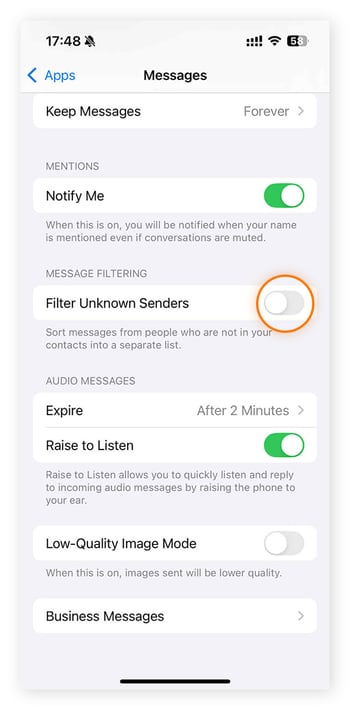
Androids don’t come with this feature, but you can turn on Scam protection in your messaging app settings to help protect your SMS inbox. Or, use a dedicated app that filters unknown numbers and spam, like SpamHound.
If you get a fake text message, you should report it. On most phones, you can tap and hold the message or the sender to trigger a pop-up menu and report the message as spam. This will stop the same number from reaching your phone again.
To benefit from your device’s security, it’s important to update your phone regularly — set up automatic updates so you don’t forget. Updates include security patches that can help prevent the latest scams and fix vulnerabilities.
Add extra security with multi-factor authentication
Multi-factor authentication (MFA) or two-factor authentication (2FA) can help protect your accounts if you fall victim to a smishing attack.
MFA is a security measure that requires you to provide two forms of authentication to log in to an account (e.g., your password plus a code sent to your phone).
If you accidentally give away sensitive information to a scammer, such as login details, hackers still won’t be able to access your accounts because they only have one form of authentication. According to Microsoft, adding MFA can prevent 99.9% of attacks on accounts.
Use anti-phishing and security apps
Downloading security apps like anti-phishing and antivirus software can give your phone an extra layer of security beyond its built-in features.
Some apps can scan, filter, and block malicious messages before they hit your inbox. Others may add scam alerts to suspicious messages, prompting you to think twice before opening them.
Security tools can also help protect you if you unwittingly engage with smishing scams. Access to malicious sites may be blocked, and downloads containing malware might be scanned and quarantined before they can do damage.
Protect yourself against smishing with Avast
Smishing attacks are common, and new technology is making scam texts harder to detect. Smishing can compromise your personal data, your devices, and your finances. Avast Free Antivirus comes with malware protection and the AI-powered Avast Assistant — simply upload a suspicious message and it will analyze whether it’s a scam or not.
FAQs
How can I recognize a smishing text?
Smishing texts almost always try to pressure you to click a link or reply with personal information. They often use urgent, threatening, and emotive language. Other tell-tale signs of smishing messages include too-good-to-be-true offers, spelling and grammar errors, unexpected notifications, and freebies.
What should I do if I fall victim to a smishing attack?
If you fall victim to smishing, the first thing to do is stop engaging with the sender and block them. If you’ve downloaded something or clicked a link, disconnect from the internet right away and run an antivirus scan. Next, change your passwords for any accounts that may have been compromised. If your financial accounts are at risk, call your bank to secure them.
Are there any tools to help prevent smishing?
Yes, there are built-in tools on your phone and third-party apps to help prevent smishing. You can turn on message filtering or scam protection from the settings menu of messaging apps. The AI-powered Avast Assistant can also help you identify scam messages if you’re ever unsure.
What customers say

More Security Articles
What Is Smishing and How to Avoid It

What Is Vishing? Definition, Attack Methods & Prevention

How to Spot and Prevent IP Spoofing

How to Spot Amazon Phishing Emails and Beat Scammers
What Is Pharming and How to Protect Against It

Spear Phishing: What Is It and How Can You Avoid It?
/Academy-How-to-stop-phone-spoofing-Thumb.jpg)
What Is Phone Number Spoofing and How to Stop It

What Is Spoofing and How Can I Prevent it?
/How-to-spot-and-avoid-Apple-ID-phishing-scams-Thumb.jpg)
How to Identify and Prevent Apple ID Phishing Scams
Phishing
Security
Ben Gorman
17-12-2025