- Security
- Privacy
- Performance
Secure messaging apps stop snoops from peeking at your conversations or stealing your personal data. The best messaging apps use encryption to ensure your chats are truly private. Check out our roundup of the most secure messaging apps on the market. And get a VPN to encrypt all your web traffic, no matter which messaging app you use.




This Article Contains
This Article Contains
What are secure messaging apps?
Secure messaging apps use encryption to keep the contents of communications private and prevent unauthorized parties from accessing your chats and calls. The most secure messaging apps use end-to-end encryption, ensuring that only the message sender and recipient can see the correspondence.
A secure messaging service with encryption protects your data and boosts your overall privacy. If you’re using an unencrypted messaging app, your communications could be exposed to the company running the app, advertisers, and hackers — not to mention what could happen in the event of a data breach. Your private information could even be sold online or used for identity theft and other cybercrimes.
With so much personal data stored on your phone, it’s an open target for attacks. Protect yourself by learning the signs of phone hacking, securing your devices with strong passwords, and using one of the best password managers to keep track of them all.
If you're concerned about a family member or someone else using your phone and seeing certain apps, you can also hide apps on your Android or iPhone to enhance your privacy.
What encryption can — and can’t — protect
Most secure messaging apps employ end-to-end encryption (E2EE), ensuring no one but the sender and recipient can read messages — not even the service provider. Think of it like a sealed envelope: the messaging service delivers it, but only the sender and intended recipient know what’s inside it. Some apps, including Signal, also regularly refresh encryption keys, limiting the impact if a key is ever compromised.
But while E2EE secures messages in transit, it doesn't hide metadata such as who you're messaging or when you contacted them. It also can't protect your messages if they are accessed via an unlocked phone, linked devices, or unencrypted cloud backups. And bear in mind that encrypted connections via secure messaging apps can still deliver malicious content such as phishing.
But end-to-end encryption isn't available in all messaging apps — even those generally considered to be secure. Notably, Instagram discontinued E2E-encrypted DMs on May 8, 2026, meaning that, while still encrypted in transit, the service itself can technically access the contents of messages.
For highly sensitive information — such as financial details, identity documents, or medical records— be sure to choose a messaging app that offers end-to-end encryption, such as Signal, WhatsApp, or iMessage.
How to choose a secure messaging app
There’s a variety of encrypted messaging apps out there. But beware: Some supposedly secure messaging apps are actually fake apps, while others don’t adequately protect your data. The best encrypted messaging apps all contain essential features to keep you safe.
When choosing a private messaging app, make sure it has these key features:
-
Open-source code
When an app’s source code is available to the online community, it ensures that the app is put through more security tests. Also, it’s regularly checked for bugs and other vulnerabilities that may cause a malware infection. -
Encryption
Your data is highly sought after by cybercriminals and advertisers. The best encryption software makes sure your personal data stays private. A secure messaging app offers end-to-end text encryption to enforce privacy. -
Privacy policy
If you care about your privacy, make sure the companies providing your apps do too. A secure messaging app adheres to company policies that respect your privacy and protect your data. -
Responsible data collection
Though many secure messaging apps use encryption, they can still collect metadata about you, including device info, your IP address, and geolocation. The most secure apps don’t collect this information, or they let you easily opt out of data collection.
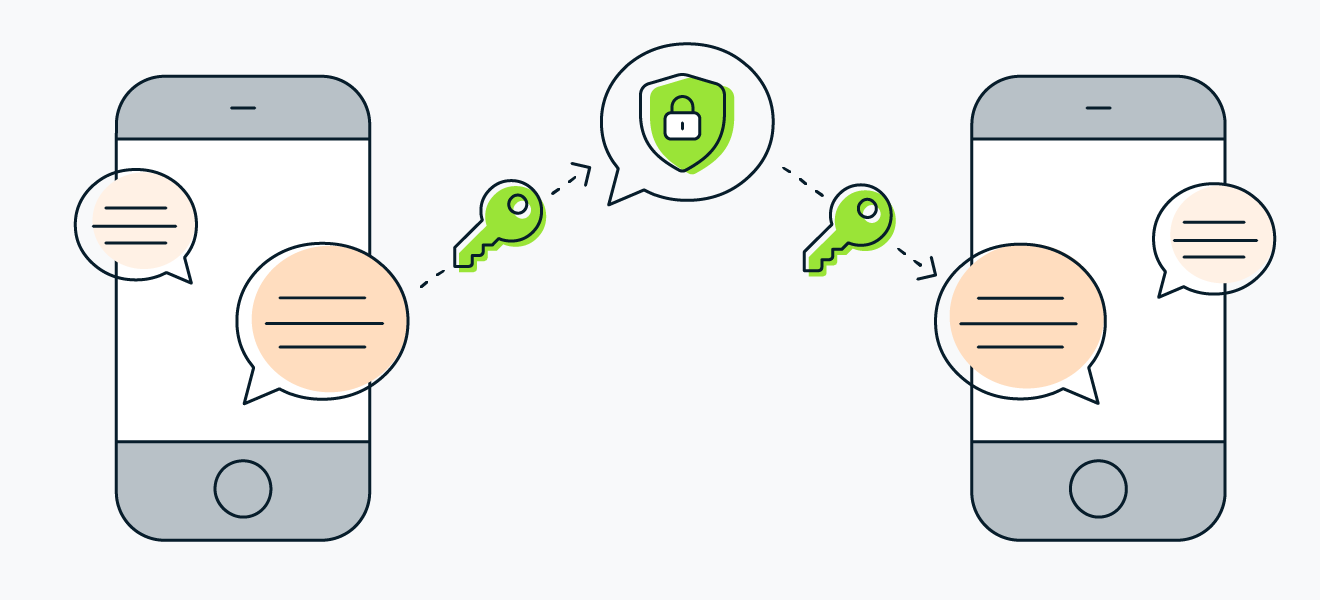 Secure messaging apps use encryption to keep communications private.
The best encrypted messaging apps for your phone
We’ve rounded up the top contenders for the best secure messaging service. When compiling our list, we considered key security benefits as well as features, usability, price, and more.
Here’s our list of the best encrypted messaging applications:
The world’s most popular standalone chat and voice app, WhatsApp has over three billion monthly active users (as of 2025) — so it’s very likely that many of your contacts already use it.
WhatsApp uses end-to-end encryption and allows encrypted backups of all your chats, though you'll need to enable the feature and securely store your backup password or recovery key. The messages you send are not stored on WhatsApp's servers, and two-step verification adds an extra layer of security by requiring a PIN when registering your phone number on a new device. And since the app uses limited background data, you may even save on your phone bill.
A drawback to some is that WhatsApp is owned by Meta (formerly Facebook). WhatsApp shares information with other Meta companies, so your data could be used for targeted advertisements. Also — perhaps due to its wide usership — WhatsApp has been used as a platform for spam text messages and even spyware attacks.
 Pros:
Pros:
-
End-to-end encryption — including backups
-
Wide user base
-
Cross-platform flexibility
-
Free
 Cons:
Cons:
-
Owned by Meta
-
Data sold to advertisers
Telegram
Telegram works similarly to WhatsApp and other secure text apps. It lets you message and call other Telegram users, have group chats, and send files. Telegram features a smooth, intuitive interface that’s especially great for group messaging (up to 20,000 participants!). Beyond messaging, Telegram is also a popular social media platform.
Telegram has two kinds of chats, and the difference has major privacy and security implications. The default is Standard Cloud Chats, which are stored on Telegram’s servers so you can access them from any device, but they are not E2E-encrypted, which leaves your data vulnerable if their servers are breached. To use E2EE on Telegram, you have to start what’s called a Secret Chat, which is tied to a single device and does not sync across your other devices.
Pros:
-
Intuitive interface, especially for group chats
-
Multi-platform friendly, with easy data syncs
-
Free
Cons:
-
End-to-end encryption not enabled by default
-
Cloud-based storage could leave your data at risk
Signal
Considered one of the most secure messaging apps on the market, Signal protects your communications with end-to-end call and text encryption. Its encryption protocol is so secure that other leading apps like WhatsApp and Facebook messenger use it too.
Crucially, privacy is not an optional mode you have to find in the settings. Signal encrypts everything by default. You can also verify safety numbers with a contact to confirm you’re not chatting with an impostor.
Like other apps, Signal features messaging, calls, video chats, and file and photo sharing. It also allows disappearing messaging for extra privacy. You need a phone number to sign up, and we recommend securing the app with a password. For the security-minded, all your data is stored locally on your device — not on remote servers.
Signal is not owned by a Big Tech company — instead, it’s open source and funded by grants and donations. Unlike other private messaging apps, Signal has no ads, affiliates, or secret tracking — no need to fuss with a do not track option. Plus, its open-source status means the app goes through continuous security audits to make it even more secure.
Pros:
-
Open source and default end-to-end encryption
-
Not owned by Big Tech
-
Password-protection feature
-
Disappearing messages
-
Free
Cons:
-
Requires a phone number
-
Basic features compared to other apps
Threema
Threema is an open-source, totally encrypted messaging app whose company headquarters are in Switzerland. Like other apps, it features messages, voice and video calls, and group chats. But unlike its competitors, Threema does not require a phone number or email to use, making it one of the best secure messaging apps for anonymity.
Threema emphasizes protecting metadata. It permanently deletes a message from its servers after it’s delivered. To limit eavesdropping, Threema prefers managing information locally on user devices rather than servers.
The downside for the powerful security Threema provides is that it’s not free. Also, the app has yet to catch on outside the German-speaking world.
Pros:
-
End-to-end encryption
-
No phone number or email required
-
Protects metadata
Cons:
-
Not free
-
Mostly used by German-speakers
iMessage
Apple’s iMessage uses end-to-end encryption for conversations between Apple devices, which appear as blue bubbles in the Messages app. Messages shown as green bubbles are sent using SMS, MMS, or, in some cases, RCS, which usually don’t offer end-to-end protection. So, the level of data security provided within the Messages app is heavily dependent on the messaging protocol being used.
Data in iMessage can be backed up to Apple’s cloud storage platform iCloud. Though it’s a convenient way to transfer and store data, iCloud is vulnerable to hacks that could compromise your private data.
And though your messages are encrypted, phone numbers and contact lists are listed in plain text. Plus your metadata is not encrypted — leaving hackers an opening to access your device. To stay safe on iOS while using iMessage, use the best privacy and security apps for iPhone.
Pros:
-
End-to-end encryption between users
-
Sleek, simple interface
-
Free
Cons:
-
Messages sent to non-Apple devices fall back on unencrypted SMS/MMS
-
Encryption limited to messages
-
Only available for Apple products
-
iCloud backups can put data at risk
Facebook Messenger
Facebook Messenger is one of the world's most widely used messaging apps, offering one-to-one and group chats, voice and video calls, file sharing, stickers, disappearing messages, and other communication features. Since 2024, Messenger has enabled end-to-end encryption by default for personal messages and calls, replacing the earlier opt-in "Secret Conversations" feature. This means the contents of your conversations are protected from interception while in transit.
However, encryption is only one aspect of privacy. Meta has faced ongoing scrutiny over its data collection practices and previous privacy controversies. Because Messenger is closely integrated with your Facebook account, maintaining strong account security — including a unique password and multi-factor authentication — is just as important as the encryption protecting your messages.
Want to know what Meta already knows about you? You can download your Facebook data to find out.
Pros:
-
E2EE enabled by default
-
Widely used
-
User friendly interface
-
Option for disappearing messages
-
Free
Cons:
-
End-to-end encryption isn’t enabled by default
-
Questionable privacy policies
-
User data collection
Viber
Viber is one of the more feature-rich encrypted messaging applications available. Along with standard messaging and voice and video calls connected to your phone number, it features disappearing messages and hidden chats. Viber also includes some fun AR filters and stickers for your photos.
You can also sync Viber across your desktop and mobile devices for easy accessibility.
Viber uses end-to-end encryption and features a unique color-coded indicator to show you a conversation’s level of protection. Green means the chat is encrypted and the contact is trusted. Gray means the chat is encrypted but the contact has not yet been marked as trusted. Red indicates the contact can’t be authenticated.
Viber doesn’t have as extensive a user base as some other secure chat apps on our list, so a lot of your contacts may not be on the app. And you need to pay a fee when calling non-Viber numbers.
Pros:
-
End-to-end encryption
-
Lots of secure and fun features
-
Syncs across desktop and mobile
-
Color-coded security indicator
Cons:
-
Somewhat more limited user base
-
Must pay to call non-Viber numbers
Line
Line was created in the wake of the 2011 Tōhoku earthquake and tsunami in Japan. After the disaster disrupted normal means of communication, the internet company Naver created the app for its employees. Once opened to the public, Line spread in popularity throughout Japan and the rest of Asia.
Line offers standard messaging, voice and video calls, and file sharing. But the fun extras set it apart. Virtual stickers, animated emojis, games, and even a taxi-ordering tool. The app also has end-to-end encryption, but not by default.
Though a fun and secure app, Line has yet to catch on outside of Asia. You can register to use the app with your phone number or your Facebook login.
Pros:
-
Unique features and extras
-
End-to-end encryption
Cons:
-
You have to opt-in for encryption
-
Not popular outside of Asia
Google Messages
This private messaging app comes standard with Android phones. Google Messages uses the new RCS (rich communication services) protocol by default. Safer than SMS, RCS can handle payments, high-res photos and file sharing, location sharing, video calls, and other features.
On top of that, Google Messages has end-to-end encryption by default. Plus, it’s open-source technology so it’s regularly tested for vulnerabilities that may turn into security exploits.
Although Google Messages can also be used in a web browser, RCS was originally centered on Android. That changed when Apple added RCS support in iOS 18 in 2024, bringing richer media, read receipts, typing indicators, and better group messaging to Android–iPhone conversations.
The important caveat is encryption. RCS between Android and iPhone was not end-to-end encrypted at launch, but Google and Apple began rolling out end-to-end encrypted RCS across both platforms in 2026. Until you can clearly see that encryption is active in a specific chat, do not treat RCS as equivalent to Signal, WhatsApp, or iMessage.
Pros:
-
End-to-end encryption by default
-
New RCS protocol
-
Open-source technology
-
Standard on Android devices
Cons:
-
RCS protocol only for Android devices
-
Cross-platform RCS encryption is still rolling out
How to keep your messages private
Choosing a secure messaging app is important, but your habits play an equally significant role in protecting your conversations. Most messaging account compromises happen because attackers exploit weak security practices rather than flaws in the encryption itself.
These steps can help keep your messages private:
-
Enable extra account protection: Turn on two-factor verification (2FA) or a registration lock whenever it's available. WhatsApp and Telegram support 2FA, while Signal offers a registration lock to help prevent unauthorized account access.
-
Review linked devices regularly: Every connected laptop, tablet, or browser session provides another way to access your messages. Periodically review your linked devices or active sessions and remove any you don't recognize.
-
Secure your backups: If your messaging app offers E2EE backups, enable the feature and store your recovery key or password somewhere safe. Otherwise, your cloud backups may not provide the same level of protection as your live conversations.
-
Protect verification and pairing codes: Treat login codes, QR codes, and device-pairing requests like passwords. Only approve them if you initiated the process yourself, and never share verification codes with anyone.
-
Be skeptical of urgent requests: Messages urging you to send money, share verification codes, or act immediately are common social engineering tactics. If a request seems important, verify it through another trusted communication channel before responding.
Get a VPN to secure all your online communications
A secure messaging app may protect the messages you send and receive while using the app, but what about the rest of your online activity? A VPN like SecureLine VPN creates a secure tunnel to encrypt all your communications. That way, you don’t have to worry about the particular protection offered by an individual app, because all your messages and data are protected.
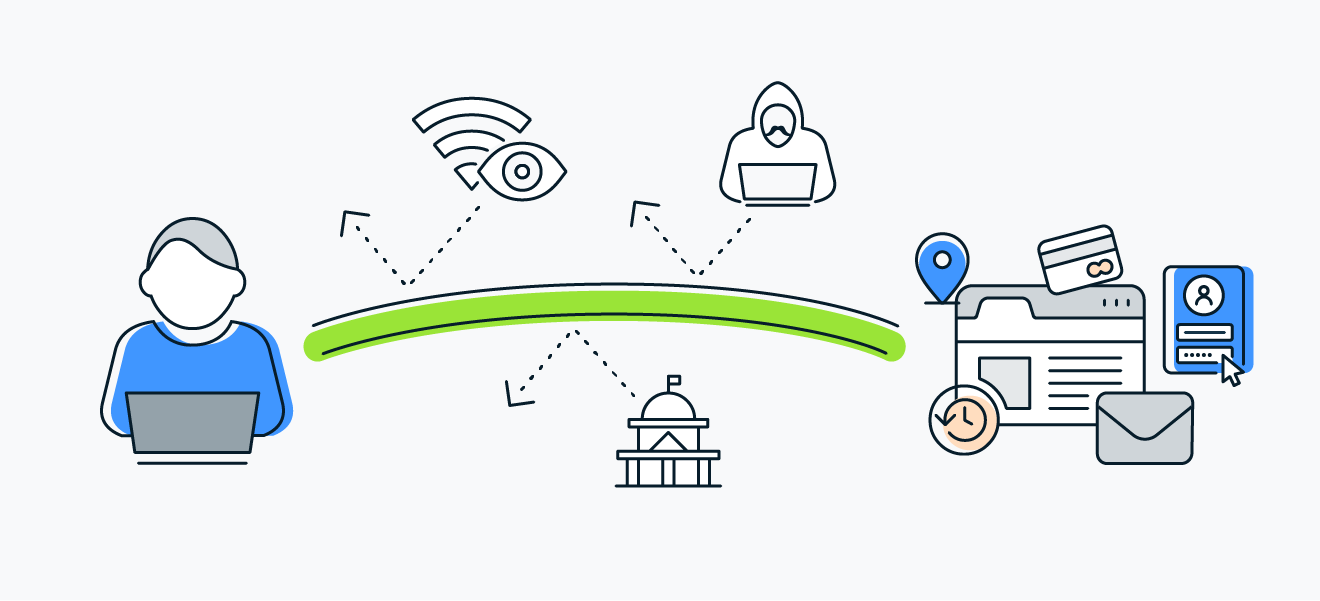 A VPN provides an encrypted tunnel to secure your messages and other communications.
Get powerful protection against hackers and secure your communications from your ISP and other snoops. SecureLine VPN hides your online activity and helps protect you from today’s myriad online threats — especially when you’re on public Wi-Fi. Plus, with lightning fast connection speeds, you can access content and stream all your favorite shows. Install SecureLine VPN right now.
FAQs
What messaging app is the most secure?
According to our privacy experts, Signal is probably the most secure messaging app. Its open-source encryption protocol has become the industry standard for end-to-end message and voice encryption. And Signal is funded by donations and grants, so it isn’t incentivized to monetize data. Privacy is enabled by default, and you can verify safety numbers to confirm you're communicating with the intended person rather than an impostor.
For strong anonymity, Threema is another solid option. It's automatically E2E-encrypted, doesn't require a phone number or email to sign up, and minimizes the metadata it stores.
What is the most secure messaging app?
Overall, Signal is widely regarded as one of the most secure messaging apps available. E2EE is enabled by default via the open-source Signal Protocol, and it includes additional security features such as registration lock and safety number verification to help protect accounts and confirm you're communicating with the intended recipient.
Is Telegram the most secure messaging app?
Telegram is not the most secure messaging app. Telegram does not use end-to-end encryption by default — you’ll have to switch to its secret chat mode. Plus it uses its own MTProto encryption protocol, which, though it hasn’t been cracked, is not as proven as other protocols.
What texting app is not traceable?
Threema is nearly untraceable. It uses encryption, open-source technology, and doesn’t require an email or phone number to sign up. It protects your metadata and permanently deletes messages after they’re sent. Of course, we can’t guarantee that Threema is completely untraceable, and you can use a sniffer to monitor internet traffic and check for yourself.
What customers say

More Privacy Articles

Avast expands SecureLine VPN with Double VPN, IP Rotation, and more
Are free VPNs safe?

Can You Be Tracked While Using a VPN?

What Is VPN Split Tunneling?
VPN Kill Switch: What It Is and Why It Matters

What Is a Replay Attack and How Does It Work?

How to Fix The “Connected Without Internet” Wi-Fi Issue

Understanding AES Encryption: What Is the Advanced Encryption Standard?

Is Telegram Safe? A Guide to the Secure Messaging App

How to Encrypt Email on Gmail, Outlook, iOS, Android, and Other Platforms

VPN Protocols Explained and Compared

How to Use a VPN for Streaming TV Shows and Movies
VPN
Privacy
Deepan Ghimiray
23-02-2023