- Security
- Privacy
- Performance
Sophisticated cybercriminals aim to cause harm without leaving a trace, and fileless malware is a key tool in their arsenal. This stealthy cyberthreat slips into systems like a phantom, lurking in host devices’ RAM. Learn why fileless malware is so hard to detect and what strategies you can use to protect against it, including using powerful security software.






This Article Contains
This Article Contains
What is fileless malware?
Fileless malware is malicious code that infiltrates a computer system without leaving an obvious footprint, unlike traditional viruses or other types of malware that typically create trace files. Instead, fileless malware lives entirely in a computer’s random access memory (RAM) and weaponizes trusted system tools to execute harmful processes and steal data.
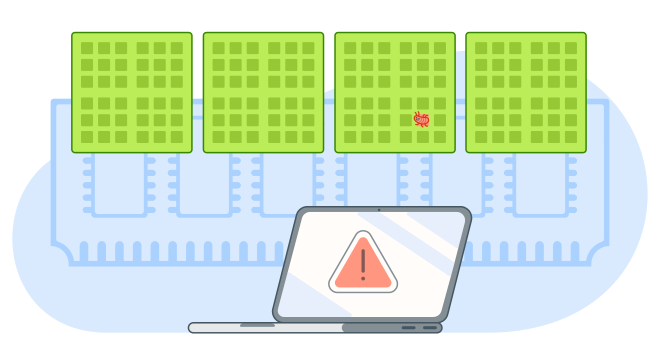 Fileless malware hides deep in the system memory rather than on the disk.
Attackers launching fileless malware attacks often use legitimate built-in programs and commands on your PC to blend in with normal system activity. Tools that fileless malware can leverage include:
-
PowerShell.
-
Windows Management Instrumentation (WMI).
-
VBScript.
-
JScript.
-
Batch files.
-
System utilities, such as mshta.exe and rundll32.exe.
Because fileless malware generally blends in with normal system activity, it’s difficult to detect, as antivirus programs typically search for infected files as evidence of malware lurking somewhere on the system. Without that file-based evidence, traditional antivirus software may completely overlook the presence of fileless malware.
How does fileless malware work?
Fileless malware infections typically begin when a victim downloads a harmless looking document or executes a script they think is innocuous, but is actually infected with malicious code. This action prompts a program like Powershell to activate behind the scenes, and the bad code is loaded directly in RAM.
Once it’s active, fileless malware can download additional payloads, deploy spyware, harvest sensitive data, or alter system settings, all while blending in with normal system activity.
This technique turns legitimate system tools into weapons, allowing attackers to blend in and operate without leaving the obvious file-based traces typical of traditional malware.
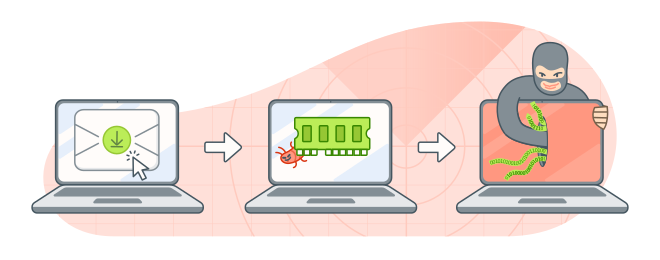 Once the victim downloads the malware, it sneaks into the RAM, and sends stolen data to the hacker.
Here’s a more detailed breakdown of how a fileless malware attack develops:
Gaining access
First, the hacker must gain unauthorized access to the system they’re targeting. Fileless attacks usually begin by reaching out to the victim with a malicious link in a phishing email, an infected attachment, a drive-by download (malware that’s automatically downloaded from an infected website), or hidden code injected into a trusted app through a “backdoor”.
If the user responds as intended, by clicking on a fake link or downloading a compromised document, for example, the fileless malware can trigger a built-in program to run a script, allowing harmful code to run on the device’s memory.
Establishing persistence
Once in place and activated, fileless malware aims to remain under the radar so it can execute more harmful processes or steal more data before it’s detected.
It operates lightly, continuing to run in RAM and avoiding creating any files that could give it away to an antivirus or malware scan. It may store scripts inside registry keys, set up WMI events that automatically relaunch the malware when you restart your system, or create sneaky scheduled tasks.
Data exfiltration
Fileless malware uses built-in tools and commands common on computers, such as PowerShell, CertUtil, or mshta.exe, to move around the system or quietly exfiltrate data. Some fileless threats can even encrypt your files or steal passwords from memory. Since the stolen data usually blends in with regular network traffic, these attacks can run amok without raising red flags.
Common types of fileless malware
Fileless malware, like regular malware, comes in lots of different forms. But they all have one thing in common: they operate without leaving the usual file traces typical of traditional malware. Instead, they run in temporary memory and hijack built-in system tools, making detecting any type of fileless malware more difficult than detecting standard file-based attacks.
These are some of the most common varieties of fileless malware:
 Memory-resident malware
Memory-resident malware takes root in a system’s RAM. It covers its tracks by rarely writing to disk, making the work of traditional antivirus tools incredibly difficult. This fileless super-villain typically infects computer systems through network gateways and firewalls and only runs when the system is powered on, carrying out its tasks quietly in the background.
A well-known example is Duqu 2.0, which rocked the IT security industry in 2015. The highly sophisticated cyberespionage tool infected computers in hotels in Austria and Switzerland, which were sites of international negotiations over Iran’s nuclear program.
 Registry-based malware
Registry-based malware hides its malicious code or commands inside the Windows registry, which it uses as both a launch pad and mechanism to establish persistence. Instead of relying on a traditional executable file, it embeds scripts or encoded payloads directly into registry keys. This cunningly allows the malware to reload itself every time the system starts.
The trojan malware variants, Poweliks and Kovter, became infamous for using this technique and staying deeply undercover while leaving virtually no footprint.
Poweliks was one of the earliest, widely-recognized fileless threats, storing its malicious JavaScript directly in the registry and using legitimate system tools to execute it. Kovter began as a file-based threat but later evolved into a mostly fileless malware family, using registry-stored payloads to support click-fraud, ad-injection, and remote attacker control while minimizing its footprint on disk.
 WMI- or Script-Based Attacks
These attacks exploit trusted Windows tools such as WMI and PowerShell to execute malicious commands directly from the device’s memory. They “live off the land,” blending in with regular system activity and aiming to avoid writing anything suspicious to disk to prevent incriminating themselves.
These script-driven methods are among the most common forms of fileless attacks, because they rely on tools the operating system already trusts. Instead of dropping a traditional executable file, attackers abuse PowerShell, WMI, or other scripting engines to load malicious code directly into memory or retrieve it from a remote server. The FIN7 intrusion campaign, which frequently leveraged PowerShell and JavaScript-based loaders to carry out stealthy, fileless operations, is one of the most well-documented script-based fileless malware attacks.
Detecting fileless malware
Fileless malware’s LOTL approach means it can slip past defenses like traditional antivirus software and any cybersecurity systems that rely solely on signature-based detection (looking for known files), whitelisting, and sandboxing.
Potential victims facing these threats instead need to rely on software that focuses on behavior-based detection, monitoring for unusual script activities, abnormal PowerShell use, and suspicious processes running in memory.
These are two of the main ways modern cybersecurity programs or apps aim to detect fileless malware:
Indicators of attack vs. indicators of compromise
Because fileless malware doesn’t involve any compromised files that signature-based detection tools can identify as risky (known as reactive evidence or “indicators of compromise”), fileless malware defense relies on proactive evidence or “indicators of attack.” These can include signs that something suspicious is happening, like PowerShell executing unusual processes or unexpected scripts running.
Deploying tools that can spot suspicious behavior as it occurs, rather than just detecting the aftermath, is the key to catching an attack and, hopefully, stopping it before it causes real damage.
Behavioral analysis techniques
The backbone of fileless malware detection is watching what the system does, not what files it creates or stores. Cybersecurity features like real-time monitoring, script block logging, and detailed process-behavior tracking can spot unusual activity as it happens, exposing threats that would be invisible to purely signature-based security.
To identify anomalies, cybersecurity tools often have to first create a baseline of what normal behavior looks like, a process that’s increasingly powered by AI and machine learning technology.
How to prevent fileless malware attacks
Effective defenses against fileless malware should be proactive, because they need to catch the malware in the act of exploiting trusted system tools, as opposed to picking up on evidence it leaves behind. And, since fileless attacks rely on many of the same exposure methods as traditional malware, being aware of common cyberthreat attack vectors like phishing, compromised software, and infected attachments is also critical.
These are some of the best ways to help protect your devices against the risk posed by fileless malware:
-
 Avoid suspicious links and attachments. Many fileless malware infections start with phishing attacks, so be cautious about opening or interacting with unexpected emails, links, social media messages, or attachments. They could be a social engineering ploy to sidestep your defenses, hoping you act without thinking and inadvertently give the malware access to your system.
 -
Keep your OS and other software and apps up to date. Keeping your operating system and individual apps or programs updated with the latest patches helps ensure that you’re protected against attack vectors that aim to exploit weaknesses in outdated software versions.
-
Use trusted security software. Although some traditional antivirus apps might not be much help against fileless malware, modern solutions like Avast Free Antivirus combine signature-based protection with behavioral monitoring and other features that can help you defend against scams, ransomware, zero-day threats, and other types of malware.
-
Disable macros in Office files. Many fileless attacks involve the harmful code-triggering scripts in documents to extract sensitive information or cause other damaging effects. Disabling macro functionality in your Office suite can help prevent macro viruses from doing this, effectively blocking subsequent fileless attacks.
-
Use restricted PowerShell policies. Changing your PowerShell policy gives you more control over what scripts are allowed to do, or even if they can run at all, which can cut off one of the main fileless malware attack methods. If you have admin rights, you can, for example, switch PowerShell to Constrained Language Mode or enforce Execution Policies (like AllSigned or Restricted).
-
Enable PowerShell logging. PowerShell logging creates a record of all commands that are run, helping you spot unusual requests early. This can make it easier to investigate what’s happened if you notice suspicious signs that seem to point towards a malware infection.
Enterprise-level prevention strategies
Fileless malware can target businesses, too. But a multi-pronged security approach that includes keeping systems patched, using behavior-based detection tools, and educating employees can help reduce the risk of internal systems becoming compromised.
A Security Operations Center (SOC) or a managed threat-hunting team can keep an eye out for anything unusual. At the same time, EDR/XDR security tools monitor devices in real time and flag suspicious behavior. Companies can also use application whitelisting to allow only approved apps to run.
Access to powerful system tools like PowerShell and WMI should be limited to the people who genuinely need them. Following least-privilege or zero trust permissions helps keep systems safer by containing any damage.
In short, effective prevention isn’t about blocking files, but about controlling behavior and using tools to spot malicious activity before it does harm. The good news for IT teams battling these new-age threats is that while there are many fileless malware variants, they tend to operate in very similar ways.
Help protect your system from fileless malware today
Avast Free Antivirus offers a combination of features that can help you defend against traditional malware, fileless malware, and other online threats. With behavioral analysis, real-time protection to keep your devices more secure as you browse online, and an AI-powered scam detecting assistant, it can help you protect against the diverse attack vectors cybercriminals can exploit. Download Avast Free Antivirus now and stay ahead of evolving threats.
What customers say

More Security Articles

What is fileless malware, and how can you help prevent it?

Can You Run Windows Defender and Avast at the Same Time?

Malicious Code: What Is It and How Can You Prevent It?

What Is Spyware, Who Can Be Attacked, and How to Prevent It

What Is Malware? Definition, Types & How It Works
/What-is-scareware-and-how-to-remove-it-Thumb.jpg)
What Is Scareware? Detection, Prevention, and Removal

Pegasus Spyware: What Is It and Is It on My Phone?

How to Detect and Remove Spyware From an iPhone

What Is the Mirai Botnet?

The Zeus Trojan: What it is, How it Works, and How to Stay Safe

How to Remove a Virus From Your Router

What Is Trojan Malware? The Ultimate Guide
Malware
Security
Nicola Massier-Dhillon
22-12-2025