- Security
- Privacy
- Performance
Fake virus alerts are more than just a nuisance — falling for one could install real malware onto your device. Learn how to spot fake virus warnings and pop-ups, then get a powerful digital security app to help secure your devices against online threats.







This Article Contains
This Article Contains
What is a fake virus?
A fake virus is an online warning message that falsely claims your device is infected and must be fixed. Fake virus alerts are a form of scareware designed to imitate a real virus warning and panic you into downloading or buying fake virus protection. But if you click a fake virus pop-up, rather than installing real antivirus software on your device, you may actually download malware.
How to spot a fake virus warning
To spot a fake virus warning, first check where it appears. Alerts inside a browser tab or webpage are more likely to be fake than notifications from your operating system or trusted security software. Other red flags include urgent or threatening language, suspicious links, repeated pop-ups, and demands to download software, call a number, or pay for a fix.
 Signs of a fake virus warning include a slow device, intrusive alerts, and requests to call tech support.
Here are some of the signs that a pop-up virus alert is fake:
-
You don’t use antivirus software. Only software installed on your device can complete a full scan for viruses — if you don’t have an antivirus, you won’t get genuine virus warnings.
-
You have an Apple product. Virus warnings that appear in a browser on iOS or macOS are typically fake alerts from websites, not system notifications. Legitimate Mac security software only displays real malware or threat warnings outside the browser.
-
A high number of viruses are detected. If the pop-up claims there are multiple instances of malware on your device, it is usually a scare tactic.
-
The alert behaves unexpectedly. If pop-ups automatically launch a new browser window, block or freeze your screen, or can’t be closed, they are probably fake virus alerts.
-
You can’t install a real antivirus. Certain types of pop-up malware can prevent you from installing legitimate antivirus software like Avast One.
-
The warning is ambiguous. Fake virus alerts often lack details about the threats they warn you about. If the message is vague, it’s probably an attempt to trick you.
-
The alert is poorly written. Pay attention to the quality of language used in the alert — poor grammar and spelling mistakes are red flags.
-
There are URL or brand discrepancies. Scammers pretending to be a legitimate brand may use slight variations of the company’s name, e.g. “Avasst” or “Avvast.” Watch for brand misspellings or incorrect domains.
-
There is a sense of urgency. Exclamation marks, time-limited offers, and calls to act immediately within pop-ups are a way to pressure you into making a quick decision.
-
You are notified repeatedly. Excessive, frequent, and intrusive virus messages may signal a potential scam — legitimate antivirus programs typically provide timely and measured notifications.
-
You need to pay for a resolution. Be skeptical of alerts urgently demanding payment to resolve the issue. Reputable free antivirus programs may recommend an upgrade for improved security but won’t force payment to remove a virus.
-
You need to call tech support. Real antivirus warnings don’t include a phone number. If you call the number on a pop-up fake virus alert, you will be connected to scammers who will try to steal money and access your private data — this is a type of tech support scam.
What is an example of a fake virus alert?
Examples of fake virus alerts include malvertising, fake system tray notifications, and copycat advertisements. No matter what type of fake virus warning you see, the purpose is the same — to infect your device or scam you out of money.
Fake versions of real pop-ups
Scammers will try to mimic genuine notifications from legitimate antivirus brands by closely matching their designs and illegally using their logos.
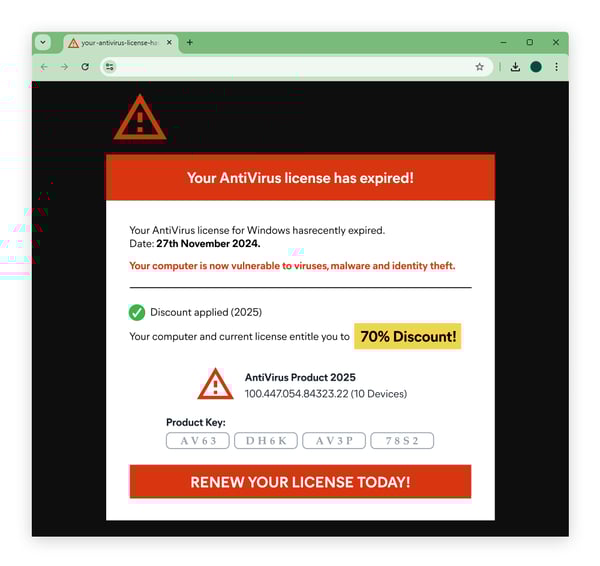
The fake McAfee pop-up, a Trojan spyware alert scam, is an example of this in action. The fake pop-up uses the familiar McAfee logo to seem trustworthy while scaring people into clicking a malicious download link and handing over money to get “protected.” This type of fake virus alert can be convincing, but pay attention to exaggerated or fear-mongering language.
Malvertising
Malvertisements are ads infected with malware displayed on legitimate websites. Cybercriminals purchase online ad space from advertising networks so they can display their fake virus alerts across the web.
While malvertising remains an active and evolving threat, these historical examples show how this tactic has been used in practice:
-
In the first 6 months of 2026, malvertising represented almost 30% of threat detections according to Gen telemetry.
-
In 2023, fake Webex adverts on Google tricked victims into downloading malware known as BatLoader.
-
In 2016, visitors to the free version of the music streaming platform Spotify were targeted with compromised ads that caused their browser to automatically open a malware website.
Fraudulent system tray notifications
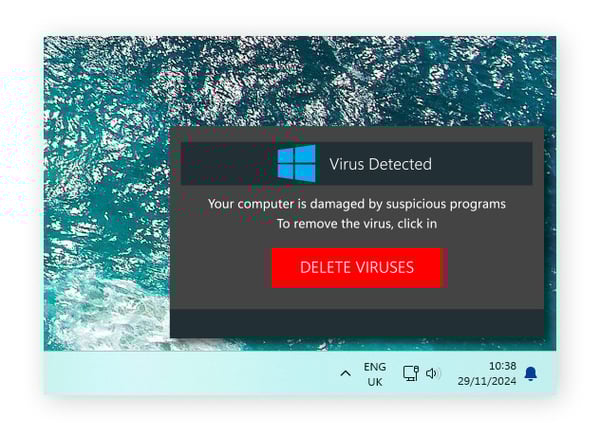
This example of a fake virus warning targets Windows users when the alert appears in the system tray on the bottom-right of the Windows taskbar. System tray notifications are less common than malvertising and copycat ads but can be the most convincing as they are visible from your desktop, and may look like official Windows notifications.
How to get rid of fake virus warnings
To get rid of a fake virus warning that you didn't interact with, simply close the browser and clear your browsing data. If you clicked the alert, downloaded something, installed software, or entered sensitive information, take additional steps to secure your device:
-
Close the browser: Force-close it if necessary rather than clicking anything else in the pop-up. On mobile, close the browser app without tapping the alert again.
-
Run a virus scan: Use a virus removal tool to scan your device for malware and remove any detected threats.
-
Delete suspicious downloads or apps: Remove any files, browser extensions, or software you installed after interacting with the alert.
-
Clear your browser data: Clear your browser history and cache to help prevent the malicious page or ad from reappearing.
-
Secure exposed accounts: If you entered a password, payment information, or other sensitive data, change affected passwords from a trusted device, enable two-factor authentication where available, and monitor relevant accounts for suspicious activity.
How to prevent fake virus alerts
The best way to prevent fake virus pop-ups is to install legitimate antivirus software, use an ad blocker on your browser, and keep your devices’ operating systems up to date. But some fake alerts may still slip through, so stay vigilant for deceptive messages designed to mimic legitimate warnings.
Here’s how to shield your device from malicious virus notifications:
-
Disable suspicious browser notifications. Review your browser’s notification permissions and remove access for unfamiliar or untrusted websites.
-
Disable pop-ups on mobile. Go to Settings > Notifications and turn off pop-ups and push notifications.
-
Remove suspicious apps from your phone. If you start receiving fake virus alerts right after installing a new app, it could be spyware, and you should delete it immediately.
-
Activate your browser’s pop-up blocker. Ad blockers can help protect you from malware as you browse the web. You can always disable them later if they’re preventing sites from loading.
-
Install antivirus software. Download an antivirus with features like a firewall and real-time malware protection from a reputable cybersecurity brand.
-
Keep your software updated. Software companies provide updated code to “patch” security vulnerabilities, so be sure to keep your apps and operating system updated.
-
Avoid unsecured websites. Only visit websites that have “https” in the URL. Sites with just “http” don’t have an SSL certificate, which means they are not protected by reliable data encryption. You can also block unsafe websites so you don’t accidentally visit them again in the future.
Ensure your digital security with Avast
Spotting the deceptive tactics of scammers can be tricky — they can be experts at manipulation. Thankfully, with the advanced threat detection suite included in Avast One, help is at hand.
Covering up to five devices, our award-winning security software can help keep you safe by blocking suspicious websites, stopping scam emails from reaching your inbox, and providing real-time protection against a wide range of online threats.
What customers say

More Security Articles

How to Check for Viruses on iPhone

iPhone Viruses: Can My Phone Get Infected?

Fake Viruses: How Do You Know If a Virus Alert Is Real?
The 7 Most Dangerous New Computer Viruses & Malware

Can Macs Get Viruses?

What Is a Computer Virus and How Does It Work?

Stuxnet: What Is It & How Does It Work?

How to Remove a Virus From an Android Phone
/What-is-a-macro-virus-Thumb.jpg)
Macro Virus: What Is It and How to Remove It

Worm vs. Virus: What's the Difference and Does It Matter?

How to Remove a Virus or Other Malware From a Mac

Can Your iPhone or Android Phone Get a Virus?
Viruses
Security
Jeremy Coppock
24-01-2025