- Security
- Privacy
- Performance
Ransomware is a type of malware that holds files hostage, or blocks access to your entire device, until you pay a ransom. Reversing ransomware encryption is often impossible, so prevention is the best defense. Learn how to prevent ransomware from holding your sensitive data hostage, from adopting safer online habits to using cybersecurity software.





This Article Contains
This Article Contains
What is Ransomware?
Ransomware is malware that encrypts data or locks systems and demands payment in exchange for restoring access. It’s the digital version of a hostage situation.
Ransomware encrypts files, which means it scrambles their structure so they become unusable and inaccessible. Typically, only the attacker’s key can decrypt them and restore access. Today, many ransomware attacks also steal the targeted files. This double-extortion tactic (encryption + theft) gives attackers even more leverage.
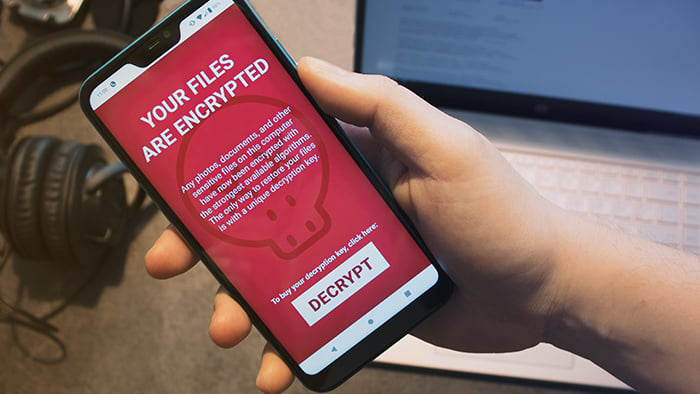
Once ransomware is installed, the victim receives a ransom note with a payment deadline and instructions on how to pay. If the deadline isn’t met, ransomware can permanently delete files, destroy systems, or render devices unusable.
Research has found that ransomware and extortion attacks are experiencing explosive growth and now represent over half of all cyberattacks.
Ransomware can target all kinds of files, from personal to business-critical. Attackers often target organizations that collect valuable data, such as financial institutions and hospitals. However, individuals are also common targets because they’re less likely to have the resources to deal with an attack, and may be more likely to pay the ransom.
Unfortunately, paying the ransom won’t always get your files back. Some hackers take the money and destroy the files anyway. Others restore access, but still leak the files on the dark web, where they can sometimes sell them for a profit.
 Ransomware and viruses are both types of malware, but they aren’t the same.
How ransomware works
Here’s how a ransomware attack generally works:
-
Delivery: Ransomware is delivered to the victim’s device, often via phishing emails, malicious attachments, or harmful links. Most devices are susceptible, including PCs, Macs, Androids, and iPhones.
-
Execution: Once opened or triggered, the ransomware encrypts targeted files, rendering them inaccessible. It may also block access to entire systems and devices. Ransomware tends to use data encryption methods that can only be reversed with a specific decryption key, making recovery nearly impossible without the attacker’s cooperation.
-
Ransom note: A message appears informing the victim of the attack, the payment deadline, and how to pay the ransom (usually in cryptocurrency).
-
Aftermath: If the ransom is paid, the attacker might restore access — or not. Recovery isn’t guaranteed. If the ransom goes unpaid, files may be deleted, systems or devices permanently locked or destroyed, or the attacker may increase the ransom and set a new deadline.
How does ransomware spread?
The most common way ransomware spreads is through social engineering schemes. Victims are tricked into clicking malicious links or attachments in seemingly trustworthy emails, texts, or social media messages.
These links and attachments hide ransomware, which is released once they’re opened or triggered. When executed, the ransomware installs itself on the device.
Ransomware can also be spread via hardware, such as an infected USB drive or compromised public USB charging ports. In some cases, hackers can spread malware across an entire network by connecting to just one unprotected device.
Other ways ransomware can spread include:
-
Zero-day exploits: These attacks exploit software vulnerabilities that haven’t been patched yet, leaving victims defenseless.
-
Remote access abuse: Criminals target tools that grant remote access to devices or networks, such as Remote Desktop Protocol (RDP) or VPNs with weak security. Even if device security is strong, exposed remote access ports can give attackers an easy way to deliver ransomware.
-
Compromised credentials or stolen API keys: By stealing API keys, attackers can impersonate their victims and gain access to data, services, and networks. This makes it easy to deliver ransomware to target systems.
-
Software supply chain attacks: Sophisticated hackers can infect trusted apps or service providers, using their software as Trojans. When victims download compromised files or software updates, they also unknowingly download ransomware.
Types of ransomware
While new strains of ransomware are constantly emerging, here are the main types of ransomware:
-
Filecoders: Also known as encryptors, filecoders encrypt and lock files on infected devices. The attackers demand payment for decryption keys, usually by a deadline. After the deadline passes, they may damage, destroy, or permanently lock your files.
-
Screenlockers: These lock you out of your device completely. Screenlockers often mimic government institutions, like the US Department of Homeland Security or the FBI, claiming that you broke the law and must pay a fine to unlock your device.
-
Doxxing: Doxxing isn’t technically a form of ransomware, but it is a serious digital threat that can involve extortion. An attacker gains access to your private data, including usernames, passwords, credit card numbers, or passport details. They then threaten to publish it unless you pay a ransom.
-
Scareware: Scareware is a fake software program that claims to have detected issues on your computer and demands payment to fix them. Scareware typically bombards your screen with pop-ups or alerts. Some strains behave like screenlockers, locking your computer or mobile completely.
-
Locker ransomware: Locker ransomware locks you out of your device or key functions like apps or system tools. Victims often see a full-screen ransom note that may imitate law enforcement or another official notice.
-
Double-extortion ransomware: Attackers steal your files before encrypting them. This gives them extra leverage, as they can threaten to leak the data if the ransom isn’t paid.
-
Ransomware-as-a-service (RaaS): RaaS tools are ready-to-use ransomware, making it easy for virtually anyone to launch this type of attack. It’s not just individuals working alone either. There are RaaS groups that lease out their “toolkits,” LockBit being a well-known example. These groups lease their ransomware out in exchange for an upfront fee or a share of the ransom.
Real-world ransomware examples
Ransomware has accounted for some of the most devastating cyberattacks in history, and it’s still a major threat today. Here are some examples of the biggest ransomware attacks over the years.
GandCrab
Emerging in 2018 and estimated to have affected over 1.5 million users, GandCrab operated on a ransomware-as-a-service (RaaS) model. Researchers released a decryption tool in 2019 that nullifies all versions of GandCrab.
WannaCry
The WannaCry strain shows how extensive a PC-based ransomware attack can be. In May 2017, WannaCry spread across the globe, ultimately attacking over 200,000 computers, causing hundreds of millions of dollars in damage.
Petya
The Petya strain, which first appeared in 2016, used the screenlocker approach by encrypting the hard drive’s master file table to lock up computers. While the original Petya version is no longer around, ESET Research discovered new ransomware in 2025 that it named HybridPetya after its resemblance.
Popcorn Time
Ransomware attackers can maximize their profits by spreading to many devices, so they’ve started encouraging victims to infect others. The Popcorn Time strain asks you to infect two other users with the malware instead of paying a ransom. If both of those users pay the ransom demand, you’ll receive your files back free of charge.
Locky
The Locky ransomware threat usually spreads through fraudulent emails with malicious attachments. Once opened, your files are locked tight. Locky can encrypt a variety of files, from Microsoft Office files to your computer’s actual source code. Locky was most prominently used in 2016 for a campaign targeting healthcare institutions.
CryptoLocker
The CryptoLocker ransomware strain was especially nasty. It installed itself within a PC user’s profile and scanned the computer and connected devices for files and folders to encrypt. First appearing in late 2013, CryptoLocker used the notorious Gameover ZeuS botnet to spread in a sustained campaign that lasted for months.
Cerber
Using the RaaS model, the creators of Cerber licensed their strain to other cybercriminals for a percentage of the earnings raised from their victims. Introduced in 2016, Cerber became a very popular ransomware option due to its ease of use and availability. While it’s not as prominent today, it still remains a threat.
Ryuk
Ryuk is ransomware that targets high-value victims likely to pay big ransom demands. Targets include businesses, governments, and public institutions like hospitals and schools. First appearing in 2018, Ryuk was a notable threat for over five years. Today, Ryuk’s playbook of disrupting critical infrastructure continues to inspire new attacks.
REvil
REvil was one of the most prolific cybercriminal organizations from 2019 to 2021. In 2021, it orchestrated the biggest ransomware attack on record (at the time), demanding a $70 million ransom. REvil infected hundreds of major businesses through a vulnerability in their desktop management software, disrupting operations around the globe.
Apple screenlocker ransomware
Apple devices are generally less vulnerable to malware, but their ever-growing popularity has been noted by malware developers. In recent years, ransomware specifically targeting macOS has emerged, with LockBit being cited as responsible.
Can ransomware be removed?
Depending on your device and strain, ransomware removal may be possible. But it may not be possible to undo all the damage already caused.
If your computer has been infected by ransomware, consult our guides on removing ransomware from PCs and removing it from Macs. You should also try to download a free decryption key from this list to restore your files. If you can’t see your ransomware strain there, the No More Ransom Project also lists decryption tools.
You may find that decryption tools aren’t available for newer strains, which is why ransomware prevention is important. Ransomware is a type of malware, so if you use a trusted antivirus software, you can help keep it off in the first place.
How to prevent ransomware attacks
There’s no single way to prevent ransomware attacks because malware can infect your devices in multiple ways. To help avoid ransomware, take a layered approach by following these cybersecurity tips.
-
Keep software updated: Software and operating system updates involve security patches that are vital to help prevent ransomware and other malware from infiltrating your devices.
-
Use trusted security tools: Security software, such as antivirus protection and firewalls, can help block malware and alert you to suspicious activity. Many antivirus programs can also keep you safer from scams and hackers.
-
Regular offline/cloud backups: If you back up your important data regularly, you can easily reinstall files without needing an attacker’s decryption key. Use a combination of offline and online storage methods, as some ransomware can target your backups.
-
Don’t download apps from unknown sources: Only download apps from trusted sources like Microsoft Store, Apple App Store, and Google Play Store. Avoid third-party app stores, and never download apps from links sent via email, text, or social media.
-
Don’t click unknown links: Don’t click links you receive from unknown contacts via SMS, email, or messenger applications. Even if you think you know the sender, take a closer look at both their address and the link before clicking.
-
Enable MFA: Multifactor authentication, such as 2FA (two-factor authentication), is one of the most effective ways to prevent many cyberattacks. It adds an extra layer of verification to your accounts to help keep hackers out.
-
Avoid unknown USBs: Don’t stick unknown USB drives into your device. They might be pre-loaded with ransomware. Even people you trust may unknowingly carry malware in their drives.
-
Use a VPN on public Wi-Fi: Public Wi-Fi is not generally secure, and this makes it easier for hackers to intercept sensitive information such as login credentials or file transfers. Using a VPN encrypts your in-transit traffic, which helps prevent attackers from stealing your data to use against you in social engineering scams.
-
Segment networks and isolate backups: For businesses and organizations, segmenting networks can stop ransomware from spreading throughout an entire system. Storing backups on isolated servers helps keep data away from ransomware’s reach.
-
Maintain and test an incident response plan: Creating and testing a response plan can help organizations respond to attacks more quickly and limit the damage.
Can’t I just pay the ransom instead?
No. Never pay the ransom demanded by a ransomware attacker. Every major security and law enforcement agency advises against paying, including the FBI, CISA, and Europol.
Here’s why:
-
There is no guarantee of restoration: Your files may still be corrupted, destroyed, sold on the dark web, or lost forever, even if you pay.
-
You may become a target for repeat attacks: Once attackers know you’ll pay, they have an incentive to target you again.
-
You fund criminal activity: Ransomware payments fund further criminal activity, including terrorism and human trafficking. If you knowingly pay a terrorist organization or a sanctioned entity, you could also be subject to criminal penalties.
Paying the ransom may seem like the quickest solution, but it can lead to even bigger problems. If you’ve been infected by ransomware, don’t pay. Instead, protect yourself and prevent future attacks.
 If you get hit with ransomware, our advice is not to pay the ransom.
Keep your data safe from ransomware
Ransomware now accounts for over half of all cyberattacks. Everyone is vulnerable, whether you’re a business, an individual, a PC user, or an Apple user. Ransomware is nearly impossible to reverse once an attack has begun. The best defense is to block it before it takes your files or your device hostage. That starts with robust antivirus software.
Avast Free Antivirus is trusted by more than 400 million people worldwide. It alerts you to ransomware and other malware threatening your device, allowing you to take action before it’s too late. With the latest security features and AI-driven threat detection, Avast helps shield your data and devices from ransomware, hackers, and other digital threats.
FAQs
What causes a ransomware attack?
There are several vectors for ransomware attacks. One of the most common is phishing emails. Victims receive emails with infected attachments or links. Once the email attachment is opened, the ransomware is initiated and starts to seize data. Cybercriminals can target victims randomly or target specific individuals with tailor-made attacks.
What is ransomware recovery?
Ransomware recovery is the process of restoring files, devices, or systems following a ransomware attack. This is done with the help of ransomware decryption tools that let you regain access to the data or device held hostage. Or, you may be able to recover from a ransomware attack if you have up-to-date backups stored on a secure cloud infrastructure or an external SSD or HDD.
Can ransomware steal data?
Yes, ransomware can steal data. Many modern ransomware attacks, called double-extortion attacks, involve stealing and encrypting files. It’s common for hackers to hold onto private data even after the victim pays. They can then use the data to launch more attacks or sell it online.
Do hackers use ransomware?
Yes, hackers use ransomware malware to carry out malicious activities, namely seizing your data or locking your device until you pay a ransom. Ransomware is more readily available now than when it was first introduced. Ransomware as a service (RaaS) enables less tech-savvy fraudsters to rent or purchase ransomware kits from malware developers.
Major ransomware attacks
Major ransomware attacks have made headlines due to their scale and impact. In 2017, the WannaCry ransomware strain successfully infected over 200,000 computers and caused hundreds of millions of dollars in damage. The worldwide attacks hit major businesses and hospitals, forcing system shutdowns and service cancellations.
What customers say

More Security Articles
What Is Ransomware and How to Prevent It
What Is Ryuk Ransomware?

The Destructive Reality of Ransomware Attacks
How to Remove Ransomware from Android Devices
How to Remove Ransomware from Your iPhone or iPad

What is CryptoLocker Ransomware and How to Remove it
Cerber Ransomware: Everything You Need to Know

What is WannaCry?

How to Prevent Ransomware
What is Locky Ransomware?
What is Petya Ransomware, and Why is it so Dangerous?
How to Remove Ransomware from a Mac
Ransomware
Security
Ben Gorman
9-02-2023